Computer Science · Ch 7 — Functions
Module
Module
Besides its built-in functions, the Python standard library contains a large number of modules. The distinction is one of level: a function is a grouping of instructions, while a module is a grouping of functions.
Two situations lead naturally to modules:
- Complexity. As a program grows, functions simplify the code and avoid repetition — but for a really complex problem it may not be feasible to manage all the code in one single file. The program is then divided into parts at different levels, and those parts are called modules.
- Reuse across programs. If we have written useful functions in one program and want to reuse them in another, we can save those functions in a module and import it wherever needed.
Concretely, a module is a Python (.py) file containing a collection of function definitions.
Importing a module
To use a module we must first import it. Once imported, all the functions of the module become available. The syntax:
import modulename1 [, modulename2, ...]
To call a function that lives in a module, prefix the function's name with the module's name, joined by a dot:
modulename.functionname()
(A) Built-in modules
Python's library ships with many ready-made modules. Three of the most commonly used are math, random and statistics.
1. The math module
The math module contains mathematical functions of many kinds; most of them return a float value. It is brought in with:
import math
Remember that Python is case sensitive, and all module names are in lowercase.
Commonly used functions of math (compare Table 7.2):
| Function | Arguments | Returns |
|---|---|---|
math.ceil(x) | int or float | ceiling value of x |
math.floor(x) | int or float | floor value of x |
math.fabs(x) | int or float | absolute value of x (as a float) |
math.factorial(x) | positive integer | factorial of x |
math.fmod(x, y) | int or float | x % y, carrying the sign of x |
math.gcd(x, y) | positive integers | greatest common divisor of x and y |
math.pow(x, y) | int or float | x raised to the power y (as a float) |
math.sqrt(x) | positive int or float | square root of x |
math.sin(x) | int or float, in radians | sine of x |
import math
math.ceil(9.7)        # 10
math.ceil(-9.7)       # -9
math.floor(4.5)       # 4
math.floor(-4.5)      # -5
math.fabs(-6.7)       # 6.7
math.fabs(-4)         # 4.0
math.factorial(5)     # 120
math.fmod(-4.9, 2.5)  # -2.4   (result takes the sign of x)
math.gcd(10, 2)       # 2
math.pow(3, 2)        # 9.0    (always a float)
math.sqrt(144)        # 12.0
math.sin(0)           # 0.0
2. The random module
The random module contains functions for generating random numbers. Import it with:
import random
Commonly used functions (compare Table 7.3) — being random, the outputs below are just one possible run:
| Function | Argument | Returns |
|---|---|---|
random.random() | none | a random real number (float) in the range 0.0 to 1.0 |
random.randint(x, y) | integers with x <= y | a random integer between x and y |
random.randrange(y) | positive integer (stop value) | a random integer between 0 and y |
random.randrange(x, y) | positive integers (start, stop) | a random integer between x and y |
import random
random.random()          # 0.65333522   (some float between 0.0 and 1.0)
random.randint(3, 7)     # 4
random.randint(-3, 5)    # 1
random.randrange(5)      # 4
random.randrange(2, 7)   # 2
3. The statistics module
The statistics module provides functions for calculating statistics of numeric (real-valued) data. Import it with:
import statistics
Commonly used functions (compare Table 7.4):
| Function | Argument | Returns |
|---|---|---|
statistics.mean(x) | numeric sequence | arithmetic mean |
statistics.median(x) | numeric sequence | median (middle value) of x |
statistics.mode(x) | sequence | mode (the most repeated value) |
import statistics
statistics.mean([11, 24, 32, 45, 51])      # 32.6
statistics.median([11, 24, 32, 45, 51])    # 32
statistics.mode([11, 24, 11, 45, 11])      # 11
statistics.mode(("red", "blue", "red"))    # 'red'
Points to note about import
- The
importstatement can be written anywhere in the program. - A module, however many times it is imported, must be imported only once (it is loaded a single time).
- To get a list of the modules available in Python:
>>> help("module")
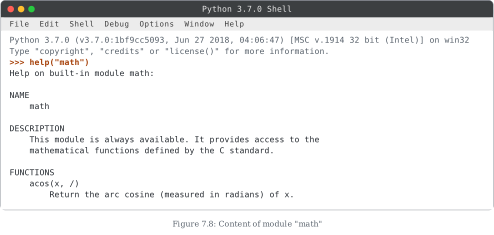
- To view the contents of a particular module, say
math(this produces the listing shown in Figure 7.8):
>>> help("math")
- The modules of the standard library can be found in the Lib folder of the Python installation.
(B) The from statement
Importing a whole module loads all of its functions into memory. If only one or two functions are needed, the from statement loads just the specified function(s) instead:
from modulename import functionname [, functionname, ...]
A function imported this way is called directly by its own name — no module-name prefix is needed:
>>> from random import random
>>> random()                 # called without the module name
0.[PII:card]
>>> from math import ceil, sqrt
>>> value = ceil(624.7)      # ceiling of 624.7 stored in value
>>> sqrt(value)              # sqrt applied to that stored value
25.0
Good programming practice: importing only the required function(s), rather than the whole module, saves memory.
Composition
The two-step ceil-then-sqrt example above can be collapsed into one statement:
>>> sqrt(ceil(624.7))
25.0
Here sqrt() cannot run until ceil() has produced its output — the functions depend on each other's execution. A programming statement in which functions or expressions depend on one another's execution to achieve an output is termed composition. If instead we wanted the integer part of a number, we could compose with trunc() from the math module:
>>> from math import trunc
>>> sqrt(trunc(625.7))       # trunc gives 625, sqrt of 625 is 25.0
25.0
Other examples of composition:
a = int(input("First number: "))
print("Square root of ", a, " = ", math.sqrt(a))
print(floor(a + (b / c)))
math.sin(float(h) / float(c))
Creating our own module
Besides the modules of the standard library, we can create our own module containing our own functions — it is just a .py file of function definitions.
Docstrings. A """docstring""" (Python documentation string) is a multiline comment added to describe a module, function, etc. It is typically written as the first line, enclosed in three double quotes. …
Drawn by us to help you understand the concept clearly, and verified to make sure it's accurate. For exams, practice from your NCERT textbook's own diagram.
Figure 7.8 is a screenshot of the Python shell (an IDLE window titled "Python 3.7.0 Shell") demonstrating how to inspect the contents of a module from the interactive prompt.
After the interpreter's banner line identifying the Python version (3.7.0, on win32), the user types the command:
>>> help("math")
The start of the command's output is visible in the window:
- the heading
Help on built-in module math:; - a NAME entry —
math; - a DESCRIPTION entry — "This module is always available. It provides access to the mathematical functions defined by the C standard.";
- the beginning of the FUNCTIONS listing, opening with
acos(x, /)and its one-line description, "Return the arc cosine (measured in radians) of x." …
| Function Syntax | Arguments | Returns | Example Output |
|---|---|---|---|
| math.ceil(x) | x may be an integer or floating point number | ceiling value of x | >>> math.ceil(-9.7) -9 >>> math.ceil (9.7) 10 >>> math.ceil(9) 9 |
| math.floor(x) | x may be an integer or floating point number | floor value of x | >>> math.floor(-4.5) -5 >>> math.floor(4.5) 4 >>> math.floor(4) 4 |
| math.fabs(x) | x may be an integer or floating point number | absolute value of x | >>> math.fabs(6.7) 6.7 >>> math.fabs(-6.7) 6.7 >>> math.fabs(-4) 4.0 |
| math.factorial(x) | x is a positive integer | factorial of x | >>> math.factorial(5) 120 |
| math.fmod(x,y) | x and y may be an integer or floating point number | x % y with sign of x | >>> math.fmod(4,4.9) 4.0 >>> math.fmod(4.9,4.9) 0.0 >>> math.fmod(-4.9,2.5) -2.4 >>> math.fmod(4.9,-4.9) 0.0 |
| math.gcd(x,y) | x, y are positive integers | gcd (greatest common divisor) of x and y | >>> math.gcd(10,2) 2 |
| math.pow(x,y) | x, y may be an integer or floating point number | x^y (x raised to the power y) | >>> math.pow(3,2) 9.0 >>> math.pow(4,2.5) 32.0 >>> math.pow(6.5,2) 42.25 >>> math.pow(5.5,3.2) 233.97 |
| Function Syntax | Argument | Return | Example Output |
|---|---|---|---|
| random.random() | No argument (void) | Random Real Number (float) in the range 0.0 to 1.0 | >>> random.random() 0.65333522 |
| random.randint(x,y) | x, y are integers such that x <= y | Random integer between x and y | >>> random.randint(3,7) 4 >>> random.randint(-3,5) 1 >>> random.randint(-5,-3) -5.0 |
| random.randrange(y) | y is a positive integer signifying the stop value | Random integer between 0 and y | >>> random.randrange(5) 4 |
| Function Syntax | Argument | Return | Example Output |
|---|---|---|---|
| statistics.mean(x) | x is a numeric sequence | arithmetic mean | >>> statistics.mean([11,24,32,45,51]) 32.6 |
| statistics.median(x) | x is a numeric sequence | median (middle value) of x | >>> statistics.median([11,24,32,45,51]) 32 |