Computer Science · Ch 11 — Data Communication
Wireless Technologies
Wireless Technologies
Wireless Technologies
Wireless technologies let devices communicate without physical cables. The book discusses two main types: Bluetooth and Wireless LAN (Wi-Fi).
Bluetooth
Bluetooth is a short-range wireless technology. It connects devices like mobile phones, mice, headphones, keyboards, and computers over a small distance. For example, you can print documents to a Bluetooth-enabled printer without plugging in a cable.
Every Bluetooth device contains a low-cost transceiver chip. This chip uses the unlicensed 2.4 GHz frequency band to send and receive data. The data transfer range is about 10 meters, and the speed is 1–2 Mbps.
When Bluetooth devices come within 10 meters of each other, they form a personal area network called a piconet. Devices in a piconet work in a master-slave configuration. One master device can communicate with up to 7 active slave devices at the same time. Bluetooth technology allows up to 255 devices to build a network. Out of these, only 8 devices can communicate simultaneously — the remaining devices stay inactive, waiting for a response command from the master.
Bluetooth is ideal for connecting personal devices over short distances, like pairing a wireless mouse with a laptop or sharing files between phones.
Wireless LAN (Wi-Fi)
Wireless LAN is another way to communicate wirelessly. It is a local area network (LAN) and a popular method to connect to the Internet. The international organisation IEEE assigns numbers to different LAN standards. The wireless LAN standard is numbered 802.11, and it is popularly known as Wi-Fi.
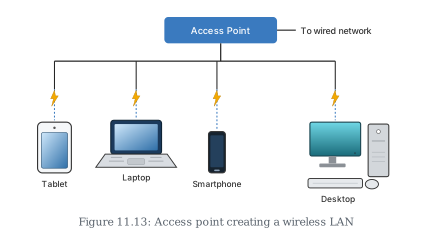
A wireless LAN consists of communicating devices such as laptops and mobile phones, along with network devices called access points (APs). An access point is installed in buildings or on floors. It connects to a wired router, switch, or hub, and creates a wireless local area network. All devices in the network communicate or access the Internet through this access point. …
Drawn by us to help you understand the concept clearly, and verified to make sure it's accurate. For exams, practice from your NCERT textbook's own diagram.
A single Access Point can let several different wireless devices — here a Tablet, a Laptop, a Smartphone, and a Desktop — all connect to the same network without a single cable running to any of them. Each device links to the Access Point over a wireless signal (shown by the lightning-bolt marks). …