Q.Create a hotspot using a smartphone and connect other devices to it.
🔒You're viewing a preview — the full solution, concept, methods & PYQ mapping are locked.
🔒 Start your 14-day free trial to unlock the full solution →Concept understanding — Network Configuration
Network Definition: A First Look
Think about the last time you called a friend, sent a WhatsApp message, or even just walked into a crowded room. In each case, you were part of a network — a structure of connections. The phone call connects two people; the WhatsApp group connects many; the room connects everyone in it through sight and sound. A network is simply any collection of nodes (the things being connected) and the links (the connections between them).
In everyday life, you already know dozens of networks. Your family is a network of people connected by blood or marriage. Your school is a network of students, teachers, and staff connected by classes and activities. The roads you travel form a network of intersections and highways. Even your own body has a network of blood vessels and nerves. The idea is so natural that you have been using it your whole life without giving it a name.
The Precise Meaning
Formally, a network is defined by two things:
- Nodes (also called vertices): the individual units or points in the system. In a friendship network, each person is a node. In a transport network, each city or bus stop is a node.
- Links (also called edges or connections): the relationships or pathways that join nodes together. A link exists between two nodes if they are directly connected — two friends who know each other, two cities with a direct flight, two computers that can exchange data.
The key insight is that a network is not just a random collection of connections. It has a structure — a pattern of who is connected to whom — and that structure determines how the network behaves. A tightly-knit group of friends behaves differently from a loose chain of acquaintances, even if both have the same number of people.
In some subjects, you will hear the word graph used instead of network. They mean the same thing: nodes and links. "Graph theory" is the mathematical study of networks, but in a prose subject like commerce or humanities, we stick with the term network.
Why It Matters
Networks are everywhere, and understanding them changes how you see the world. Consider a few examples:
- Social networks (Facebook, Instagram, LinkedIn) are built on the idea that people are nodes and "friendship" or "follow" is a link. The structure of these networks determines how information spreads, how trends go viral, and how influence works.
- Supply chains are networks of companies, factories, warehouses, and stores connected by the flow of goods. A disruption at one node — a factory fire, a port strike — can ripple through the entire network.
- Communication networks (the internet, telephone systems) are networks of devices and transmission lines. The design of these networks determines whether your call drops or your video streams smoothly. …
To create a hotspot on a smartphone, you turn the phone into a portable Wi-Fi access point that shares its mobile data connection with other devices. On an Android phone, go to Settings, then Network & Internet, and select Hotspot & Tethering to turn on the Wi-Fi hotspot. On an iPhone, go to Settings, tap Personal Hotspot, and toggle it on. You can set a network name (SSID) and a password for security, typically using WPA2. Other devices then scan for available Wi-Fi networks, select your hotspot's name, and enter the password to connect. The hotspot uses the phone's cellular data, so be mindful of your data plan limits. This setup is useful for providing internet access to a laptop, tablet, or …
A smartphone can be turned into a portable Wi-Fi hotspot, allowing other devices like laptops or tablets to share its mobile data connection for internet access.
To create a hotspot using a smartphone, you are essentially turning your phone into a small, portable Wi-Fi router. Your phone has a mobile data connection (through your SIM card) and a built-in Wi-Fi adapter. When you enable the hotspot feature, the phone uses its Wi-Fi adapter to broadcast a wireless network, just like a home router does. Other devices can then connect to this network, and your phone will share its mobile data with them, giving them internet access.
The exact steps vary slightly between Android and iPhone, but the core idea is the same. On an Android phone, you typically go to Settings, then Connections or Network & Internet, and look for Mobile Hotspot and Tethering or simply Hotspot & Tethering. Tap on Mobile Hotspot and toggle it on. You will see the network name (SSID) and password, which you can usually change. On an iPhone, go to Settings, then Personal Hotspot, and toggle on Allow Others to Join. The Wi-Fi password is displayed there as well.
When you turn on the hotspot, your phone's own Wi-Fi connection is usually disabled because the phone's Wi-Fi adapter is now being used to broadcast the signal, not to receive one. This means the hotspot shares your mobile data, not a Wi-Fi network your phone might be connected to. …
- CBSE 2020Set 91/D4 marksQ.Helping Hands is an NGO with its head office at Mumbai and branches located at Delhi, Kolkata and Chennai. Their Head Office located at Delhi needs a communication network to be established between the head office and all the branch offices. The NGO has received a grant from the national government for setting up the network. The physical distances between the branch offices and the head office and the number of computers to be installed in each of these branch offices and the head office are given below. You, as a network expert, have to suggest the best possible solutions for the queries as raised by the NGO, as given in(i) to (iv). Distances between various locations in Kilometres: Mumbai H.O. to Delhi 1420 Mumbai H.O. to Kolkata 1640 Mumbai H.O. to Chennai 2710 Delhi to Kolkata 1430 Delhi to Chennai 1870 Chennai to Kolkata 1750 Number of computers installed at various locations are as follows: Mumbai H.O. 2500 Delhi branch 1200 Kolkata branch 1300 Chennai branch 1100(i) Suggest by drawing the best cable layout for effective network connectivity of all the Branches and the Head Office for communicating data.(ii) Suggest the most suitable location to install the main server of this NGO to communicate data with all the offices.(iii) Write the name of the type of network out of the following, which will be formed by connecting all the computer systems across the network: (A) WAN (B) MAN (C) LAN (D) PAN(iv) Suggest the most suitable medium for connecting the computers installed across the network out of the following: (A) Optical fibre (B) Telephone wires (C) Radio waves (D) Ethernet cable
›Reveal solutionSolution
The NGO should use a Star topology with Mumbai HO as the central hub, place the main server at Mumbai HO, establish a Wide Area Network (WAN), and connect offices using Optical Fibre for reliable, high-speed data communication.
Establishing a robust and efficient communication network for an organization like Helping Hands, with its head office and multiple branches spread across significant geographical distances, requires careful consideration of several networking fundamentals. The goal is to ensure seamless data exchange, reliability, and optimal performance.
Understanding Network Connectivity
A network allows different computer systems to communicate and share resources. When designing a network, especially one spanning vast distances, we must consider how the different locations will be physically connected (topology), where central resources like servers will reside, the overall geographical scope of the network, and the most effective medium for data transmission.
(i) Best Cable Layout for Effective Network Connectivity
The "cable layout" refers to the network topology, which describes the physical or logical arrangement of nodes (computers, offices) in a network. For connecting geographically dispersed offices, the choice of topology impacts reliability, manageability, and cost.
- Star Topology: In a star topology, each branch office is connected directly to a central hub, which in this case would be the Mumbai Head Office. Data from any branch office must pass through the central hub to reach another branch or the head office.
- Bus Topology: All nodes are connected to a single main cable. This is generally not suitable for wide-area connections due to the difficulty of managing a single long cable across vast distances and its vulnerability to a single point of failure along the bus.
- Ring Topology: Nodes are connected in a closed loop, with data passing from one node to the next. While it can offer redundancy with dual rings, it is complex to implement and manage over long distances and for adding/removing nodes.
- Mesh Topology: Every node is connected to every other node. This offers high redundancy and fault tolerance but is extremely expensive and complex to implement for many nodes, especially over long distances, due to the sheer number of connections required.
For Helping Hands, with its Head Office in Mumbai and branches in Delhi, Kolkata, and Chennai, a Star topology is the most suitable choice for connecting the different locations.
- Description of Layout: Imagine Mumbai H.O. at the geographical center of this network. Direct communication links (cables) would extend from Mumbai H.O. to Delhi, from Mumbai H.O. to Kolkata, and from Mumbai H.O. to Chennai. This means each branch office communicates directly with the Head Office. If Delhi needs to communicate with Kolkata, the data would typically route through Mumbai H.O.
- Advantages of Star Topology for this scenario:
- Centralized Management: All inter-branch communication can be monitored and managed from the Head Office.
- Easier Troubleshooting: If a link to one branch fails, it does not affect the connectivity of other branches to the Head Office.
- Scalability: Adding a new branch simply involves connecting it to the central Head Office, without disrupting existing connections.
- Security: Centralized control allows for better security implementation at the hub.
ImportantFor connecting geographically distant offices, a Star topology with the Head Office as the central hub offers the best balance of manageability, reliability, and cost-effectiveness compared to other topologies.
(ii) Most Suitable Location to Install the Main Server
The main server is a critical resource that stores and processes data for the entire organization. Its placement significantly impacts performance, accessibility, and security.
When deciding on the server's location, we consider:
- Number of Users: Placing the server closer to the largest group of users minimizes latency and improves response times.
- Infrastructure: The location should have reliable power, cooling, and physical security.
- Management and Maintenance: Ease of access for IT staff to perform maintenance, upgrades, and troubleshooting.
- Bandwidth: The location should have sufficient network bandwidth to handle traffic from all connected offices.
Given the data:
- Mumbai H.O.: 2500 computers
- Kolkata branch: 1300 computers
- Delhi branch: 1200 computers
- Chennai branch: 1100 computers
Mumbai H.O. has the largest number of computers (2500), indicating it is the primary operational hub and likely has the highest data traffic and user base. Placing the main server at the Head Office offers several advantages:
- Optimal Performance for Most Users: The largest user base in Mumbai will experience the lowest latency when accessing the server.
- Centralized Control and Security: As the Head Office, Mumbai likely has the best infrastructure, security measures, and dedicated IT personnel for server management and maintenance.
- Reduced Latency for Inter-Branch Communication: If the star topology is used, all inter-branch data passes through Mumbai H.O. anyway. Having the server there means data doesn't have to travel an extra hop to a different server location.
(iii) Type of Network Formed
Network types are classified based on their geographical spread.
- LAN (Local Area Network): Connects devices within a small, confined area like a single building, office, or home.
- MAN (Metropolitan Area Network): Spans a larger area than a LAN, typically covering a city or a large campus.
- WAN (Wide Area Network): Connects networks over vast geographical distances, such as across cities, states, or even countries. It often uses public telecommunication infrastructure. …
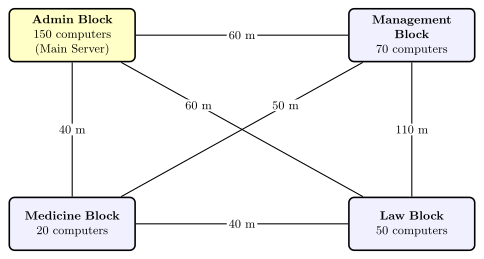
- CBSE 2019Set 91/44 marksQ.Jonathan and Jonathan Training Institute is planning to set up its centre in Amritsar with four specialised blocks for Medicine, Management, Law courses alongwith an Admission block in separate buildings. The physical distances between these blocks and the number of computers to be installed in these blocks are given below. You as a network expert have to answer the queries as raised by their board of directors as given in(i) to (iv). Shortest distances between various locations in metres: Admin Block to Management Block 60 Admin Block to Medicine Block 40 Admin Block to Law Block 60 Management Block to Medicine Block 50 Management Block to Law Block 110 Law Block to Medicine Block 40 Number of Computers installed at various locations are as follows: Admin Block 150 Management Block 70 Medicine Block 20 Law Block 50(i) Suggest the most suitable location to install the main server of this institution to get efficient connectivity.(ii) Suggest the devices to be installed in each of these buildings for connecting computers installed within the building out of the following: Modem, Switch, Gateway, Router(iii) Suggest by drawing the best cable layout for effective network connectivity of the blocks having server with all the other blocks.(iv) Suggest the most suitable wired medium for efficiently connecting each computer installed in every building out of the following network cables: Co-axial Cable, Ethernet Cable, Single Pair Telephone Cable
›Reveal solutionSolution
- Install the main server in the Admin Block — it has the maximum computers (150) and the minimum total cable run to every other block.
- A Switch in each building.
- A star layout from Admin Block: Admin–Medicine 40 m, Admin–Management 60 m, Admin–Law 60 m (total 160 m).
- Ethernet cable for connecting computers inside every building.
The given data
Link Distance (m) Admin – Management 60 Admin – Medicine 40 Admin – Law 60 Management – Medicine 50 Management – Law 110 Law – Medicine 40 Block Computers Admin 150 Management 70 Medicine 20 Law 50 (i) Server location — Admin Block
Two standard criteria, and both point the same way:
- 80/20 (maximum-traffic) rule: place the server where the most computers are, so most traffic stays local. Admin Block has 150 of the 290 computers — by far the most.
- Cable economy: connecting the server block to the other three blocks directly costs, per candidate location:
Server at Cable runs needed Total Admin 60 + 40 + 60 160 m Management 60 + 50 + 110 220 m Medicine 40 + 50 + 40 130 m (but only 20 PCs — fails the traffic rule) Law 60 + 110 + 40 210 m Admin Block combines a near-minimal cable total with the maximum computer count, so it is the most suitable server location.
(ii) Device inside each building — Switch
- Switch — connects the computers within one building into a LAN and forwards frames only to the intended port. This is the correct choice.
- Modem — converts digital signals for a telephone/broadband line; it is for internet access, not for wiring a LAN.
- Gateway — joins two networks that use different protocols; unnecessary inside one building.
- Router — routes traffic between different networks; not needed to connect computers within a single building.
(iii) Best cable layout — star from the server block
Management ──60 m── ADMIN (SERVER) ──40 m── Medicine
                        │ …
🎓Unlock everything free for 14 days
- ✓Full step-by-step solutions
- ✓Concept-first explanations
- ✓Methods, shortcuts & mistakes
- ✓PYQ mapping + timed mock tests
Full access for 14 days. No credit card required.