Computer Science · Ch 5 — Getting Started with Python
Runtime Error
Runtime Error
A runtime error causes abnormal termination of the program while it is executing. It arises when a statement is syntactically correct, but the interpreter still cannot execute it. Unlike syntax errors, runtime errors do not appear until after the program starts running — the code passes the grammar check, begins executing, and then fails partway through.
A classic example: division by zero
Suppose a program contains a division operation. If, by mistake, the denominator supplied is zero, the program stops with a runtime error such as "division by zero" — the statement a / b is perfectly valid Python, but executing it with b equal to 0 is impossible.
One program, two runtime errors
The following program is grammatically flawless, yet it can fail at run time in two different ways, depending entirely on what the user types:
# Runtime Errors Example
num1 = 10.0
num2 = int(input("num2 = "))
# if the user inputs a string or a zero, it leads to a runtime error
print(num1 / num2)
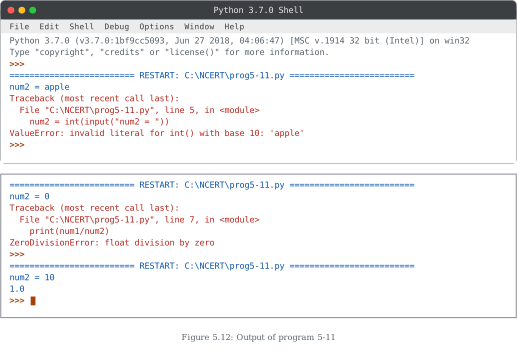
Run 1 — the user enters a non-integer value. If the user types something like apple, the conversion int("apple") cannot be performed. The program terminates with a ValueError at the input line:
num2 = apple
ValueError: invalid literal for int() with base 10: 'apple'
Run 2 — the user enters 0. The conversion succeeds, but the division 10.0 / 0 is undefined. The program terminates with a ZeroDivisionError at the print line:
num2 = 0
ZeroDivisionError: float division by zero
Run 3 — the user enters a valid non-zero integer. With an input like 10, everything works and the program produces the correct output:
num2 = 10
1.0
The takeaway
The same program can run perfectly or crash, based purely on the data it meets at run time. That is the defining character of runtime errors: they depend on the circumstances of execution, not on the text of the program. A careful programmer therefore thinks about what happens when the user supplies unexpected input — a discipline that later chapters build on.
How the three error types compare
Section 5.13 has now met all three kinds of program error. They differ in when they are caught and what catches them:
| Syntax error (5.13.1) | Logical error (5.13.2) | Runtime error (5.13.3) | |
|---|---|---|---|
| When it shows up | Before execution begins | Never reported — wrong output | During execution |
| Caught by | The interpreter's grammar check | Only by the programmer, from wrong results | The interpreter, mid-run |
| Program runs? | No — nothing executes | Yes — runs to completion | Starts, then terminates abnormally |
| Example | A missing colon after if | Averaging with the wrong formula | Dividing by a value that turns out to be 0 |
Two points students often miss:
- A runtime error message names the exception type (
ValueError,ZeroDivisionError) and points at the line that failed — read it from the bottom up; the last line states what went wrong. …
Drawn by us to help you understand the concept clearly, and verified to make sure it's accurate. For exams, practice from your textbook's own diagram.
This figure shows the output of Program 5-11 across three separate runs in the Python 3.7.0 Shell, demonstrating that the very same program can crash in two different ways or succeed — depending purely on what the user types at run time. (Note: the textbook prints this caption as "Figure 5.11", duplicating the number already used for the output of Program 5-7 on an earlier page — a misprint in the book.)
Program 5-11 reads a value with num2 = int(input("num2 = ")) and then prints num1/num2, where num1 is 10.0.
First run — non-integer input. The user types apple at the num2 = prompt. The conversion int("apple") is impossible, so the program terminates with a traceback pointing at line 5 (the input statement) and the error:
ValueError: invalid literal for int() with base 10: 'apple'
Second run — zero input. The user types 0. The conversion succeeds, but the division 10.0 / 0 cannot be performed. The traceback now points at line 7 (the print statement) with:
ZeroDivisionError: float division by zero
Third run — valid input. The user types 10, and the program runs to completion, printing the correct result 1.0. …