Computer Science · Ch 1 — Exception Handling in Python
Built-in Exceptions
Built-in Exceptions
Built-in exceptions are the errors that the Python interpreter already knows about. When you write code, certain mistakes happen so often that the language designers have pre-defined a specific exception for each one. These are called built-in exceptions, and they form part of Python’s standard library.
The purpose of having these ready-made exceptions is to provide a standardised solution for common errors. When a built-in exception occurs, the interpreter automatically runs the appropriate handler code. This handler displays two things: the name of the exception that was raised, and a reason explaining what went wrong. The programmer’s job is then to read that message and take the correct action to fix the problem.
The textbook lists twelve commonly occurring built-in exceptions. Here they are, in the order the book presents them:
- SyntaxError – Raised when there is an error in the syntax of the Python code. This is the most basic mistake: you typed something the interpreter cannot parse at all.
- ValueError – Raised when a built-in method or operation receives an argument that has the right data type but an inappropriate or mismatched value. For example, passing a string like
"abc"toint()gives a ValueError because the type is correct (a string) but the value cannot be converted to an integer. - IOError – Raised when a file specified in a program statement cannot be opened. This could happen if the file does not exist, the path is wrong, or you lack permission.
- KeyboardInterrupt – Raised when the user accidentally hits the Delete or Esc key while a program is running. This interrupts the normal flow of execution.
- ImportError – Raised when the requested module definition is not found. For instance, if you try to
importa module that is not installed or does not exist. - EOFError – Raised when the
input()function reaches the end of a file condition without reading any data. This typically happens when there is no more input to read. - ZeroDivisionError – Raised when the denominator in a division operation is zero. Division by zero is mathematically undefined, so Python raises this exception.
- IndexError – Raised when an index or subscript in a sequence (like a list or string) is out of range. For example, accessing
my_list[10]when the list has only five elements. - NameError – Raised when a local or global variable name is not defined. This happens when you try to use a variable that has not been assigned a value yet.
- IndentationError – Raised due to incorrect indentation in the program code. Python relies on consistent indentation to define blocks, and any mismatch triggers this error.
- TypeError – Raised when an operator is supplied with a value of an incorrect data type. For example, trying to add a string and an integer with
+gives a TypeError. …
Drawn by us to help you understand the concept clearly, and verified to make sure it's accurate. For exams, practice from your textbook's own diagram.
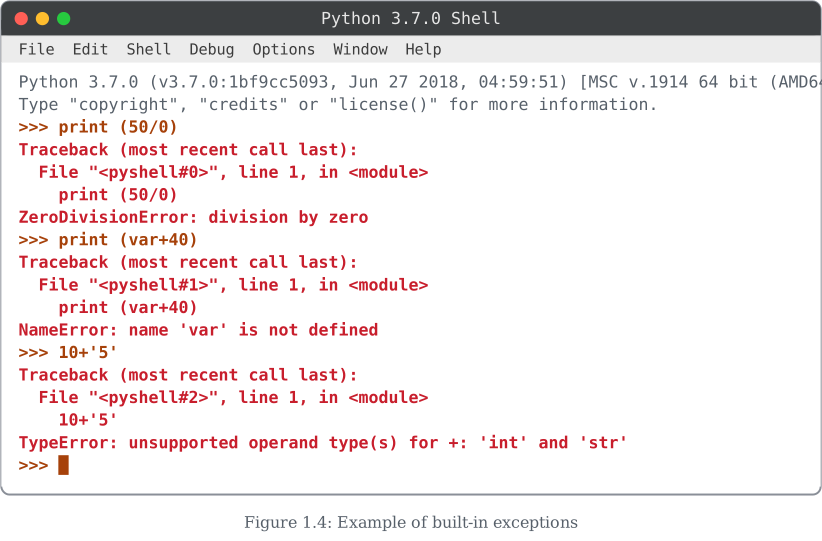
This Shell session runs three separate statements, one after another, each of which is syntactically perfectly valid Python but fails when the interpreter tries to execute it — these are runtime, or built-in, exceptions, not syntax errors.
First, print (50/0) divides 50 by zero. Python raises ZeroDivisionError: division by zero, because division by zero is mathematically undefined. Second, print (var+40) tries to use a variable var that was never assigned anywhere in this session, so Python raises NameError: name 'var' is not defined. Third, 10+'5' tries to add an integer to a string using +; Python does not automatically convert types for you, so it raises TypeError: unsupported operand type(s) for +: 'int' and 'str'. …
| S. No | Name of the Built-in Exception | Explanation |
|---|---|---|
| 1. | SyntaxError | It is raised when there is an error in the syntax of the Python code. |
| 2. | ValueError | It is raised when a built-in method or operation receives an argument that has the right data type but mismatched or inappropriate values. |
| 3. | IOError | It is raised when the file specified in a program statement cannot be opened. |
| 4 | KeyboardInterrupt | It is raised when the user accidentally hits the Delete or Esc key while executing a program due to which the normal flow of the program is interrupted. |
| 5 | ImportError | It is raised when the requested module definition is not found. |
| 6 | EOFError | It is raised when the end of file condition is reached without reading any data by input(). |
| 7 | ZeroDivisionError | It is raised when the denominator in a division operation is zero. |
| 8 | IndexError | It is raised when the index or subscript in a sequence is out of range. |
| 9 | NameError | It is raised when a local or global variable name is not defined. |
| 10 | IndentationError | It is raised due to incorrect indentation in the program code. |