Informatics Practices · Ch 5 — Internet and Web
Introduction to Computer Networks
Introduction to Computer Networks
What is a Network?
We live in a connected world. Information is produced, exchanged, and tracked across the globe in real time. This is possible because almost everyone and everything in the digital world is interconnected in some way.
A network is simply a group of two or more similar things or people that are interconnected with each other. Networks are everywhere in our daily lives. Examples include a social network (connections between people), a mobile network (connections between phones), a network of computers, and the networks used by airlines, railways, banks, and hospitals.
Computer Networks
A computer network is an interconnection among two or more computers or computing devices. This interconnection allows computers to share data and resources with each other.
A basic network might connect just a few computers placed in a single room. The size of a network can vary from very small to extremely large, depending on the number of computers it connects.
A computer network can include different types of hosts (also called nodes), such as servers, desktops, laptops, and cellular phones.
The terms 'host' and 'node' are often used interchangeably to refer to any device connected to a network.
Networking Devices
Apart from computers, networks include dedicated networking devices like switches, routers, and modems. These devices are used to connect multiple computers in different settings and make the network function.
How Data Travels: Packets
For communication to happen, data in a network is divided into smaller chunks called packets. These packets are then carried over the network from one device to another.
Wired and Wireless Connections
Devices in a network can be connected in two main ways:
- Wired media: Using physical cables.
- Wireless media: Using the air (e.g., radio waves, as in Wi-Fi).
What is a Node?
In a communication network, any device that is a part of the network and can receive, create, store, or send data to different network routes is called a node. In the context of data communication, a node can be many types of devices, including a modem, hub, bridge, switch, router, digital telephone handset, a printer, a computer, or a server.
Why Use a Computer Network?
The interconnectivity of computing devices in a network provides two major benefits:
- Exchange of Information: It allows us to exchange information simultaneously with many parties through email, websites, audio/video calls, and more.
- Sharing of Resources: A network allows the sharing of resources. For example, a single printer can be made available to multiple computers through a network. Similarly, a networked storage device can be accessed by many computers. People often connect their devices through a hotspot, forming a small personal network to share an internet connection.
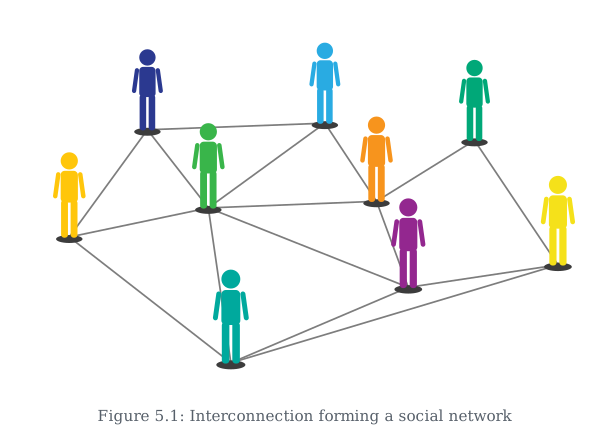
Drawn by us to help you understand the concept clearly, and verified to make sure it's accurate. For exams, practice from your textbook's own diagram.
Figure 5.1 is a simple node-and-link diagram. It shows several circular nodes, each labelled with a person’s name (like a typical social circle). Lines (edges) connect some of these nodes directly, while other nodes are connected indirectly through intermediate people. The key point is that every person in the diagram is reachable from every other person via one or more links — no one is isolated.
The figure does not show any specific places, dates, or real-world artefacts. It is purely abstract: a set of labelled circles (people) and straight lines (relationships). There are no arrows, panels, or multiple scenes — just a single graph.
What this teaches is the core idea of a network: a group of similar things (here, people) that are interconnected. The textbook uses this as a stepping stone to computer networks. The social network example makes the abstract concept concrete — you already understand that your friends are connected to each other, and through them you can reach people you don’t know directly. That same principle applies when computers are the “people” and cables or wireless signals are the “lines”.
The figure deliberately uses people (not computers) to introduce the term network before moving to technical definitions. This is a common pedagogical technique: start with a familiar example, then generalise.
The layout is not important — the diagram could be drawn with nodes in any arrangement. What matters is the connectivity: the pattern of who is linked to whom. In a network, the structure of connections determines how information (or data, or a message) can travel from one node to another.
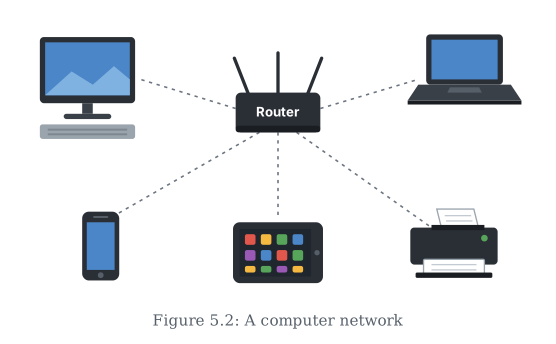
Drawn by us to help you understand the concept clearly, and verified to make sure it's accurate. For exams, practice from your textbook's own diagram.
Figure 5.2 is a schematic diagram, not a photograph. It shows a small, basic computer network. In the centre of the diagram is a single networking device — likely a switch or a hub, drawn as a rectangular box. Radiating outward from this central device are several connection lines (representing cables or wireless links), each leading to a different computing device.
The devices shown are drawn as simple icons: a desktop computer (a monitor and CPU), a laptop (a clamshell shape), a server (often depicted as a tower or rack), and a cellular phone (a handset shape). These are the nodes or hosts of the network. The lines connecting them to the central device indicate that every device is linked through that shared hub, forming a star-like layout.
The key teaching point of this figure is the definition of a computer network itself: an interconnection among two or more computers or computing devices. The diagram makes this concrete by showing multiple, different types of devices (desktop, laptop, server, phone) all connected to a single central point. This visual arrangement directly illustrates that the purpose of such a connection is to allow these devices to share data and resources with each other — for example, a laptop accessing a file stored on the server, or the desktop sending a document to a shared printer (though the printer itself is not shown in this particular figure).
The figure also reinforces the idea that a network can include a variety of hosts, not just identical computers. By including a server and a cellular phone alongside typical PCs, it shows that any computing device capable of sending or receiving data can be a node in a network. The central networking device (the hub/switch) is the physical or logical point through which all communication passes in this simple setup, highlighting the role of networking devices in connecting multiple computers.