Computer Science · Ch 5 — Getting Started with Python
Explicit Conversion
Explicit Conversion
Explicit conversion, also called type casting, happens when data type conversion takes place because the programmer forced it in the program. The general form of an explicit data type conversion is:
(new_data_type)(expression)
With explicit type conversion there is a risk of loss of information, since we are forcing an expression to become a specific type. For example, converting the floating-point value x = 20.67 to an integer with int(x) discards the fractional part .67 — the result is 20.
Python's explicit conversion functions
| Function | Description |
|---|---|
int(x) | Converts x to an integer |
float(x) | Converts x to a floating-point number |
str(x) | Converts x to a string representation |
chr(x) | Converts the ASCII value x to its character |
ord(x) | Returns the ASCII code associated with character x |
Casting between numeric types
int to float — wrapping an integer result in float() produces the floating-point form:
# Explicit type conversion from int to float
num1 = 10
num2 = 20
num3 = num1 + num2
print(num3)
print(type(num3))
num4 = float(num1 + num2)
print(num4)
print(type(num4))
30
<class 'int'>
30.0
<class 'float'>
float to int — the reverse direction demonstrates the information loss:
# Explicit type conversion from float to int
num1 = 10.2
num2 = 20.6
num3 = num1 + num2
print(num3)
print(type(num3))
num4 = int(num1 + num2)
print(num4)
print(type(num4))
30.8
<class 'float'>
30
<class 'int'>
The sum 30.8 becomes plain 30 — the .8 is simply thrown away.
Casting between numbers and strings
What happens if we try to glue a number onto a string with +?
# Type conversion between numbers and strings
priceIcecream = 25
priceBrownie = 45
totalPrice = priceIcecream + priceBrownie
print("The total is Rs." + totalPrice)
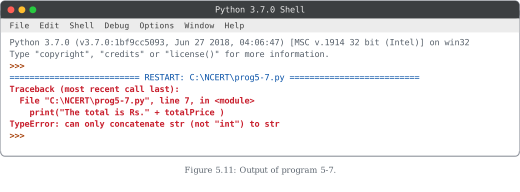
On execution this program stops with an error (shown in Figure 5.11): the interpreter reports that it cannot convert an integer value to a string implicitly — it can only concatenate a string to a string.
It may seem intuitive that Python should just convert the integer to a string based on the usage. But the interpreter deliberately refuses to decide on its own when to convert, because there is a risk of loss of information. Instead, Python provides explicit type conversion so the programmer can state the desired outcome clearly. With str(), the same program works perfectly:
# Explicit type casting
priceIcecream = 25
priceBrownie = 45
totalPrice = priceIcecream + priceBrownie
print("The total in Rs." + str(totalPrice))
The total in Rs.70
Similarly, type casting is needed to convert a float to a string before concatenating it.
Converting strings to numbers
The conversion also runs the other way: a string holding digits can be converted to an integer or float whenever required. The next program shows both behaviours side by side — first the strings are concatenated as text, then they are converted and genuinely added:
# Explicit type conversion …
Drawn by us to help you understand the concept clearly, and verified to make sure it's accurate. For exams, practice from your NCERT textbook's own diagram.
This figure shows what the Python shell displays when Program 5-7 is executed — a run that ends in an error rather than the expected output.
The screenshot is of the Python 3.7.0 Shell (IDLE) window. First comes the usual restart banner that IDLE prints whenever a script is run, naming the file being executed: RESTART: C:\NCERT\prog5-7.py. Immediately below it, instead of a total price, appears a traceback shown in red — Python's standard error report. The traceback identifies exactly where the failure happened: file prog5-7.py, line 7, in the statement print("The total is Rs." + totalPrice). The final line states the error itself:
TypeError: can only concatenate str (not "int") to str
The teaching point is the reason behind this error. Program 5-7 computed totalPrice as an integer (25 + 45 = 70) and then tried to join it to a string using the + operator. For strings, + means concatenation, and concatenation is only defined between two strings. The interpreter refuses to convert the integer to a string on its own — implicit conversion is avoided here because deciding when and how to convert carries a risk of losing information. So the program terminates with a TypeError. …
| Function | Description |
|---|---|
| int(x) | Converts x to an integer |
| float(x) | Converts x to a floating-point number |
| str(x) | Converts x to a string representation |
| chr(x) | Converts ASCII value of x to character |