Computer Science · Ch 5 — Getting Started with Python
Mutable and Immutable Data Types
Mutable and Immutable Data Types
Programs often need to change or update the values of certain variables as they run. For some data types Python allows this freely — but for others, once a variable of that type has been created and assigned a value, Python does not allow the value to be changed. This split gives the two classifications:
- Mutable — variables whose values can be changed after they are created and assigned.
- Immutable — variables whose values cannot be changed after they are created and assigned.
What happens when we "update" an immutable variable anyway? The old variable is destroyed, and a new variable is created by the same name in memory. The name survives; the underlying object is replaced.
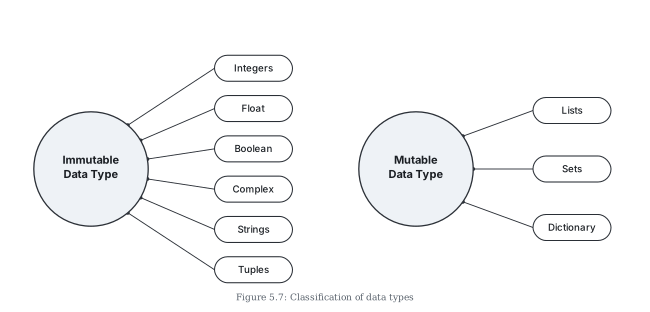
The classification (Figure 5.7)
| Immutable data types | Mutable data types |
|---|---|
| Integers | Lists |
| Float | Sets |
| Boolean | Dictionary |
| Complex | |
| Strings | |
| Tuples |
Watching an update happen, step by step
The id() view of objects from Section 5.6 makes the destroy-and-recreate behaviour visible. Follow three statements:
Step 1 — create an object:
>>> num1 = 300
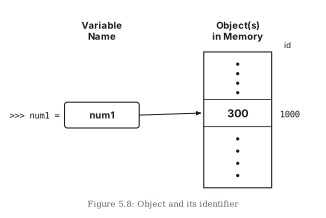
This creates an object with the value 300, referenced by the identifier num1 (Figure 5.8 draws this as the name num1 pointing to a memory cell holding 300).
Step 2 — assign one variable to another:
>>> num2 = num1
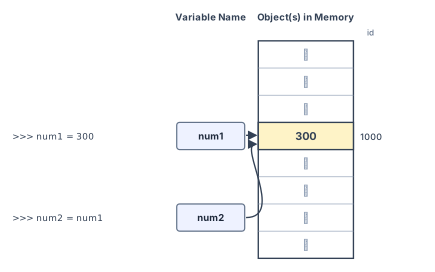
The statement makes num2 refer to the same value 300 already referred to by num1, stored at some memory location — say location number 1000. num1 now shares the referenced location with num2 (Figure 5.9: both names point at the one cell). This is the key insight into Python assignment: it is made effective by copying only the reference, not the data.
Step 3 — "update" the immutable value:
>>> num1 = num2 + 100
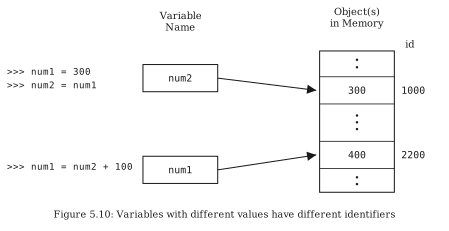
This statement links the variable num1 to a new object, stored at a different memory location — say number 2200 — holding the value 400. Because num1 is an integer, an immutable type, it is rebuilt rather than modified in place (Figure 5.10: num2 still points at the old 300 cell, while num1 now points at the fresh 400 cell). …
Drawn by us to help you understand the concept clearly, and verified to make sure it's accurate. For exams, practice from your NCERT textbook's own diagram.
This figure classifies Python's data types into the two camps defined in Section 5.7.6 — mutable and immutable — using a diagram of two circles.
The left circle is labelled "Immutable Data Type". From it, pointers lead to six ovals, one per type whose values cannot be changed once created and assigned:
- Integers
- Float
- Boolean
- Complex
- Strings
- Tuples
The right circle is labelled "Mutable Data Type". Its pointers lead to three ovals, the types whose values can be changed after creation:
- Lists
- Sets
- Dictionary
The visual weight of the diagram makes the surprising point memorable: most of Python's types — all four numeric types plus strings and tuples — are immutable; only three types are mutable. Notice also how the split cuts across the family tree of Figure 5.6: within the sequences, strings and tuples are immutable while lists are mutable, so belonging to the same family does not imply the same mutability. …
Drawn by us to help you understand the concept clearly, and verified to make sure it's accurate. For exams, practice from your NCERT textbook's own diagram.
This figure is the first of a three-part sequence (Figures 5.8, 5.9, 5.10) that pictures what happens in memory as variables are created and reassigned. It illustrates the single statement:
>>> num1 = 300
The diagram has two parts. Under the heading "Variable Name" sits a box labelled num1 — the identifier. An arrow leads from this box to a memory cell containing the value 300, drawn inside a vertical column headed "Object(s) in Memory". Beside the cell, at the right, its id — the memory location — is shown as 1000.
The picture teaches the fundamental model of a Python assignment: the statement creates an object (the value 300, occupying a location in memory) and makes the identifier num1 reference that object. The name and the value are separate things connected by an arrow — num1 is not a box that "contains" 300, but a label that points to where 300 lives. The id 1000 is the identity that the id() function of Section 5.6 would report. …
Drawn by us to help you understand the concept clearly, and verified to make sure it's accurate. For exams, practice from your NCERT textbook's own diagram.
This figure shows the memory picture after two statements have run:
>>> num1 = 300
>>> num2 = num1
The diagram now has two variable-name boxes, num1 and num2. Both boxes have arrows pointing to the same memory cell — the one containing 300, at id 1000, in the "Object(s) in Memory" column. There is still only one object; what has doubled is the number of names referencing it.
This is the key fact the figure exists to teach: the assignment num2 = num1 copies only the reference, not the data. Python does not manufacture a second 300 for num2; it simply makes num2 point at the object num1 already references. The two variables now share the referenced location, which is why (recalling Section 5.6) id(num1) and id(num2) would return the same identity. …
Drawn by us to help you understand the concept clearly, and verified to make sure it's accurate. For exams, practice from your NCERT textbook's own diagram.
This figure completes the memory story of Figures 5.8 and 5.9. Three statements have now run:
>>> num1 = 300
>>> num2 = num1
>>> num1 = num2 + 100
Where Figure 5.9 showed both names sharing one object, the picture has now split. num2 still points to the original cell containing 300 at id 1000. But num1 points to a new cell containing 400, at a different memory location — id 2200.
The figure makes visible what "immutable" means in practice. The statement num1 = num2 + 100 did not walk to the 300 cell and rewrite it as 400 — integers are an immutable type, so the existing object cannot be altered. Instead the interpreter built a brand-new object holding 400 at a fresh location and re-pointed the name num1 at it: the integer is rebuilt, not modified. …