Computer Science · Ch 8 — Database Concepts
File System to DBMS
File System to DBMS
The shift from a file system to a DBMS is best understood by working through a concrete example. The textbook uses the school scenario where two separate files existed: a STUDENT file (maintained by the office) and an ATTENDANCE file (maintained by the teacher). In a file system, these files were independent and often duplicated data. The goal is to redesign them into a single, integrated database.
Why the file system approach had problems
When you look at the original two files, you notice several issues that a database is designed to fix.
-
Redundancy of student name in ATTENDANCE: The ATTENDANCE file originally stored both
RollNumberandSName. ButSNameis already present in the STUDENT file. In a database, you store it only once. You can always retrieve a student's name by using the common fieldRollNumberto link the two tables. This eliminates duplicate data entry and the risk of inconsistencies (e.g., a name spelled differently in two places). -
Redundancy of guardian details for siblings: If two siblings are in the same class, the same guardian details (
GName,GPhone,GAddress) would be repeated for each sibling in the STUDENT file. This is a clear case of data redundancy. A database avoids this by splitting the data so that each guardian's information is stored only once. -
Difficulty in uniquely identifying a guardian: Multiple guardians can share the same name. If you only have
GName, you cannot tell which guardian belongs to which student. The textbook notes that you could use a phone number to distinguish guardians, but phone numbers can change over time, making them unreliable as a permanent identifier. The solution is to introduce a new, unique column.
The redesign: splitting and linking tables
To convert the two files into a proper database, three specific changes are made.
-
Remove
SNamefrom ATTENDANCE. The ATTENDANCE table now only needsRollNumber(to identify the student),Date, andAttendanceStatus. The student's name is fetched from the STUDENT table when needed. -
Split the STUDENT file into two tables: STUDENT and GUARDIAN. This removes the redundancy of guardian data. Each guardian's details (
GName,GPhone,GAddress) are stored exactly once in the GUARDIAN table. -
Add a unique
GUID(Guardian ID) column. This is the key step. A new columnGUIDis created in the GUARDIAN table. It holds a unique value for each guardian record. This sameGUIDcolumn is also added to the STUDENT table. Now, to find which guardian belongs to a student, you simply match theGUIDvalue in the STUDENT row with theGUIDvalue in the GUARDIAN row. This creates a relationship between the two tables.
The resulting database structure
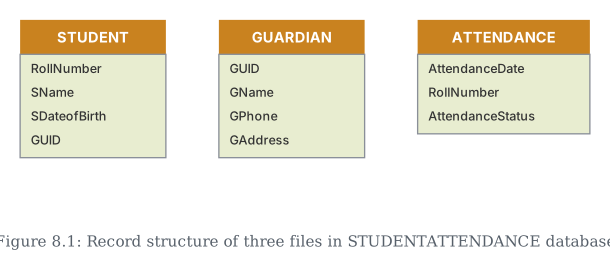
After these changes, the database consists of three related tables. The textbook shows their empty record structures in Figure 8.1, which is reproduced here conceptually.
| STUDENT | GUARDIAN | ATTENDANCE |
|---|---|---|
| RollNumber | GUID | AttendanceDate |
| SName | GName | RollNumber |
| SDateofBirth | GPhone | AttendanceStatus |
| GUID | GAddress |
These tables are then populated with actual data. The textbook provides sample snapshots (Tables 8.4, 8.5, and 8.6) to illustrate how the data now looks.
Notice that in the STUDENT table, student 3 (Taleem Shah) has no GUID value. This is allowed — it simply means that no guardian data is recorded for that student in the GUARDIAN table. Also, the GUARDIAN table shows that Danny Dsouza has no phone number listed; a database can handle such missing information gracefully.
The cost of moving to a DBMS
The textbook explicitly warns that shifting from a file system to a DBMS is not free. It involves significant costs:
- High cost of hardware and software: A DBMS often requires more powerful hardware and a licensed database software package. …
Drawn by us to help you understand the concept clearly, and verified to make sure it's accurate. For exams, practice from your textbook's own diagram.
This is the record structure — the column names only, no data yet — for the three files the STUDENTATTENDANCE database is built from. Splitting one big STUDENT file into three related pieces (STUDENT, GUARDIAN, ATTENDANCE) avoids repeating a student's guardian details on every single attendance record. …
| RollNumber | SName | SDateofBirth | GUID |
|---|---|---|---|
| 1 | Atharv Ahuja | 2003-05-15 | 444444444444 |
| 2 | Daizy Bhutia | 2002-02-28 | 111111111111 |
| 3 | Taleem Shah | 2002-02-28 | |
| 4 | John Dsouza | 2003-08-18 | 333333333333 |
| GUID | GName | GPhone | GAddress |
|---|---|---|---|
| 444444444444 | Amit Ahuja | 5711492685 | G-35, Ashok Vihar, Delhi |
| 111111111111 | Baichung Bhutia | 3612967082 | Flat no. 5, Darjeeling Appt., Shimla |
| 101010101010 | Himanshu Shah | 4726309212 | 26/77, West Patel Nagar, Ahmedabad |
| 333333333333 | Danny Dsouza | S -13, Ashok Village, Daman |
| Date | RollNumber | Status |
|---|---|---|
| 2018-09-01 | 1 | P |
| 2018-09-01 | 2 | P |
| 2018-09-01 | 3 | A |
| 2018-09-01 | 4 | P |
| 2018-09-01 | 5 | A |
| 2018-09-01 | 6 | P |
| 2018-09-02 | 1 | P |
| 2018-09-02 | 2 | P |
| 2018-09-02 | 3 | A |