Computer Science · Ch 9 — Structured Query Language (SQL)
Functions in SQL
Functions in SQL
Functions in SQL
A function in SQL is a pre-written block of code that performs a specific task and returns a value (or values) as a result. Functions are extremely useful when writing queries because they let you transform, calculate, or summarise data directly inside your SELECT statements.
SQL functions are broadly classified based on how many rows they work on at a time:
- Single Row Functions – operate on one row at a time and return one result per row.
- Aggregate (Multiple Row) Functions – operate on a group of rows and return a single result for the entire group.
The textbook introduces these concepts using a sample database called CARSHOWROOM. Let's first understand its structure, because all the examples that follow are based on it.
The CARSHOWROOM Database
The database has four tables, and their relationships are shown in the schema diagram (Figure 9.2 in the textbook). Here is what each table stores:
1. INVENTORY – Contains details of every car in the showroom's stock.
Columns: CarId, CarName, Price, Model, YearManufacture, FuelType
2. CUSTOMER – Stores information about each customer.
Columns: CustId, CustName, CustAdd, Phone, Email
3. SALE – Records every sale transaction.
Columns: InvoiceNo, CarId, CustId, SaleDate, PaymentMode, EmpID, SalePrice
4. EMPLOYEE – Holds details of all employees.
Columns: EmpID, EmpName, DOB, DOJ, Designation, Salary
The actual data in these tables is given in the textbook as Tables 9.9 through 9.12. You should refer to those tables when working through the examples — they contain the exact records that the functions will be applied to.
Single Row Functions
Single row functions work on each row individually. For every row in the result set, they take one or more input values and produce a single output value. They are used to manipulate data items — for example, changing the case of a name, extracting part of a date, or rounding a price.
The textbook classifies single row functions into three categories, as shown in Figure 9.3:
1. Numeric Functions
These functions operate on numeric data and return numeric results. The key ones mentioned are:
-
POWER()– Raises a number to a specified power.Example:
POWER(Price, 2)would square the price of each car. -
ROUND()– Rounds a number to a specified number of decimal places.Example:
ROUND(Price, 0)would round each car's price to the nearest whole rupee. -
MOD()– Returns the remainder of a division.Example:
MOD(Price, 1000)would give the remainder when price is divided by 1000.
2. String Functions
These work on character data. The textbook lists the following:
UCASE()– Converts a string to uppercase.LCASE()– Converts a string to lowercase.MID()– Extracts a substring from a string, starting at a given position for a given length.LENGTH()– Returns the number of characters in a string.LEFT()– Extracts a given number of characters from the left side of a string.RIGHT()– Extracts a given number of characters from the right side of a string.INSERT()– Inserts a substring into another string at a specified position, replacing a specified number of characters.LTRIM()– Removes leading spaces from a string.RTRIM()– Removes trailing spaces from a string.TRIM()– Removes both leading and trailing spaces from a string.
3. Date Functions
These functions work on date and time values. The ones covered are:
NOW()– Returns the current date and time.DATE()– Extracts the date part from a date/time expression.MONTH()– Returns the month number (1 to 12) from a date.MONTHNAME()– Returns the full name of the month (e.g., 'January').YEAR()– Extracts the year from a date.DAY()– Returns the day of the month (1 to 31).DAYNAME()– Returns the name of the weekday (e.g., 'Monday').
Aggregate (Multiple Row) Functions
Aggregate functions operate on a group of rows and return a single summary value. They are also called group functions or multiple row functions. The textbook introduces them in this section but does not list them individually here — they are covered in more detail later in the chapter. However, the key idea is that while single row functions produce one output per input row, aggregate functions collapse many rows into one result.
For example, if you wanted the average salary of all employees, you would use an aggregate function like AVG(Salary). That function would look at all the rows in the EMPLOYEE table and return just one number.
Important Distinction
The textbook makes a clear point: the classification of functions depends on how many rows they act upon. A single row function processes each row independently — if your query returns 10 rows, the function runs 10 times and gives 10 results. An aggregate function processes all the rows in a group together — if your query returns 10 rows, the aggregate function might give just 1 result (if you group all rows together) or a few results (if you group by some category).
This distinction is fundamental to writing correct SQL queries. Using a single row function where an aggregate is needed (or vice versa) will either give you an error or produce unintended results.
Working with Multiple Tables …
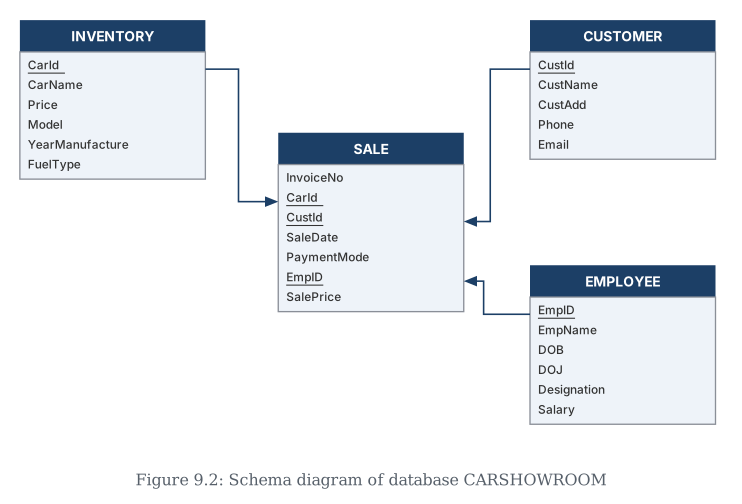
Drawn by us to help you understand the concept clearly, and verified to make sure it's accurate. For exams, practice from your textbook's own diagram.
This is the schema — the table structure — of the CARSHOWROOM database used throughout the chapter's examples. Four tables: INVENTORY (the cars for sale), CUSTOMER (the buyers), EMPLOYEE (the staff), and SALE, which sits in the middle and ties the other three together. …
mysql> SELECT * FROM INVENTORY;
| CarId | CarName | Price | Model | YearManufacture | Fueltype |
|---|---|---|---|---|---|
| D001 | Dzire | 582613.00 | LXI | 2017 | Petrol |
| D002 | Dzire | 673112.00 | VXI | 2018 | Petrol |
| B001 | Baleno | 567031.00 | Sigma1.2 | 2019 | Petrol |
| B002 | Baleno | 647858.00 | Delta1.2 | 2018 | Petrol |
| E001 | EECO | 355205.00 | 5 STR STD | 2017 | CNG |
| E002 | EECO | 654914.00 | CARE | 2018 | CNG |
mysql> SELECT * FROM CUSTOMER;
| CustId | CustName | CustAdd | Phone | |
|---|---|---|---|---|
| C0001 | Amit Saha | L-10, Pitampura | 4564587852 | amitsaha2@gmail.com |
| C0002 | Rehnuma | J-12, SAKET | 5527688761 | rehnuma@hotmail.com |
| C0003 | Charvi Nayyar | 10/9, FF, Rohini | 6811635425 | charvi123@yahoo.com |
mysql> SELECT * FROM SALE;
| InvoiceNo | CarId | CustId | SaleDate | PaymentMode | EmpID | SalePrice |
|---|---|---|---|---|---|---|
| I00001 | D001 | C0001 | 2019-01-24 | Credit Card | E004 | 613248.00 |
| I00002 | S001 | C0002 | 2018-12-12 | Online | E001 | 590321.00 |
| I00003 | S002 | C0004 | 2019-01-25 | Cheque | E010 | 604000.00 |
| I00004 | D002 | C0001 | 2018-10-15 | Bank Finance | E007 | 659982.00 |
| I00005 | E001 | C0003 | 2018-12-20 | Credit Card | E002 | 369310.00 |
mysql> SELECT * FROM EMPLOYEE;
| EmpID | EmpName | DOB | DOJ | Designation | Salary |
|---|---|---|---|---|---|
| E001 | Rushil | 1994-07-10 | 2017-12-12 | Salesman | 25550 |
| E002 | Sanjay | 1990-03-12 | 2016-06-05 | Salesman | 33100 |
| E003 | Zohar | 1975-08-30 | 1999-01-08 | Peon | 20000 |
| E004 | Arpit | 1989-06-06 | 2010-12-02 | Salesman | 39100 |
| E006 | Sanjucta | 1985-11-03 | 2012-07-01 | Receptionist | 27350 |