Computer Science · Ch 1 — Computer System
OS User Interface
OS User Interface
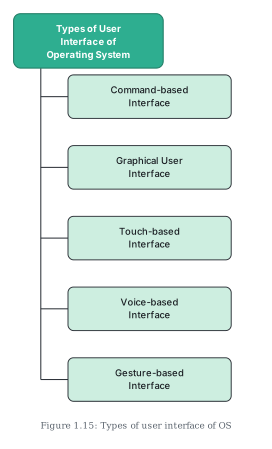
Operating systems offer several different kinds of user interface, each providing a different way for the user to give commands. The commonly used types (Figure 1.15) are: command-based, graphical (GUI), touch-based, voice-based and gesture-based interfaces.
Think and Reflect (from the book): when a computer is switched on, who brings the OS into RAM from secondary storage? (Recall from section 1.3.2: the boot loader stored in ROM.)
(A) Command-based interface
- The user must type commands to perform tasks — creating, opening, editing or deleting a file, and so on.
- The burden is on the user's memory: one must remember the names of all the programs and the specific commands the OS supports.
- The primary input device is the keyboard.
- Command-based interfaces are often less interactive and usually let the user run a single program at a time.
- Examples: MS-DOS and Unix.
(B) Graphical User Interface (GUI)
- The GUI lets users run programs and give instructions through icons, menus and other visual options.
- Icons usually represent files and programs stored on the computer; windows represent the running programs the user has launched through the OS.
- Common input devices for a GUI: the mouse and keyboard.
- Examples: Microsoft Windows, Ubuntu, Fedora, Macintosh, among others.
(C) Touch-based interface
- Smartphones, tablets and PCs let users interact simply by touch.
- Through the touchscreen the user gives inputs which the OS interprets as commands — opening an app, closing an app, dialing a number, scrolling across apps, etc.
- Examples: Android and iOS; Windows 8.1 and 10 also support touch on touchscreen devices.
(D) Voice-based interface
- Modern systems are designed for all types of users, including people with special needs and people who want to use the computer or phone while doing another task.
- For users who cannot use a mouse, keyboard or touchscreen, the OS offers voice-based commands as an alternative means of human–computer interaction.
- Examples of voice control in operating systems: iOS (Siri), Android (Google Now / "OK Google"), Microsoft Windows 10 (Cortana), and so on.
(E) Gesture-based interface …
Drawn by us to help you understand the concept clearly, and verified to make sure it's accurate. For exams, practice from your textbook's own diagram.
Figure 1.15 is a small tree diagram summarising the kinds of user interface an operating system can offer. At the top sits a bright green rounded box labelled "Types of User Interface of Operating System." From it a vertical line drops down the left side, with horizontal stubs branching to five boxes stacked one below another:
- Command-based Interface — the user types commands (MS-DOS, Unix); keyboard-driven, and the user must remember the command names.
- Graphical User Interface — icons, menus and windows operated with mouse and keyboard (Microsoft Windows, Ubuntu, Fedora, Macintosh).
- Touch-based Interface — input given by touching the screen directly (Android, iOS; also Windows 8.1 and 10 on touchscreen devices).
- Voice-based Interface — spoken commands control the system (Siri on iOS, Google Now / "OK Google" on Android, Cortana on Windows 10).
- Gesture-based Interface — waving, tilting, eye motion and shaking interpreted as commands on some smartphones and laptops. …