Computer Science · Ch 1 — Computer System
Programming Tools
Programming Tools
To get work done by a computer, we must give it instructions to apply to the input data. Computer languages exist for writing those instructions. But there is a fundamental gap: humans and computers understand completely different languages. Humans write programs comfortably in high-level languages; computers understand only machine language. Bridging that gap continuously requires translators, and writing the instructions in the first place requires code editors (for example, IDLE in Python). This section covers all three programming-tool families: programming languages, language translators, and program development tools.
(A) Classification of programming languages
Writing instructions directly as 1s and 0s is extremely difficult for a human, so programming languages were developed to simplify coding. They fall into two major categories: low-level and high-level languages.
Low-level languages (machine dependent)
- Machine language uses 1s and 0s to write instructions that the computer understands and executes directly. Its drawbacks: the programmer must remember all operation codes and machine addresses, and finding errors in such code is difficult.
- Assembly language was developed to simplify this: it allows English-like words and symbols instead of raw 1s and 0s. Its major drawback: the code is computer specific — code written for one type of CPU cannot be used on another type of CPU.
High-level languages (machine independent)
- High-level languages are machine independent and much simpler to write code in.
- Instructions use English-like sentences, and each language follows a set of rules, similar to natural languages.
- The catch: the computer cannot understand them directly — a translator must convert high-level code into machine language.
- Examples: C++, Java, Python.
(B) Language translators
Since the computer understands only machine language, a translator converts a program written in assembly or high-level language into machine language.
Two key terms:
- Source code — the program as written in assembly or high-level language.
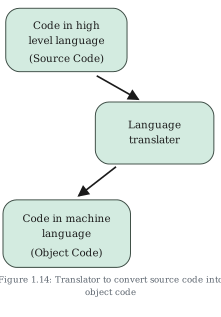
- Object (machine) code — the machine-understandable form the translator produces (Figure 1.14).
Different languages need different translators; the three types are:
- Assembler — converts assembly language code into machine language. Each assembler understands one specific microprocessor instruction set only, so the resulting machine code is not portable.
- Compiler — converts high-level source code into machine code as a whole. If the code follows all the syntactic rules of the language, it is then executed by the computer. Once translated, the compiler is no longer needed — the machine code runs on its own.
- Interpreter — translates one line at a time instead of the whole program at once. It takes a line, converts it into executable code if the line is syntactically correct, executes it, and repeats for every line of the source. Consequently, the interpreter is needed every time the program runs.
That last contrast is the classic exam point: a compiled program runs without its compiler; an interpreted program always needs its interpreter. It also explains why executing already-compiled machine code is faster than interpreting source code line by line.
Python is an interpreted language — when you type a line into the Python prompt, the interpreter translates and executes it immediately:
print("Hello, Class XI")
Hello, Class XI
``` …
Drawn by us to help you understand the concept clearly, and verified to make sure it's accurate. For exams, practice from your textbook's own diagram.
Figure 1.14 shows the job of a language translator as a simple three-step staircase of rounded boxes, read from top left to bottom:
- The top box holds "Code in high level language (Source Code)" — the program as the human wrote it, in a language like C++, Java or Python.
- A diagonal arrow leads down to the middle box, the "Language translator" — the software (an assembler, compiler or interpreter, depending on the source language) that performs the conversion.
- From there another diagonal arrow leads down to the bottom box: "Code in machine language (Object Code)" — the machine-understandable form the computer can actually execute.
The staircase shape captures the direction of the transformation: source code descends through the translator to become object code. Nothing skips the middle step — because the computer understands only machine language, every program written in an assembly or high-level language must pass through a translator before it can run. …