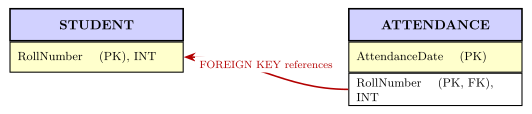
Q.Add foreign key in the ATTENDANCE table (use fig. 8.1 to identify referencing and referenced tables).
You're viewing a preview — the full solution, concept, methods & PYQ mapping are locked.
Start your 14-day free trial to unlock the full solution →In the StudentAttendance schema, RollNumber of ATTENDANCE refers to RollNumber, the primary key of STUDENT.
So ATTENDANCE is the referencing table and STUDENT is the referenced table, and one ALTER TABLE ... ADD FOREIGN KEY statement wires them together.
Step 1 — Identify referencing and referenced tables
The relationship diagram of the StudentAttendance database (the figure the activity points to) links the three tables like this: every attendance record belongs to one student, so ATTENDANCE carries the student's RollNumber. Table 8.5 also marks RollNumber in ATTENDANCE as FOREIGN KEY, while Table 8.3 marks RollNumber as the PRIMARY KEY of STUDENT. Therefore:
- Referencing table (holds the foreign key): ATTENDANCE, attribute
RollNumber - Referenced table (holds the primary key): STUDENT, attribute
RollNumber
Before adding the foreign key, recall the three rules from the chapter: the referenced table (STUDENT) must already exist, the referenced attribute must be (part of) its primary key — RollNumber is STUDENT's primary key — and both attributes must have the same data type and size (INT on both sides). All three hold here.
Step 2 — Add the foreign key
ALTER TABLE ATTENDANCE
ADD FOREIGN KEY(RollNumber) REFERENCES
STUDENT(RollNumber);
Query OK, 0 rows affected (0.83 sec)
Records: 0 Duplicates: 0 Warnings: 0
``` …
Unlock everything free for 14 days
- Full step-by-step solutions
- Concept-first explanations
- Methods, shortcuts & mistakes
- PYQ mapping + timed mock tests
Full access for 14 days. No credit card required.