Computer Science · Ch 10 — Computer Networks
DNS Server
DNS Server
Why We Need DNS
Computers communicate using IP addresses, but humans find it far easier to remember names. Instead of memorising a string of numbers like 164.100.60.233, we assign a domain name to each IP address — for example, www.ncert.nic.in. The problem is that a web browser needs the actual IP address to fetch a webpage. The process of converting a domain name into its corresponding IP address is called domain name resolution, and it is handled by a special server called a DNS server (Domain Name System server).
How DNS Works in Practice
When you type a URL into a web browser, the HTTP protocol does not immediately know where to find the requested resource. It first contacts a DNS server, asking for the IP address that matches the domain name you entered. The DNS server looks up this information in its database and sends the IP address back to the browser. Only then does HTTP use that IP address to retrieve the webpage and load it on your screen.
The textbook illustrates this with a figure showing the flow: User → HTTP → DNS server → IP address returned → HTTP fetches the page.
The DNS Database
A DNS server maintains a database of domain names and their corresponding IP addresses. This database is not a simple flat list — it is organised in a hierarchical structure that makes searching efficient.
Hierarchical Organisation of DNS Servers
DNS servers are placed in a hierarchical order. At the very top are 13 special servers called root servers. These root servers are named using the letters A through M (the first 13 letters of the alphabet). Their physical distribution is notable:
- Ten of these root servers are located in the United States
- One is in London
- One is in Stockholm
- One is in Japan
The organisation Internet Assigned Numbers Authority (IANA) maintains the official list of these root servers.
Below the root servers, there are other DNS servers at different levels. This hierarchy is crucial because no single DNS server holds every domain name in the world. Instead, a DNS server may either:
- Contain the IP address corresponding to a domain directly, or
- Contain the IP address of another DNS server where that domain entry can be found
This means that a DNS query often travels down the hierarchy — from a root server to a top-level domain server, then to an authoritative name server — until it finds the exact IP address needed.
The key idea is that DNS is a distributed, hierarchical system. No single server knows everything; each server either has the answer or knows which server to ask next.
Summary of Key Points …
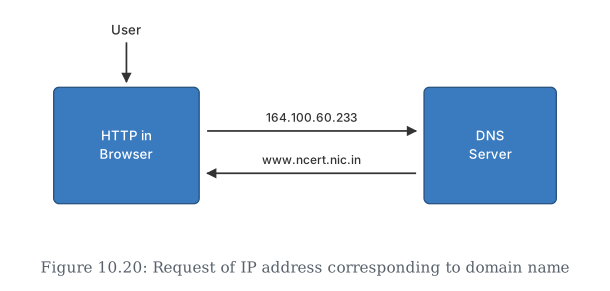
Drawn by us to help you understand the concept clearly, and verified to make sure it's accurate. For exams, practice from your textbook's own diagram.
This shows what happens behind the scenes every time you type a website's name into your browser. Your browser doesn't actually know how to reach www.ncert.nic.in directly — computers on the Internet find each other using numeric IP addresses, not names. …