Computer Science · Ch 6 — Flow of Control
The ‘For’ Loop
The ‘For’ Loop
The for statement is used to iterate over a range of values or a sequence. The loop body executes once for each item in that range. The items can be numbers, or — as later chapters show — elements of a data type such as a string, a list or a tuple. On every iteration, the control variable moves to the next value and the loop checks whether all the values in the range have been traversed. Once every item is exhausted, the loop body is not executed again and control transfers to the statement immediately following the for loop.
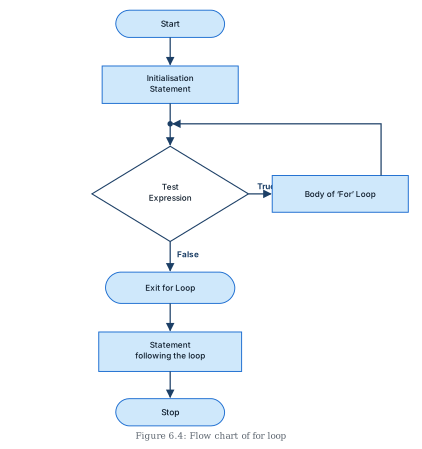
A defining property of the for loop: the number of times it will execute is known in advance (it equals the number of items in the sequence). The flowchart of a for loop's execution is given in Figure 6.4.
(A) Syntax of the for loop
for <control-variable> in <sequence/ items in range>:
    <statements inside body of the loop>
The body of the loop is indented with respect to the for statement.
Iterating over a string — each character is visited in turn:
# Print the characters of the word CODING one per line
for ch in 'CODING':
    print(ch)
C
O
D
I
N
G
Iterating over a list of numbers — each element is printed in order:
# Print the values in a given sequence
marks = [15, 25, 35, 45, 55]
for m in marks:
    print(m)
15
25
35
45
55
Combining a loop with selection — an if inside the loop body filters which items get acted on. Here only the even numbers of the sequence are reported (a number is even when dividing it by 2 leaves remainder 0, tested with the % operator):
# Print the even numbers present in a sequence
values = [1, 2, 3, 4, 5, 6, 7, 8, 9, 10]
for v in values:
    if (v % 2) == 0:
        print(v, 'is an even Number')
2 is an even Number
4 is an even Number
6 is an even Number
8 is an even Number
10 is an even Number
(B) The range() function
range() is a built-in function in Python with the syntax:
range([start], stop[, step])
It creates a sequence of integers beginning at start, going up to but excluding stop, moving in steps of step. (Functions are studied properly in the next chapter; for now it is enough to know that a function takes parameters to work on — here the parameters are start, stop and step.)
Rules for the parameters:
startandstepare optional. Ifstartis omitted, the sequence begins at 0 by default. Ifstepis omitted, the value increases by 1 on each iteration.- All parameters must be integers.
stepmay be a positive or a negative integer, but never zero.- The
stopvalue itself is never included in the sequence.
Interactive examples (wrapping in list() shows the generated sequence):
# start and step not specified: starts at 0, step 1
>>> list(range(10))
[0, 1, 2, 3, 4, 5, 6, 7, 8, 9]

# start given, default step of 1
>>> list(range(2, 10))
[2, 3, 4, 5, 6, 7, 8, 9]

# step of 5 …
Drawn by us to help you understand the concept clearly, and verified to make sure it's accurate. For exams, practice from your textbook's own diagram.
Figure 6.4 is the flowchart of how a for loop executes, showing the repeating path that control takes each time round the loop.
Reading it from the top:
- A rounded terminator labelled "Start" leads down into a rectangle: the Initialisation Statement. This runs once, before any looping begins — for a
forloop, this is where the control variable takes the first item of the sequence. - The arrow continues down towards a diamond labelled "Test Expression". On this connecting arrow there is a junction point — the spot where the loop-back arrow will re-enter the flow. The test asks whether there are still items in the range left to traverse.
- If the test is True, an arrow leaves the diamond to the right into a rectangle: the Body of the 'For' Loop. The body's statements execute once for the current item.
- From the body, an arrow travels up and to the left, re-entering the vertical flow line between the initialisation statement and the test expression. This is the loop back: the control variable advances to the next item and the test is evaluated again. This circuit — test, body, back to test — is the visual signature of repetition.
- If the test is False (all items in the range are exhausted), the flow drops straight down out of the diamond into a rounded node "Exit for Loop", then to a rectangle "Statement following the loop", and finally to the terminator "Stop". …