Computer Science · Ch 1 — Exception Handling in Python
The assert Statement
The assert Statement
The assert statement is a debugging aid that tests a condition inside your program. Think of it as a sanity check: you are asserting that something must be true at that point in the code. If your assertion turns out to be false, Python immediately raises an exception.
Purpose and placement
The textbook explains that assert is used to test an expression in the program code. If the test result is false, an exception is raised. This statement is typically placed at the beginning of a function or right after a function call, to check whether the input is valid before proceeding with the rest of the logic.
Syntax
assert Expression[, arguments]
The keyword assert is followed by an expression. Optionally, you can add a comma and then one or more arguments (usually a string message).
How it works
When Python encounters an assert statement, it evaluates the expression immediately after the keyword. If the expression is true, nothing happens — the program continues normally. If the expression is false, Python raises an AssertionError exception. This exception can be caught and handled using try and except, just like any other exception.
Program 1-1: Use of assert statement
The book gives a concrete example: a function negativecheck() that takes a number and, inside the function, uses an assert statement to check whether the number is non-negative.
print("use of assert statement")
def negativecheck(number):
    assert(number>=0), "OOPS... Negative Number"
    print(number*number)
print (negativecheck(100))
print (negativecheck(-350))
If the number is negative, the assertion fails, an AssertionError is thrown with the message "OOPS... Negative Number", and the subsequent statement inside the function — print(number*number) — is not executed. If the number is non-negative, the assertion silently passes and the square is printed as normal.
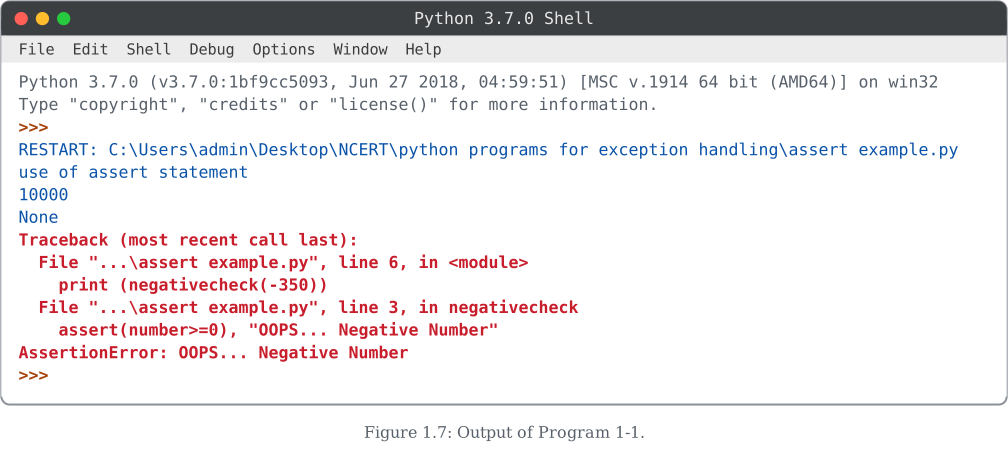
The output shown in Figure 1.7 demonstrates two calls:
negativecheck(100)— the assertion passes (100 >= 0isTrue), so the square,10000, is printed. The function itself returnsNone(it has noreturnstatement), which is why the next line printed by the outerprint(negativecheck(100))isNone.negativecheck(-350)— the assertion fails (-350 >= 0isFalse), soAssertionError: OOPS... Negative Numberis raised and theprint(number*number)line inside the function never runs. Since this second call's exception is never caught by anyexceptblock, it propagates all the way up and the program terminates with a traceback.
The assert statement is not meant for handling expected runtime errors that the user might cause. It is a tool for catching programming mistakes during development. Once your code is tested and deployed, you might disable assert statements globally with the -O (optimize) command-line flag. …
Drawn by us to help you understand the concept clearly, and verified to make sure it's accurate. For exams, practice from your textbook's own diagram.
This is the output of Program 1-1, a saved script (assert example.py) that uses Python's assert statement, run twice with different arguments to a negativecheck() function. The RESTART: line shows the full path of the file that was executed. First, print (negativecheck(100)) runs: the function prints use of assert statement, then 10000 (which is 100*100), and finally None, because negativecheck() has no return statement, so print()-ing its result prints Python's default return value.
The script then calls print (negativecheck(-350)). Inside the function, the line assert(number>=0), "OOPS... Negative Number" checks whether number is greater than or equal to zero. Since -350 fails that condition, the assert statement itself raises an exception: AssertionError: OOPS... Negative Number. The traceback shows both stack frames — the call at line 6 in the main script and the failing assert at line 3 inside negativecheck. …