Computer Science · Ch 4 — Introduction to Problem Solving
Repetition
Repetition
When giving directions, we naturally speak in repetitions: "walk 50 steps then turn right", or "walk till the next crossing, then take a right turn". Other everyday examples of the same pattern:
- clap your hands five times
- walk 10 steps ahead
- jump on the spot till you get tired
Each of these asks for something to be done repeatedly — either a given number of times, or until some condition is met. In the card game of Example 4.7, likewise, if 10 cards are to be drawn, the scoring pseudocode must be repeated 10 times before the winner can be decided.
Iteration and loops
In programming, repetition is also called iteration or a loop. A loop in an algorithm means the execution of some program statements repeatedly, till some specified condition is satisfied.
Example 4.8 — average of 5 numbers (known repetition count)
Task: accept 5 numbers and find their average.
Step 1: Set count = 0, sum = 0
Step 2: While count < 5, repeat steps 3 to 5
Step 3:     Input a number to num
Step 4:     sum = sum + num
Step 5:     count = count + 1
Step 6: Compute average = sum/5
Step 7: Print average
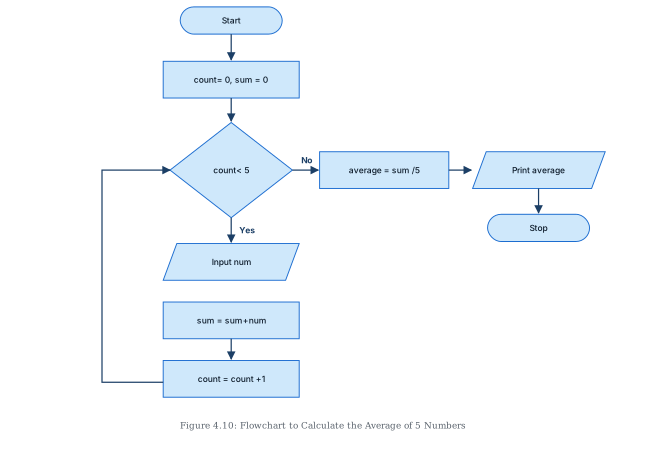
Here a counter named count keeps track of how many times the loop has run. After every iteration, count is incremented by 1, and the loop continues until it has performed the set number of repetitions given in the iteration condition (count < 5). The flowchart (Figure 4.10) shows the loop as an arrow that leads back up into the decision diamond; when the condition finally fails, control exits to compute and print the average.
Example 4.9 — average of numbers until 0 is entered (unknown repetition count)
Sometimes we do not know beforehand how many times a set of statements must repeat. Such unknown-count repetition is handled with the WHILE construct: keep checking a condition, and repeat as long as it holds.
Task: accept numbers until the user enters 0, then find their average.
Step 1: Set count = 0, sum = 0
Step 2: Input num
Step 3: While num is not equal to 0, repeat Steps 4 to 6
Step 4:     sum = sum + num
Step 5:     count = count + 1
Step 6:     Input num
Step 7: Compute average = sum/count
Step 8: Print average
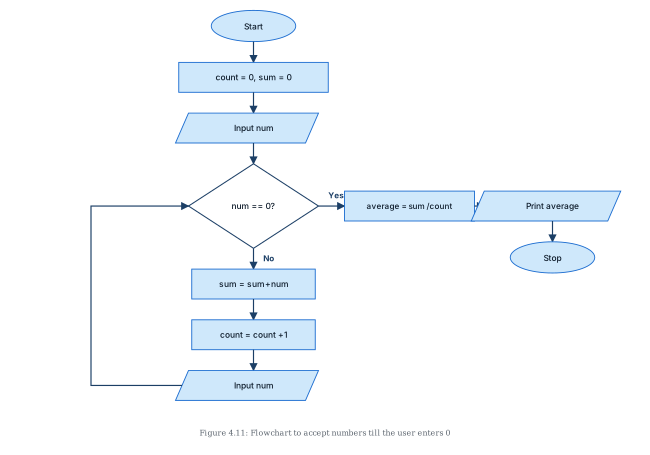
We have no idea how many numbers the user will type before entering 0; the algorithm simply re-checks the condition after every number, and stops the moment the condition becomes false. Figure 4.11 shows the flowchart. Two details deserve attention:
numis read twice — once before the loop (so the very first check has a value to test) and once at the end of each iteration (so the next check tests the newest value). Without the first read, the loop condition would be tested on nothing; without the second, the loop would test the same number forever.- The average divides by
count, not by a fixed 5 — because the quantity of numbers entered is only known at the end,count(the number of values actually summed) is the right divisor. The terminating 0 itself is never added and never counted.
Contrast between the two examples
- Example 4.8: the repetition count is fixed in advance (exactly 5), so a counter drives the loop. …
Drawn by us to help you understand the concept clearly, and verified to make sure it's accurate. For exams, practice from your NCERT textbook's own diagram.
Figure 4.10 is the flowchart for Example 4.8 — accepting 5 numbers and finding their average — and it is the chapter's first loop flowchart. Its defining visual feature is an arrow that travels backwards, up the page, re-entering an earlier node: the loop-back path that makes repetition visible.
The nodes and flow:
- Oval 'Start' at the top, leading down to
- a rectangle 'count= 0, sum = 0' — the initialisation step: the loop counter and the running total both start at zero.
- Down to the diamond 'count< 5' — the loop condition, checked before each pass.
- From the diamond, the 'Yes' branch goes down into the loop body, three nodes in sequence:
- parallelogram (input) 'Input num' — read the next number;
- rectangle 'sum = sum+num' — add it to the running total;
- rectangle 'count = count +1' — increment the counter. The exit of the increment step then runs left and up, re-entering the diamond from its left side — this is the loop-back path. Control returns to the condition and the cycle repeats.
- When
countreaches 5, the diamond's 'No' branch goes right to a rectangle 'average = sum /5', then right to a parallelogram (output) 'Print average', then down to the oval 'Stop'. …
Drawn by us to help you understand the concept clearly, and verified to make sure it's accurate. For exams, practice from your NCERT textbook's own diagram.
Figure 4.11 is the flowchart for Example 4.9 — accepting numbers until the user enters 0, then printing their average. It is a loop flowchart with a pre-read input: the structural twist that distinguishes it from Figure 4.10 is that a number is read before the loop condition is ever tested, and again at the end of every pass.
The nodes and flow:
- Oval 'Start' at the top, down to
- a rectangle 'count= 0, sum = 0' — initialise the counter and the running sum, down to
- a parallelogram (input) 'Input num' — the first read: the first number is taken before any test, so the condition has a value to examine, down to
- the diamond 'num == 0?' — the loop's controlling question: has the user entered the stopping value?
- 'Yes' branch goes right: the sentinel 0 has arrived, so the loop is over. Flow passes to a rectangle 'average = sum /count', then right to a parallelogram (output) 'Print average', then down to the oval 'Stop'.
- 'No' branch goes down into the loop body: a rectangle 'sum = sum+num' (add the number to the total), then a rectangle 'count = count +1' (one more number counted), then a second parallelogram (input) 'Input num' — the re-read that fetches the next number. Its exit runs left and up, re-entering the diamond from its left side: the loop-back path.
The figure embodies the WHILE construct for an unknown number of repetitions. Nobody knows in advance how many numbers the user will type; the chart simply tests each newly entered value, and the moment 0 appears the loop ends. Three details are worth noticing, and they answer Activity 4.4's questions:
- 'Input num' appears twice — once before the loop (to give the first test something to test) and once at the bottom of the body (so each new value is tested before being processed). This ordering also guarantees the terminating 0 is never added to
sumor counted. …