Computer Science · Ch 1 — Computer System
System Software
System Software
System software is the software that provides the basic functionality to operate a computer by interacting directly with its constituent hardware. It knows how to operate and use the different hardware components, and it provides its services either directly to the end user or to other software. The three main kinds of system software are operating systems, system utilities and device drivers.
A side note the book makes here, worth fixing firmly: hardware is the set of physical components you can see and touch (RAM, keyboard, printer, monitor, CPU), while software is the set of instructions and data that makes that hardware functional for a desired task.
(A) Operating system
The operating system (OS) is, as its name implies, the system software that operates the computer.
- It is the most basic system software — without it, no other software can work.
- It manages the other application programs running on the machine.
- It provides access and security to the users of the system.
Popular operating systems: Windows, Linux, Macintosh, Ubuntu, Fedora, Android, iOS. (The OS gets a full section of its own — section 1.8.)
(B) System utilities
Software used for the maintenance and configuration of the computer system is called a system utility. Utilities come in two sets:
- Shipped with the operating system — for example, the disk defragmentation tool, the formatting utility, and the system restore utility.
- Not shipped with the OS, but installed to improve system performance — for example, anti-virus software, a disk cleaner tool, or disk compression software.
(C) Device drivers
A device driver exists to ensure the proper functioning of one particular device.
Why drivers are needed:
- The operating system handles the overall working of the computer, but new devices and components are added to computer systems every day, each with diverse characteristics.
- It is not possible for the operating system alone to know how to operate every existing and future device.
- So the responsibility for the overall control, operation and management of a particular device at the hardware level is delegated to its device driver.
How a driver works:
- It acts as an interface between the device and the operating system.
- It provides the required services while hiding the details of the operations performed at the hardware level of the device. …
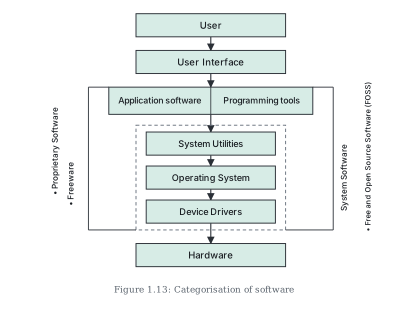
Drawn by us to help you understand the concept clearly, and verified to make sure it's accurate. For exams, practice from your textbook's own diagram.
Figure 1.13 is the chapter's map of the whole software world — a layered diagram showing how every category of software sits between the user at the top and the hardware at the bottom.
Reading it from top to bottom:
- A box labelled User starts the stack, with an arrow down to the User Interface — the software component through which the user gives commands.
- The next layer is a wide row divided into two cells side by side: Application software on the left and Programming tools on the right. These are the software the user works with directly.
- Below that, a dashed rectangle encloses three boxes connected by downward arrows: System Utilities → Operating System → Device Drivers. The dashed outline groups these three together, and a rotated label alongside it names the group: System Software.
- A final arrow leads out of the dashed box to the Hardware at the bottom of the stack.
So the diagram encodes the chapter's three-category classification (application software, programming tools, system software) and their layering: the user's commands descend through the interface and the application/programming layer, are serviced by the system-software stack, and only the device drivers at the very bottom of that stack touch the hardware itself. …