Computer Science · Ch 3 — Emerging Trends
Cloud Services
Cloud Services
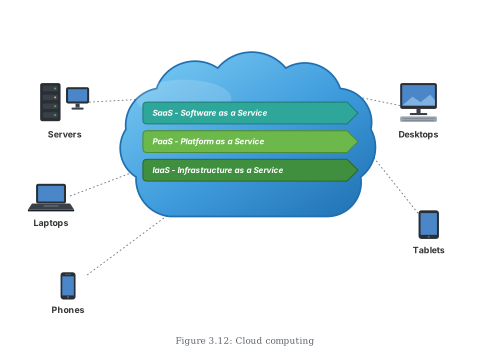
The clearest way to understand the cloud is to see everything as a service: a "service" is simply any facility provided by the cloud. Computing services delivered through the cloud are categorised into three standard models (Figure 3.12):
- Infrastructure as a Service (IaaS)
- Platform as a Service (PaaS)
- Software as a Service (SaaS)
(A) Infrastructure as a Service (IaaS)
IaaS providers offer the raw computing infrastructure: servers, virtual machines (VMs), storage and backup facilities, network components, operating systems, or any other hardware or software.
With IaaS, a user can take hardware infrastructure located at a remote location and configure, deploy and execute any software application on it. The benefits:
- hardware and software are outsourced on demand, paid as per usage
- the user saves the cost of buying software, hardware and other infrastructure
- the user also saves the costs of setting up, maintenance and security
(B) Platform as a Service (PaaS)
PaaS is the facility where a user can install and execute an application without worrying about the underlying infrastructure and its setup. In other words, PaaS supplies a ready platform or environment to develop, test and deliver software applications.
A concrete scenario: suppose we have built a web application using MySQL and Python. To run it online, we can obtain from the cloud a pre-configured Apache server with MySQL and Python already installed. We then:
- do not need to install MySQL or Python on the cloud ourselves, and
- do not need to configure the web server (Apache, nginx).
In PaaS the user retains complete control over the deployed application and its configuration — only the plumbing underneath is managed for them. This gives developers a deployment environment at a much reduced cost, without the complexity of buying and managing the underlying hardware and software.
(C) Software as a Service (SaaS)
SaaS provides on-demand access to application software, usually via a licence or subscription. When we edit a document online using Google Docs, Microsoft Office 365 or Dropbox, we are using SaaS from the cloud.
- The user is not concerned with installing or configuring the application — it just has to be accessible.
- As in PaaS, the user does get access to the configuration settings of the application software they are currently using.
The three models compared
| Model | What the cloud gives you | What you manage | Example |
|---|---|---|---|
| IaaS | Servers, VMs, storage, network, OS | Everything you deploy on that infrastructure | Renting a virtual server |
| PaaS | A pre-configured platform to build/run apps | Your application and its configuration | Pre-configured Apache + MySQL + Python server |
Drawn by us to help you understand the concept clearly, and verified to make sure it's accurate. For exams, practice from your textbook's own diagram.
This illustration organises cloud computing into one picture. A large blue cloud dominates the figure, and inside it sit three stacked horizontal banners — the three standard cloud service models:
- SaaS – Software as a Service (teal banner)
- PaaS – Platform as a Service (green banner)
- IaaS – Infrastructure as a Service (green banner)
Around the cloud, labelled groups of user devices connect to it: Servers (drawn as a rack with a monitor), Desktops, Laptops, Phones and Tablets.
The two halves of the drawing teach the section's two key points:
- Everything in the cloud is a service. The three banners inside the cloud are the three ways cloud facilities are packaged: IaaS supplies raw infrastructure (servers, virtual machines, storage, network components); PaaS supplies a ready platform to develop, test and deliver applications; SaaS supplies finished application software on demand (the way Google Docs or Office 365 are used). …