Computer Science · Ch 4 — Introduction to Problem Solving
Selection
Selection
Decision-making enters an algorithm the moment more than one path is possible. Selection is the flow-of-control construct that chooses among alternatives based on a condition.
A real-life picture: choosing a route
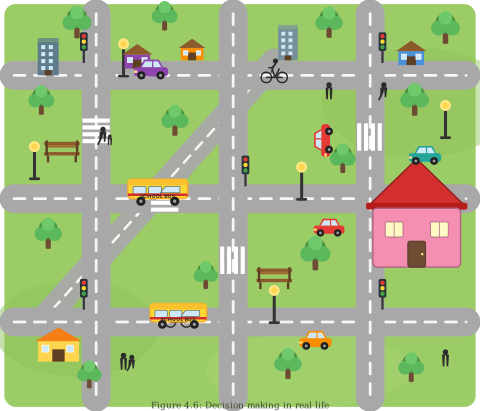
Consider the map of a neighbourhood in Figure 4.6, where a pink building with a red roof is the school and a yellow painted house at the far end is home. Two questions arise:
- Is there one predefined route for walking from home to school?
- Can the route back be different?
The map shows multiple routes between home and school. In the morning we might take the shortest route; but returning in the afternoon, the shortest route might have heavy traffic, so we could pick a different route with less traffic. Choosing the route is thus decision-making based on certain conditions.
More examples of condition-based decisions
(i) Eligibility for voting. Depending on age, a person is either allowed or not allowed to vote:
- if age is greater than or equal to 18 — eligible to vote;
- if age is less than 18 — not eligible to vote.
(ii) Grouping students. Consider this rule:
If a student is 8 years old and the student likes Maths
    put the student in Group A
Otherwise
    put the student in Group B
Applying the rule:
- 8-year-old Ravi, who does not like Maths → Group B
- 8-year-old Priti, who likes Maths → Group A
- 7-year-old Anish, who likes Maths → Group B (he is not 8, so the condition fails)
Conditionals and binary values
In each example, one of the alternatives is selected based on the outcome of a condition. Conditionals are used to check such possibilities: the program evaluates one or more conditions and performs a sequence of actions depending on whether the condition is true or false. These true/false values are called binary values.
The simplest conditional handles only the true case:
If <condition> then
    steps to be taken when the condition is true/fulfilled
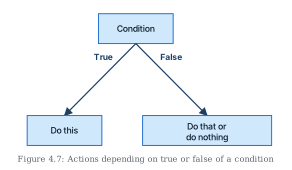
Often an action is also needed when the condition is not fulfilled (Figure 4.7):
If <condition> is true then
    steps to be taken when the condition is true/fulfilled
otherwise
    steps to be taken when the condition is false/not fulfilled
In programming languages, "otherwise" is written with the Else keyword — so a true/false conditional appears as an if-else block in actual programs.
Example 4.5 — odd or even
- Input: any number
- Process: check whether the number is even or not
- Output: the message "Even" or "Odd"
PRINT "Enter the Number"
INPUT number
IF number MOD 2 == 0 THEN
    PRINT "Number is Even"
ELSE
    PRINT "Number is Odd"
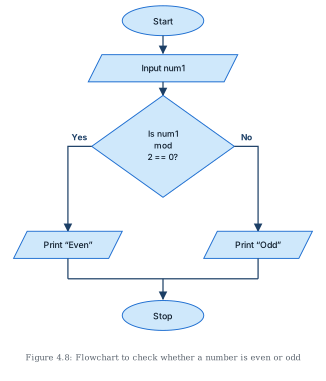
MOD gives the remainder on division; a remainder of 0 on dividing by 2 means the number is even. The flowchart (Figure 4.8) uses one diamond whose Yes branch prints "Even", whose No branch prints "Odd", and whose two branches merge before Stop.
Example 4.6 — multiple conditions (child / teenager / adult)
A person is categorised by age: child (below 13), teenager (13 or more but below 20), adult (20 or more).
- Input: Age
- Process: check Age against the given criteria
- Output: print "Child", "Teenager" or "Adult"
INPUT Age
IF Age < 13 THEN
    PRINT "Child"
ELSE IF Age < 20 THEN
    PRINT "Teenager"
ELSE
    PRINT "Adult"
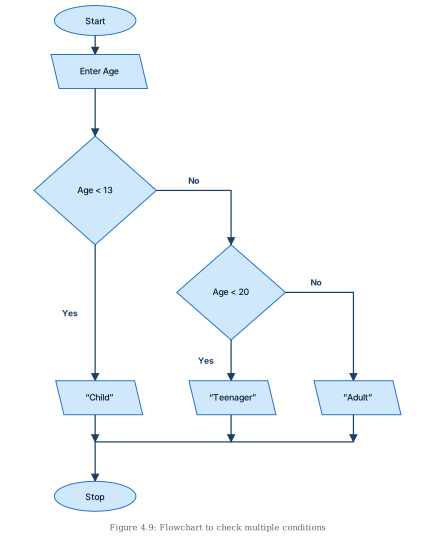
Note the cascading logic: the second test (Age < 20) runs only when the first has already failed, so reaching it guarantees the age is at least 13. Figure 4.9 shows the corresponding flowchart with two diamonds in cascade.
Example 4.7 — the "Dragons and Wizards" card game
Two teams, DRAGONS and WIZARDS, score off cards drawn as per these rules:
- a diamond or a club → Team DRAGONS gets a point;
- a heart which is a number → Team WIZARDS gets a point;
- a heart that is not a number → Team DRAGONS gets a point;
- any other card → Team WIZARDS gets a point;
- the team with the highest points wins.
Identify the components for a card:
- Input: shape, value
- Process: increment the respective team's score by one, as per the rules
- Output: the winning team
The conditionals, combining tests with OR and AND:
IF (shape is diamond) OR (shape is club)
    Team DRAGONS gets a point
ELSE IF (shape is heart) AND (value is number)
    Team WIZARDS gets a point
ELSE IF (shape is heart) AND (value is not a number)
    Team DRAGONS gets a point …
Drawn by us to help you understand the concept clearly, and verified to make sure it's accurate. For exams, practice from your textbook's own diagram.
Figure 4.6 is not a flowchart at all — it is a cartoon bird's-eye map of a neighbourhood, used to ground the idea of decision-making in a familiar, everyday scene before any formal notation is introduced.
The picture shows a grid of grey roads with white dashed centre lines criss-crossing a green background, so that several possible routes exist between any two places. Along the roads are the ordinary furnishings of a locality: houses and apartment buildings in various colours, plenty of trees, street lamps, benches, traffic lights, zebra-striped pedestrian crossings, people walking, cars, cyclists, and two yellow buses marked "SCHOOL BUS". Two buildings matter for the discussion: a pink school building with a red roof at the middle-right of the map, and a yellow painted house at the lower-left, far end — the text designates these as the school and the home.
The map exists to pose the section's opening questions: is there one predefined route for walking from home to school, and can the route back be different? Looking at the criss-crossing roads, the answer is plainly that multiple routes connect the two buildings. Which one a student actually takes depends on conditions — the shortest route might be chosen in the morning, but in the afternoon that same route might carry heavy traffic, so a longer but quieter route could be preferred. …
Drawn by us to help you understand the concept clearly, and verified to make sure it's accurate. For exams, practice from your textbook's own diagram.
Figure 4.7 is a small, schematic decision diagram — deliberately stripped down to isolate the essence of a conditional before full flowchart examples appear.
Its layout: a rectangle labelled 'Condition' sits at the top. Two arrows leave its bottom edge and diverge:
- the left arrow, labelled 'True', points down-left to a rectangle reading 'Do this';
- the right arrow, labelled 'False', points down-right to a rectangle reading 'Do that or do nothing'.
Notably, the figure uses no start/end terminators and draws all three nodes as plain rectangles — it is not a formal flowchart but a conceptual sketch of one idea: a condition's outcome selects which action happens.
The two branch labels carry the section's key vocabulary. A condition, when checked, yields exactly one of two binary values — true or false — and the program performs a different sequence of actions for each. The left branch ('Do this') is the action taken when the condition is fulfilled. The right branch's wording, 'Do that or do nothing', quietly covers both forms of the conditional introduced in the text: the if-else form, where the false case has its own alternative action ("do that"), and the plain if form, where a false condition simply means the guarded steps are skipped ("do nothing"). …
Drawn by us to help you understand the concept clearly, and verified to make sure it's accurate. For exams, practice from your textbook's own diagram.
Figure 4.8 is the flowchart for Example 4.5 — deciding whether an entered number is even or odd. It is the chapter's first complete branching flowchart for a program-style algorithm, putting the decision diamond to work between proper Start and Stop terminators.
The nodes and flow:
- Oval 'Start' at the top.
- An arrow leads down to a parallelogram (input) 'Input num1' — the number to be tested is read.
- Another arrow leads down to the diamond 'Is num1 mod 2 == 0?' (the figure wraps the text over three lines: "Is num1" / "mod" / "2 == 0?"). This is the condition: does dividing the number by 2 leave remainder 0?
- From the diamond, the 'Yes' arrow goes left and then down to a parallelogram (output) 'Print "Even"' — remainder 0 means the number is even.
- The 'No' arrow goes right and then down to a parallelogram (output) 'Print "Odd"' — a non-zero remainder means the number is odd.
- The exits of both print parallelograms drop onto a shared horizontal merge line, which leads down the centre into the oval 'Stop'. …
Drawn by us to help you understand the concept clearly, and verified to make sure it's accurate. For exams, practice from your textbook's own diagram.
Figure 4.9 is the flowchart for Example 4.6, which classifies a person by age as "Child" (below 13), "Teenager" (13 or more but below 20) or "Adult" (20 or more). Where Figure 4.8 needed one decision, this problem has three possible outcomes, and the figure shows how flowcharts handle that: with cascaded decision diamonds, one feeding into the next.
The nodes and flow:
- Oval 'Start' at the top-left, leading down to
- a parallelogram (input) 'Enter Age' — the age is read, then down to
- the first diamond 'Age < 13'.
- Yes → straight down to a parallelogram (output) '"Child"'.
- No → right and then down to the second diamond 'Age < 20'.
- From the second diamond:
- Yes → down to a parallelogram (output) '"Teenager"'.
- No → right and then down to a parallelogram (output) '"Adult"' — no third diamond is needed, because failing both tests already implies the age is 20 or more.
- The exits of all three output parallelograms ('Child', 'Teenager', 'Adult') drop onto one shared horizontal merge line; from its left end the flow descends into the oval 'Stop' at the bottom-left. …