Computer Science · Ch 10 — Computer Networks
Introduction to Computer Networks
Introduction to Computer Networks
We live in a connected world. Information is produced, exchanged, and tracked across the globe in real time. This is possible because almost everyone and everything in the digital world is interconnected in one way or another.
A network is simply a group of two or more similar things or people interconnected with each other. Examples of networks in everyday life include social networks, mobile networks, networks of computers, and the networks used by airlines, railways, banks, and hospitals.
A computer network is an interconnection among two or more computers or computing devices. This interconnection allows computers to share data and resources with each other. A basic network might connect just a few computers in a room, but the size can vary from small to large depending on how many computers it connects.
A computer network can include different types of hosts (also called nodes), such as servers, desktops, laptops, and cellular phones.
Components of a Computer Network
- Computers / Computing Devices: These are the hosts or nodes that send, receive, or store data. Examples include servers, desktops, laptops, and smartphones.
- Networking Devices: These are special devices used to connect multiple computers in different settings. Examples include switches, routers, and modems.
- Transmission Media: Devices in a network can be connected either through wired media (like cables) or wireless media (like air).
- Data (in the form of packets): For communication, data in a network is divided into smaller chunks called packets. These packets are then carried over the network.
What is a Node?
In a communication network, any device that is part of the network and can receive, create, store, or send data to different network routes is called a node. In the context of data communication, a node can be a modem, hub, bridge, switch, router, digital telephone handset, printer, computer, or server.
Why Use a Computer Network?
- Simultaneous Information Exchange: Interconnectivity allows us to exchange information with many parties at the same time through email, websites, and audio/video calls.
- Resource Sharing: A network allows sharing of resources. For example, a single printer can be made available to multiple computers, and a networked storage device can be accessed by many computers.
- Personal Networks: People often connect their devices through a hotspot, thus forming a small personal network.
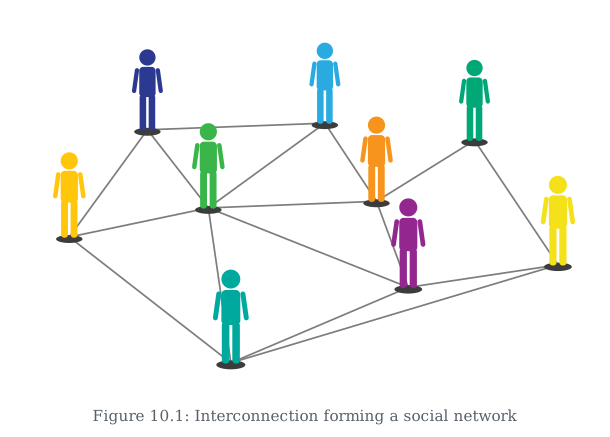
Drawn by us to help you understand the concept clearly, and verified to make sure it's accurate. For exams, practice from your textbook's own diagram.
This is the simplest possible picture of a network: a group of people (or things) connected to each other so information can pass between them. Notice not every person is directly linked to every other person — you don't need a direct line to someone to reach them, as long as there's SOME path of connections that gets you there. That's the core idea a computer network borrows from everyday life: interconnect things so they can reach each other, even indirectly.
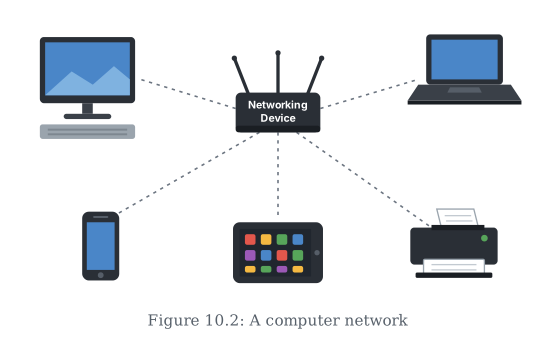
Drawn by us to help you understand the concept clearly, and verified to make sure it's accurate. For exams, practice from your textbook's own diagram.
This is the same social-network idea applied to computing devices instead of people. A desktop, a laptop, a smartphone, a tablet, and a printer are all connected — not directly to each other, but through one shared Networking Device in the middle.
Because every device connects through that shared point, any device can send data to any other, and they can share resources like the printer between them. This central-device pattern is exactly how most small networks (like a home Wi-Fi network) are actually built.