Computer Science · Ch 1 — Exception Handling in Python
Syntax Errors
Syntax Errors
Syntax Errors
A syntax error is what happens when you break the grammar rules of Python while writing code. The interpreter cannot understand what you have written because it does not follow the language's structure. These are also called parsing errors — the interpreter tries to parse (read and make sense of) your code, fails, and stops.
The key point is that a program with a syntax error will not execute at all. Python refuses to run it until you fix the mistake, save the file, and run it again. This is different from runtime errors, where the program starts but crashes later.
How Python Reports Syntax Errors
The way Python tells you about a syntax error depends on whether you are working in shell mode or script mode.
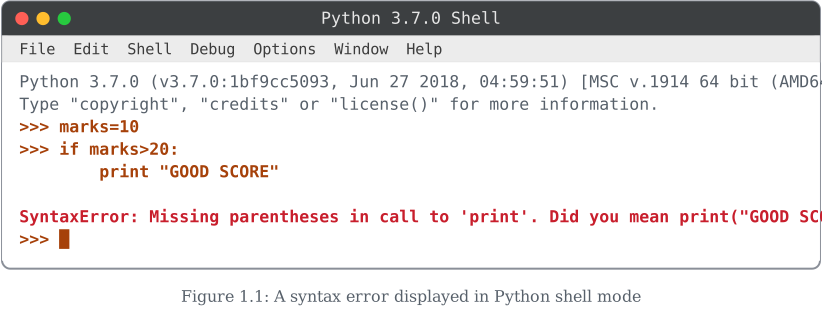
In shell mode (the interactive Python prompt), when you type a line that has a syntax error, Python immediately prints an error message. The message includes:
- The name of the error (e.g.,
SyntaxError) - A short description of what went wrong
- Often, a caret (
^) pointing to the exact spot where the interpreter got confused
For example, if you type print("Hello (missing the closing quote), Python will show something like:
SyntaxError: unterminated string literal (detected at line 1)
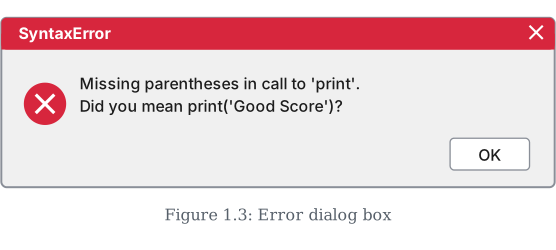
In script mode (running a .py file), when you try to run a program that contains a syntax error, Python does not run it. Instead, a dialog box pops up (in IDLE, the default Python editor) that displays:
- The name of the error (again,
SyntaxError) - A brief description of the problem
The textbook shows this with three figures:
- Figure 1.1 — a syntax error displayed in Python shell mode
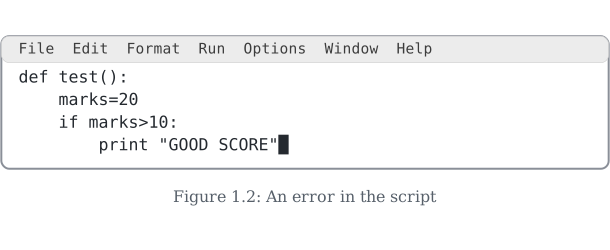
- Figure 1.2 — an error in the script (the code window with the mistake)
- Figure 1.3 — the error dialog box that appears when you try to run the script
So whether you are typing one line at a time or running a full program, Python always gives you a clear hint about what rule you broke and where. The message is meant to help you fix the problem quickly.
Common Causes of Syntax Errors
While the textbook does not list every possible cause, the idea is that any violation of Python's grammar triggers a syntax error. Some typical examples include:
- Missing a colon at the end of a
if,for,while, ordefstatement - Forgetting to close a parenthesis, bracket, or quote
- Using an equals sign (
=) when you meant two equals signs (==) for comparison - Misspelling a keyword like
TrueasTruee - Indentation that is inconsistent (mixing tabs and spaces, or not indenting after a colon)
What You Must Remember …
Drawn by us to help you understand the concept clearly, and verified to make sure it's accurate. For exams, practice from your textbook's own diagram.
This is a Python Shell (>>> interactive mode) session. The student first types marks=10, then opens a conditional with if marks>20: and, on the continuation line, writes print "GOOD SCORE" — the old Python 2 style of print, used as a bare statement with a string in double quotes and no parentheses at all. The moment this line is entered, the interpreter refuses to run it and reports SyntaxError: Missing parentheses in call to 'print'. Did you mean print("GOOD SCORE")? …
Drawn by us to help you understand the concept clearly, and verified to make sure it's accurate. For exams, practice from your textbook's own diagram.
Here the same kind of mistake is shown, but this time inside an IDLE editor/script window rather than the interactive Shell. The code being typed is:
def test():
    marks=20
    if marks>10:
        print "GOOD SCORE"
A function test() is defined, marks is set to 20, and if marks is greater than 10 the old-style print "GOOD SCORE" (again no parentheses, double-quoted string) is written. The cursor sits right after the closing quote — the student has just finished typing the line and has not yet run the file. …
Drawn by us to help you understand the concept clearly, and verified to make sure it's accurate. For exams, practice from your textbook's own diagram.
This figure shows what happens when the script from Figure 1.2 is actually run. Instead of a red traceback appearing in the Shell window, IDLE pops up a small modal dialog box titled SyntaxError, with a red error icon and the message: "Missing parentheses in call to 'print'. Did you mean print('Good Score')?" — note the message here uses single quotes around Good Score, a small wording difference from the double-quoted version the Shell printed directly in Figure 1.1. A single OK button dismisses the box. …