Informatics Practices · Ch 1 — Querying and SQL Functions
Single Row Functions
Single Row Functions
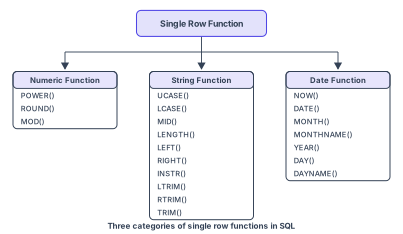
Single row functions are also known as scalar functions. They are applied on a single value and return a single value — one output for every row they process. Figure 1.2 groups the single row functions in SQL under three categories: Numeric (Math) functions, String functions, and Date and Time functions.
Each category is defined by its input and output types: the Math group takes numbers and gives back numbers; the String group works on character data and may hand back either text (e.g. a substring) or a number (e.g. a length or position); the Date-and-Time group operates on dates and times and can produce a number, a piece of text, or another date/time value. …
Drawn by us to help you understand the concept clearly, and verified to make sure it's accurate. For exams, practice from your textbook's own diagram.
The figure is a simple tree diagram. At the top is a box labelled Single Row Functions. From that box, three arrows branch downward to three child boxes arranged side by side.
The leftmost child box is labelled Numeric (Math) Functions. The middle child box is labelled String (Text) Functions. The rightmost child box is labelled Date and Time Functions.
Each child box lists the specific functions that belong to that category, exactly as they appear in the chapter. Under Numeric Functions, the functions listed are POWER(), ROUND(), and MOD(). Under String Functions, the functions listed are UCASE(), LCASE(), MID(), LENGTH(), LEFT(), RIGHT(), INSTR(), LTRIM(), RTRIM(), and TRIM(). Under Date and Time Functions, the functions listed are NOW(), DATE(), MONTH(), MONTHNAME(), YEAR(), DAY(), and DAYNAME(). …
Numeric Functions
Numeric (math) functions take numbers in and give numbers out. The textbook works with three commonly used ones — POWER(), ROUND() and MOD() — whose syntax and worked outputs are listed in Table 1.5:
POWER(X, Y)— also writtenPOW(X, Y)— calculates X raised to the power Y.POWER(2,3)gives8.ROUND(N, D)rounds off N to D decimal places; if D = 0 (or omitted), N is rounded to the nearest integer.ROUND(2912.564, 1)gives2912.6,ROUND(283.2)gives283.MOD(A, B)returns the remainder after dividing A by B.MOD(21, 2)gives1. …
| Function | Description | Example with output |
|---|---|---|
| POWER(X,Y) can also be written as POW(X,Y) | Calculates X to the power Y. | mysql> SELECT POWER(2,3); Output: 8 |
| ROUND(N,D) | Rounds off number N to D number of decimal places. Note: If D=0, then it rounds off the number to the nearest integer. | mysql>SELECT ROUND(2912.564, 1); Output: 2912.6 mysql> SELECT ROUND(283.2); Output: 283 |
String Functions
String functions perform operations on alphanumeric data — changing case, extracting a substring, measuring length, locating one string inside another, and stripping unwanted spaces. Table 1.6 lists each string function with its syntax and a worked example:
UCASE(string)/UPPER(string)converts to uppercase;LOWER(string)/LCASE(string)converts to lowercase.MID(string, pos, n)— alsoSUBSTRING()/SUBSTR()— returns n characters starting at position pos (or everything from pos to the end, if n is omitted).MID("Informatics", 3, 4)givesform.LENGTH(string)returns the character count —LENGTH("Informatics")is11.LEFT(string, N)/RIGHT(string, N)return N characters from the left/right of the string.INSTR(string, substring)returns the position of the first occurrence of substring, or 0 if absent.LTRIM(),RTRIM()andTRIM()remove leading, trailing, or both leading and trailing white space. …
| Function | Description | Example with output |
|---|---|---|
| UCASE(string) OR UPPER(string) | Converts string into uppercase. | mysql> SELECT UCASE("Informatics Practices"); Output: INFORMATICS PRACTICES |
| LOWER(string) OR LCASE(string) | Converts string into lowercase. | mysql> SELECT LOWER("Informatics Practices"); Output: informatics practices |
| MID(string, pos, n) OR SUBSTRING(string, pos, n) OR SUBSTR(string, pos, n) | Returns a substring of size n starting from the specified position (pos) of the string. If n is not specified, it returns the substring from the position pos till end of the string. | mysql> SELECT MID("Informatics", 3, 4); Output: form mysql> SELECT MID('Informatics',7); Output: atics |
| LENGTH(string) | Return the number of characters in the specified string. | mysql> SELECT LENGTH("Informatics"); Output: 11 |
| LEFT(string, N) | Returns N number of characters from the left side of the string. | mysql> SELECT LEFT("Computer", 4); Output: Comp |
| RIGHT(string, N) | Returns N number of characters from the right side of the string. | mysql> SELECT RIGHT("SCIENCE", 3); Output: NCE |
| INSTR(string, substring) | Returns the position of the first occurrence of the substring in the given string. Returns 0, if the substring is not present in the string. | mysql> SELECT INSTR("Informatics", "ma"); Output: 6 |
| LTRIM(string) | Returns the given string after removing leading white space characters. | mysql> SELECT LENGTH(" DELHI"), LENGTH(LTRIM(" DELHI")); Output: +--------+--------+ | 7 | 5 | +--------+--------+ 1 row in set (0.00 sec) |
Date and Time Functions
Date and time functions operate on date and time data — displaying the current date, extracting a date's day/month/year, or naming the day of the week. Table 1.7 lists the date functions with syntax and worked outputs:
NOW()returns the current system date and time.DATE()returns just the date part of a date/time expression.MONTH(date)/MONTHNAME(date)return the month in numeric form / by name.YEAR(date)returns the year.DAY(date)/DAYNAME(date)return the day of the month / the day's name.
Example 1.4 applies these to the EMPLOYEE table's DOJ (date of joining) column — first extracting day/month/year separately, then formatting a full "Weekday, Day, Month, Year" string for every employee who didn't join on a Sunday. Activity 1.4 then asks you to apply the same functions to the EMPLOYEE table on your own. …
| Function | Description | Example with output |
|---|---|---|
| NOW() | It returns the current system date and time. | mysql> SELECT NOW(); Output: 2019-07-11 19:41:17 |
| DATE() | It returns the date part from the given date/time expression. | mysql> SELECT DATE(NOW()); Output: 2019-07-11 |
| MONTH(date) | It returns the month in numeric form from the date. | mysql> SELECT MONTH(NOW()); Output: 7 |
| MONTHNAME(date) | It returns the month name from the specified date. | mysql> SELECT MONTHNAME("2003-11-28"); Output: November |
| YEAR(date) | It returns the year from the date. | mysql> SELECT YEAR("2003-10-03"); Output: 2003 |