Computer Science · Ch 9 — Structured Query Language (SQL)
Single Row Functions
Single Row Functions
Single Row Functions
Single row functions, also called scalar functions, work on a single value at a time and return a single value as output. They are applied to each row individually when used in a query. These functions fall into three categories, shown in Figure 9.3: Math (Numeric) functions, String functions, and Date and Time functions. …
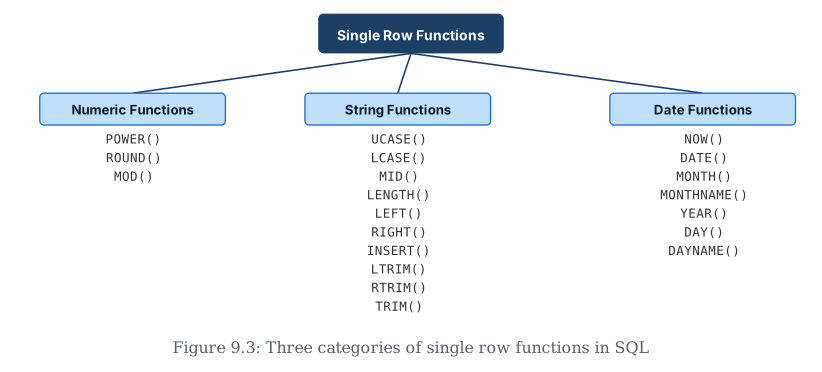
Drawn by us to help you understand the concept clearly, and verified to make sure it's accurate. For exams, practice from your textbook's own diagram.
SQL's single-row functions — ones that take one value and immediately return one result — fall into three families, shown here as a simple tree. Numeric functions like POWER(), ROUND(), and MOD() work on numbers. String functions like UCASE(), LENGTH(), LEFT(), and TRIM() work on text. Date functions like NOW(), YEAR(), and DAYNAME() work on date/time values. …
| Function | Description | Example with output |
|---|---|---|
| POWER(X,Y) can also be written as POW(X,Y) | Calculates X to the power Y. | mysql> SELECT POWER(2,3); Output: 8 |
| ROUND(N,D) | Rounds off number N to D number of decimal places. Note: If D=0, then it rounds off the number to the nearest integer. | mysql>SELECT ROUND(2912.564, 1); Output: 2912.6 mysql> SELECT ROUND(283.2); Output: 283 |
| Function | Description | Example with output |
|---|---|---|
| UCASE(string) OR UPPER(string) | converts string into uppercase. | mysql> SELECT UCASE("Informatics Practices"); Output: INFORMATICS PRACTICES |
| LOWER(string) OR LCASE(string) | converts string into lowercase. | mysql> SELECT LOWER("Informatics Practices"); Output: informatics practices |
| MID(string, pos, n) OR SUBSTRING(string, pos, n) OR SUBSTR(string, pos, n) | Returns a substring of size n starting from the specified position (pos) of the string. If n is not specified, it returns the substring from the position pos till end of the string. | mysql> SELECT MID("Informatics", 3, 4); Output: form mysql> SELECT MID('Informatics',7); Output: atics |
| LENGTH(string) | Return the number of characters in the specified string. | mysql> SELECT LENGTH("Informatics"); Output: 11 |
| LEFT(string, N) | Returns N number of characters from the left side of the string. | mysql> SELECT LEFT("Computer", 4); Output: Comp |
| RIGHT(string, N) | Returns N number of characters from the right side of the string. | mysql> SELECT RIGHT("SCIENCE", 3); Output: NCE |
| INSTR(string, substring) | Returns the position of the first occurrence of the substring in the given string. Returns 0, if the substring is not present in the string. | mysql> SELECT INSTR("Informatics", "ma"); Output: 6 |
| LTRIM(string) | Returns the given string after removing leading white space characters. | mysql> SELECT LENGTH(" DELHI"), LENGTH(LTRIM(" DELHI")); Output: | 7 | 5 | |
| Function | Description | Example with output |
|---|---|---|
| NOW() | It returns the current system date and time. | mysql> SELECT NOW(); Output: 2019-07-11 19:41:17 |
| DATE() | It returns the date part from the given date/time expression. | mysql> SELECT DATE(NOW()); Output: 2019-07-11 |
| MONTH(date) | It returns the month in numeric form from the date. | mysql> SELECT MONTH(NOW()); Output: 7 |
| MONTHNAME(date) | It returns the month name from the specified date. | mysql> SELECT MONTHNAME("2003-11-28"); Output: November |
| YEAR(date) | It returns the year from the date. | mysql> SELECT YEAR("2003-10-03"); Output: 2003 |
Math Functions
Math Functions
Three commonly used math functions are POWER(), ROUND(), and MOD().
POWER(X,Y) — also written as POW(X,Y) — calculates X raised to the power Y. For example, SELECT POWER(2,3) returns 8.
ROUND(N,D) rounds off the number N to D decimal places. If D is 0, it rounds the number to the nearest integer. For instance, SELECT ROUND(2912.564, 1) gives 2912.6, and SELECT ROUND(283.2) gives 283.
MOD(A,B) returns the remainder after dividing number A by number B. For example, SELECT MOD(21, 2) returns 1.
The textbook demonstrates these functions through a car dealer scenario. To calculate GST as 12 percent of Price and display it rounded to one decimal place, the query is: SELECT ROUND(12/100*Price,1) "GST" FROM INVENTORY. This produces GST values like 69913.6, 80773.4, and so on.
A new column FinalPrice is added to the Inventory table using ALTER TABLE INVENTORY ADD(FinalPrice Numeric(10,1)). Then the FinalPrice is updated as the sum of Price and the rounded GST value: UPDATE INVENTORY SET FinalPrice=Price+Round(Price*12/100,1).
To calculate EMIs (equal monthly instalments) in multiples of 1000, the query uses both ROUND and MOD: SELECT CarId, FinalPrice, ROUND(FinalPrice- MOD(FinalPrice,1000)/10,0) "EMI", MOD(FinalPrice,10000) "Remaining Amount" FROM INVENTORY. This divides the FinalPrice into 10 instalments and also finds the remaining amount using modular division. …
| Function | Description | Example with output |
|---|---|---|
| POWER(X,Y) (also POW(X,Y)) | Calculates X to the power Y. | SELECT POWER(2,3); → 8 |
| ROUND(N,D) | Rounds off number N to D decimal places (if D=0, rounds to the nearest integer). | SELECT ROUND(2912.564, 1); → 2912.6; SELECT ROUND(283.2); → 283 |
String Functions
String Functions
String functions perform operations on alphanumeric data stored in tables. They can change case, extract substrings, calculate string length, and more.
UCASE(string) or UPPER(string) converts a string to uppercase. For example, SELECT UCASE("Informatics Practices") returns INFORMATICS PRACTICES.
LOWER(string) or LCASE(string) converts a string to lowercase. SELECT LOWER("Informatics Practices") returns informatics practices.
MID(string, pos, n) — also written as SUBSTRING(string, pos, n) or SUBSTR(string, pos, n) — returns a substring of size n starting from position pos. If n is not specified, it returns the substring from position pos to the end of the string. For instance, SELECT MID("Informatics", 3, 4) returns "form", and SELECT MID('Informatics',7) returns "atics".
LENGTH(string) returns the number of characters in the string. SELECT LENGTH("Informatics") returns 11.
LEFT(string, N) returns N characters from the left side of the string. SELECT LEFT("Computer", 4) returns "Comp".
RIGHT(string, N) returns N characters from the right side. SELECT RIGHT("SCIENCE", 3) returns "NCE".
INSTR(string, substring) returns the position of the first occurrence of the substring in the given string. It returns 0 if the substring is not present. SELECT INSTR("Informatics", "ma") returns 6.
LTRIM(string) removes leading white space characters. SELECT LENGTH(" DELHI"), LENGTH(LTRIM(" DELHI")) shows the difference — 7 versus 5.
RTRIM(string) removes trailing white space characters. SELECT LENGTH("PEN "), LENGTH(RTRIM("PEN ")) shows 5 versus 3.
TRIM(string) removes both leading and trailing white space characters. SELECT LENGTH(" MADAM "), LENGTH(TRIM(" MADAM ")) shows 9 versus 5. …
| Function | Description | Example with output |
|---|---|---|
| UCASE(string) (also UPPER(string)) | converts string into uppercase. | SELECT UCASE("Informatics Practices"); → INFORMATICS PRACTICES |
| LOWER(string) (also LCASE(string)) | converts string into lowercase. | SELECT LOWER("Informatics Practices"); → informatics practices |
| MID(string, pos, n) (also SUBSTRING(string, pos, n), SUBSTR(string, pos, n)) | Returns a substring of size n starting from the specified position (pos) of the string. If n is not specified, it returns the substring from position pos to the end of the string. | SELECT MID("Informatics", 3, 4); → form; SELECT MID('Informatics',7); → atics |
| LENGTH(string) | Return the number of characters in the specified string. | SELECT LENGTH("Informatics"); → 11 |
| LEFT(string, N) | Returns N number of characters from the left side of the string. | SELECT LEFT("Computer", 4); → Comp |
| RIGHT(string, N) | Returns N number of characters from the right side of the string. | SELECT RIGHT("SCIENCE", 3); → NCE |
| INSTR(string, substring) | Returns the position of the first occurrence of the substring in the given string. Returns 0 if the substring is not present in the string. | SELECT INSTR("Informatics", "ma"); → 6 |
| LTRIM(string) | Returns the given string after removing leading white space characters. | SELECT LENGTH(" DELHI"), LENGTH(LTRIM(" DELHI")); → 7 (with the leading spaces), 5 (after LTRIM) |
Date and Time Functions
Date and Time Functions
Date and time functions perform operations on date and time data. They can display the current date, extract elements of a date (day, month, year), and show the day of the week.
NOW() returns the current system date and time. For example, SELECT NOW() might return 2019-07-11 19:41:17.
DATE() returns the date part from a given date/time expression. SELECT DATE(NOW()) returns just the date portion.
MONTH(date) returns the month in numeric form. SELECT MONTH(NOW()) returns 7 for July.
MONTHNAME(date) returns the month name. SELECT MONTHNAME("2003-11-28") returns November.
YEAR(date) returns the year. SELECT YEAR("2003-10-03") returns 2003.
DAY(date) returns the day part. SELECT DAY("2003-03-24") returns 24.
DAYNAME(date) returns the name of the day. SELECT DAYNAME("2019-07-11") returns Thursday.
Using the EMPLOYEE table, the day, month number, and year of joining for all employees can be selected: SELECT DAY(DOJ), MONTH(DOJ), YEAR(DOJ) FROM EMPLOYEE. To display dates that are not Sundays in a formatted way, the query selects DAYNAME, DAY, MONTHNAME and YEAR together as separate columns, filtered with WHERE DAYNAME(DOJ)!='Sunday'.
Comparison with Multiple Row Functions
Single row functions differ from multiple row functions (also called aggregate functions) in several ways. Single row functions operate on one row at a time and return one result per row. They can be used in SELECT, WHERE, and ORDER BY clauses. Math, String, and Date functions are examples of single row functions.
Multiple row functions operate on groups of rows and return one result for a group. They can be used only in the SELECT clause. Examples include MAX(), MIN(), AVG(), SUM(), COUNT(), and COUNT(*). …
| Function | Description | Example with output |
|---|---|---|
| NOW() | It returns the current system date and time. | SELECT NOW(); → 2019-07-11 19:41:17 |
| DATE() | It returns the date part from the given date/time expression. | SELECT DATE(NOW()); → 2019-07-11 |
| MONTH(date) | It returns the month in numeric form from the date. | SELECT MONTH(NOW()); → 7 |
| MONTHNAME(date) | It returns the month name from the specified date. | SELECT MONTHNAME("2003-11-28"); → November |
| YEAR(date) | It returns the year from the date. | SELECT YEAR("2003-10-03"); → 2003 |