Computer Science · Ch 7 — Understanding Data
Data Processing
Data Processing
Data processing is the bridge between raw data and useful information. A collection of numbers, text, or images by itself does not give us answers. To make decisions — whether in a bank, an exam system, or a railway booking — we must process that data in a structured way.
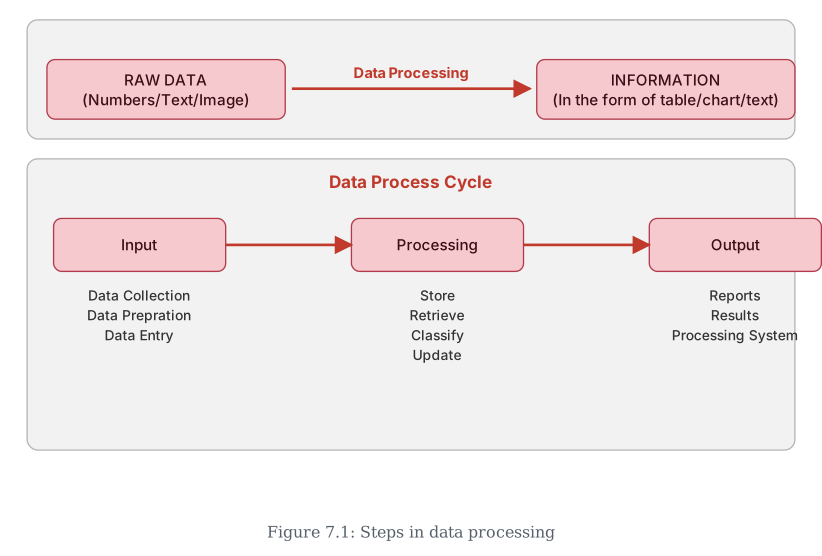
The textbook explains this through a clear cycle. First comes data collection, where inputs are gathered. Then data preparation cleans and organises that input. After that, data entry feeds it into a system, where it can be stored, retrieved, classified, or updated. Finally, the system produces reports and results — and the processing system itself is listed among these outputs — which we analyse to reach conclusions.
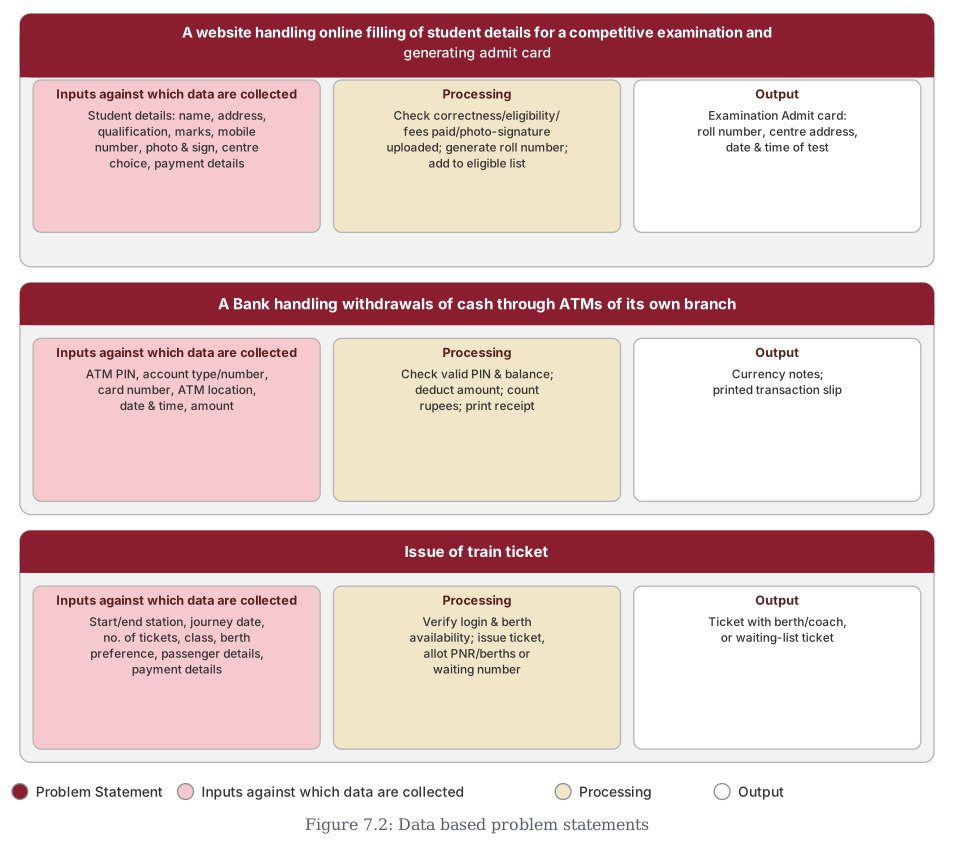
This cycle is automated in everyday situations: paying a bill online, registering a complaint, or booking a ticket. The book illustrates it with three detailed examples, each showing the same pattern — input, processing, output.
Example 1: Online competitive exam form
- Inputs: Student details (name, address, qualifications, marks, photo, signature, centre choice, online payment info like credit/debit card or net banking).
- Processing: Verify correctness of data, check eligibility (as per advertisement), confirm fee payment, check photo and signature uploads. Then generate a roll number and add the applicant to the eligible list.
- Output: Admit card with roll number, centre address, date and time of test.
Example 2: ATM cash withdrawal (own bank branch)
- Inputs: ATM PIN number, account type, account number, card number, ATM location, date and time, amount to withdraw.
- Processing: Check for a valid PIN, verify existing bank balance. If satisfied, deduct the amount from the account, count the rupees, and initiate printing of a receipt.
- Output: Currency notes and a printed slip with transaction details.
Example 3: Train ticket booking
- Inputs: Journey start and end stations, date of journey, number of tickets, class of travel (Sleeper/AC/other), berth preference (if any), passenger names and ages, mobile and email, payment details.
- Processing: Verify login details, check berth availability in that class. If payment is done, issue tickets and deduct that number from total available. Allocate a PNR number and berths, or generate a waiting list number.
- Output: A ticket with berth and coach number, or a ticket with a waiting list number. …
Drawn by us to help you understand the concept clearly, and verified to make sure it's accurate. For exams, practice from your textbook's own diagram.
The top half of the figure shows the basic idea in one line: RAW DATA (numbers, text, or images) is turned by Data Processing into INFORMATION — the same raw facts, but now presented in a useful form such as a table, chart, or piece of text. Data on its own doesn't tell you much; it's only once it has been processed that it becomes information you can actually use.
The bottom half, labelled the Data Process Cycle, breaks that single "Data Processing" step into its three real stages, shown left to right: Input (Data Collection, Data Preparation, Data Entry) feeds into Processing (Store, Retrieve, Classify, Update) which produces Output (Reports, Results, and the Processing System itself, as one of the things the cycle outputs). …
Drawn by us to help you understand the concept clearly, and verified to make sure it's accurate. For exams, practice from your textbook's own diagram.
Figure 7.1 showed the data-processing cycle in the abstract — Input,
Processing, Output. Figure 7.2 puts real numbers on that same cycle for the three
examples already walked through above (the exam admit card, the ATM withdrawal, and the
train ticket): each row names the problem statement, then lists exactly what data goes
in, how the system processes it, and what comes out.
Reading any one row left to right retraces the same cycle: the Inputs column is the
raw data collected, the Processing column is what the system checks/computes/stores, …