Informatics Practices · Ch 5 — Internet and Web
Switch
Switch
A switch is a networking device that acts as the central connection point in a Local Area Network (LAN). Its job is to receive data from one device and send it only to the intended destination device, rather than broadcasting it to every device on the network.
Like a hub, a switch connects multiple computers or communicating devices together. But the similarity ends there. When data arrives at a switch, the switch does something smarter: it reads the destination address from the data packet, then looks up that address in an internal table to decide exactly which port (and therefore which device) should receive the packet. This means the switch sends signals only to selected devices, not to all devices connected to it.
A switch can forward multiple packets at the same time, which makes it much more efficient than a hub. It also handles errors: if a signal is noisy or corrupted, the switch does not forward it. Instead, it drops the bad signal and asks the sender to resend the data.
The most common type of switch used in homes and offices is the Ethernet switch. It is used to connect multiple devices together, creating a LAN, or to give those devices access to the Internet.
The textbook mentions Figure 5.9, which shows cables connected to a network switch. This figure is not reproduced here, but it illustrates the physical ports on a switch where Ethernet cables are plugged in.
Key points to remember:
- A switch is a networking device central to a LAN.
- It connects multiple computers or communicating devices.
- It extracts the destination address from each data packet and uses a table to decide where to send it. …
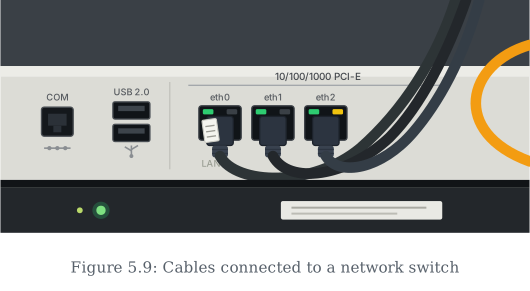
Drawn by us to help you understand the concept clearly, and verified to make sure it's accurate. For exams, practice from your textbook's own diagram.
A real-world view of a network switch in use: Ethernet cables with RJ-45 plugs seated in ports labelled eth0, eth1 and eth2, their green and yellow link LEDs lit to show live connections, with a bright orange cable joining from the side. Like the hub of the previous figure, the switch is a multi-port box through which several devices communicate on one network; the photograph adds the practical details — the '10/100/1000' marking on the panel, spare empty ports awaiting more …