Informatics Practices · Ch 1 — Querying and SQL Functions
Introduction
Introduction
The Purpose of This Chapter
In Class XI, you learned the fundamentals of databases — how to create them in MySQL, populate them with data, and retrieve that data using SQL queries. This chapter builds directly on that foundation. You will now learn more advanced SQL commands that let you perform richer queries: using single-row and multiple-row functions, sorting records in ascending or descending order, grouping records based on criteria, and working with multiple tables in a single query.
What You Will Learn in This Chapter
The chapter is organised around these major topics:
- Functions in SQL — both single-row functions (which work on one row at a time) and multiple-row functions (which work on groups of rows).
- Group By in SQL — how to group records based on a criterion and apply functions to each group.
- Operations on Relations — working with two or more tables in a query, including joins and set operations.
- Using Two Relations in a Query — practical examples of combining data from multiple tables.
The CARSHOWROOM Database
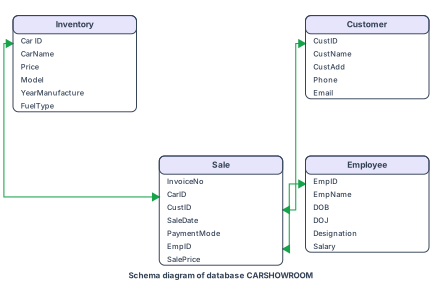
To illustrate these ideas, the chapter introduces a database called CARSHOWROOM, with the schema shown in Figure 1.1. It has four relations:
- INVENTORY — Stores details of each car in the showroom's inventory: Car ID, Car Name, Price, Model, Year of Manufacture, and Fuel Type.
- CUSTOMER — Stores customer information: Customer ID, Customer Name, Customer Address, Phone number, and Email.
- SALE — Records each sale transaction: Invoice Number, Car ID, Customer ID, Sale Date, Payment Mode, Employee ID of the salesperson, and Selling Price.
- EMPLOYEE — Stores employee details: Employee ID, Employee Name, Date of Birth, Date of Joining, Designation, and Salary.
The records of these four relations are shown in Tables 1.1, 1.2, 1.3 and 1.4 respectively — the exact sample data used in every worked example and exercise in this chapter. Make sure you are comfortable with the structure of these four tables before moving on.
Drawn by us to help you understand the concept clearly, and verified to make sure it's accurate. For exams, practice from your textbook's own diagram.
The schema diagram in Figure 1.1 is a visual map of the CARSHOWROOM database. It shows four rectangular boxes, one for each table: INVENTORY, CUSTOMER, SALE, and EMPLOYEE. Inside each box, the table's column names are listed vertically.
For INVENTORY, the columns are: CarID, CarName, Price, Model, YearManufacture, and FuelType. CarID is marked as the primary key (usually underlined or labelled in the diagram). For CUSTOMER, the columns are: CustID, CustName, CustAdd, Phone, and Email, with CustID as the primary key. For SALE, the columns are: InvoiceNo, CarID, CustID, SaleDate, PaymentMode, EmpID, and SalePrice. InvoiceNo is the primary key here. For EMPLOYEE, the columns are: EmpID, EmpName, DOB, DOJ, Designation, and Salary, with EmpID as the primary key.
The diagram also draws foreign-key links as arrows or lines connecting the related columns between tables. Specifically:
- A line connects CarID in SALE to CarID in INVENTORY (each sale refers to a car in inventory).
- A line connects CustID in SALE to CustID in CUSTOMER (each sale is linked to a customer).
- A line connects EmpID in SALE to EmpID in EMPLOYEE (each sale is handled by an employee).
The diagram does not show any other relationships — for example, there is no direct link between CUSTOMER and EMPLOYEE, or between INVENTORY and EMPLOYEE. All connections go through the SALE table, which acts as a central junction.
What this teaches: The schema diagram is a blueprint of the database structure. It shows you at a glance which tables exist, what data each stores, and how they are related through primary and foreign keys. This is essential for writing correct SQL queries — especially when you need to join tables. For instance, to find the name of the customer who bought a particular car, you would need to join SALE with CUSTOMER using CustID, and SALE with INVENTORY using CarID. The diagram makes these paths obvious.
mysql> SELECT * FROM INVENTORY;
| CarId | CarName | Price | Model | YearManufacture | Fueltype |
|---|---|---|---|---|---|
| D001 | Car1 | 582613.00 | LXI | 2017 | Petrol |
| D002 | Car1 | 673112.00 | VXI | 2018 | Petrol |
| B001 | Car2 | 567031.00 | Sigma1.2 | 2019 | Petrol |
| B002 | Car2 | 647858.00 | Delta1.2 | 2018 | Petrol |
| E001 | Car3 | 355205.00 | 5 STR STD | 2017 | CNG |
| E002 | Car3 | 654914.00 | CARE | 2018 | CNG |
| S001 | Car4 | 514000.00 | LXI | 2017 | Petrol |
| S002 | Car4 | 614000.00 | VXI | 2018 | Petrol |
8 rows in set (0.00 sec)
mysql> SELECT * FROM CUSTOMER;
| CustId | CustName | CustAdd | Phone | |
|---|---|---|---|---|
| C0001 | AmitSaha | L-10, Pitampura | 4564587852 | amitsaha2@gmail.com |
| C0002 | Rehnuma | J-12, SAKET | 5527688761 | rehnuma@hotmail.com |
| C0003 | CharviNayyar | 10/9, FF, Rohini | 6811635425 | charvi123@yahoo.com |
| C0004 | Gurpreet | A-10/2, SF, MayurVihar | 3511056125 | gur_singh@yahoo.com |
4 rows in set (0.00 sec)
mysql> SELECT * FROM SALE;
| InvoiceNo | CarId | CustId | SaleDate | PaymentMode | EmpID | SalePrice |
|---|---|---|---|---|---|---|
| I00001 | D001 | C0001 | 2019-01-24 | Credit Card | E004 | 613247.00 |
| I00002 | S001 | C0002 | 2018-12-12 | Online | E001 | 590321.00 |
| I00003 | S002 | C0004 | 2019-01-25 | Cheque | E010 | 604000.00 |
| I00004 | D002 | C0001 | 2018-10-15 | Bank Finance | E007 | 659982.00 |
| I00005 | E001 | C0003 | 2018-12-20 | Credit Card | E002 | 369310.00 |
| I00006 | S002 | C0002 | 2019-01-30 | Bank Finance | E007 | 620214.00 |
6 rows in set (0.00 sec)
mysql> SELECT * FROM EMPLOYEE;
| EmpID | EmpName | DOB | DOJ | Designation | Salary |
|---|---|---|---|---|---|
| E001 | Rushil | 1994-07-10 | 2017-12-12 | Salesman | 25550 |
| E002 | Sanjay | 1990-03-12 | 2016-06-05 | Salesman | 33100 |
| E003 | Zohar | 1975-08-30 | 1999-01-08 | Peon | 20000 |
| E004 | Arpit | 1989-06-06 | 2010-12-02 | Salesman | 39100 |
| E006 | Sanjucta | 1985-11-03 | 2012-07-01 | Receptionist | 27350 |
| E007 | Mayank | 1993-04-03 | 2017-01-01 | Salesman | 27352 |
| E010 | Rajkumar | 1987-02-26 | 2013-10-23 | Salesman | 31111 |
7 rows in set (0.00 sec)