Computer Science · Ch 1 — Computer System
Data and Its Types
Data and Its Types
A computer system receives raw data — facts, concepts, instructions — through its many input devices. Internally, everything is stored in binary form (0s and 1s); but externally, data can be entered in human-friendly text form made of:
- English alphabets A–Z, a–z,
- numerals 0–9, and
- special symbols like @, #, etc.
Data can also be entered in other languages, or read directly from files.
Because input data comes from different sources, it arrives in different formats. For example:
- an image is a collection of Red, Green, Blue (RGB) pixels,
- a video is made up of frames, and
- a fee receipt is made of numeric and non-numeric characters.
Primarily, data is of three types: structured, unstructured and semi-structured.
(A) Structured data
Data that follows a strict record structure and is easy to comprehend is called structured data. Such data has a pre-specified tabular format and may be stored in a data file for future access.
The book's example (Table 1.3) is a school's monthly attendance record: every row has the same four fields — Roll No, Name, Month, Attendance (in %) — for students R1–R5 across the months May and July.
Properties and examples:
- Organised in a row/column format, so it is easily understandable.
- It can be sorted in ascending or descending order — in the example, the records are sorted in increasing order on the column 'Month'.
- Other examples: sales transactions, online railway ticket bookings, ATM transactions.
(B) Unstructured data
Data not organised in a pre-defined record format is unstructured data. Examples include:
- audio and video files,
- graphics,
- text documents,
- social media posts,
- satellite images.
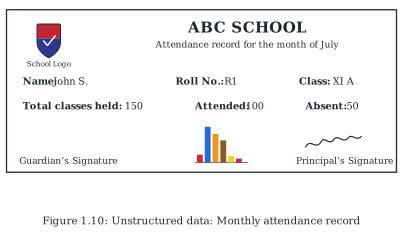
The book's example (Figure 1.10) is a report card with attendance details sent to parents: it mixes textual content and graphics (a school logo, headings, signatures, a small chart) that do not follow any specific format — which is exactly what makes it unstructured.
Think and Reflect (from the book): can you list more examples of unstructured data from your daily life?
(C) Semi-structured data
Data that has no well-defined structure but maintains internal tags or markings to separate the data elements is semi-structured data. Examples include:
- email documents,
- HTML pages,
- comma-separated values (csv) files.
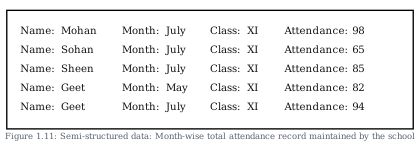
The book's example (Figure 1.11) shows month-wise attendance records where each value is written after a tag — Name:, Month:, Class:, Attendance: — but there is no fixed format for each record. The tags are what allow a program to interpret each value correctly during processing, even though the records themselves are irregular. …
Drawn by us to help you understand the concept clearly, and verified to make sure it's accurate. For exams, practice from your NCERT textbook's own diagram.
Figure 1.10 shows a sample school report card — the book's example of unstructured data. It is drawn as a black-bordered rectangle laid out like a real document sent to parents:
- At the top left, a small shield-shaped school crest with the caption "School Logo".
- Centred at the top, the bold heading "ABC SCHOOL" with the italic subtitle "Attendance record for the month of July".
- Below that, a row of fields: Name: John S., Roll No.: R1, Class: XI A.
- A second row of figures: Total classes held: 150, Attended: 100, Absent: 50.
- At the bottom: the Guardian's Signature at the left, a small multi-coloured bar chart in the centre (several vertical bars of different heights and colours on a tiny axis), and a handwritten signature above the label Principal's Signature at the right. …
Drawn by us to help you understand the concept clearly, and verified to make sure it's accurate. For exams, practice from your NCERT textbook's own diagram.
Figure 1.11 shows the school's month-wise attendance records written as semi-structured data. Inside a black-bordered box are five records, one per line, each expressed as four tag-and-value pairs (the values in italic):
- Name: Mohan — Month: July — Class: XI — Attendance: 98
- Name: Sohan — Month: July — Class: XI — Attendance: 65
- Name: Sheen — Month: July — Class: XI — Attendance: 85
- Name: Geet — Month: May — Class: XI — Attendance: 82
- Name: Geet — Month: July — Class: XI — Attendance: 94
What makes this semi-structured rather than structured or unstructured is visible in the layout itself. There is no fixed record structure — no table, no column grid that every entry must fit; each record is just a line of text. Yet the data is not formless either: every value is preceded by its tag — Name, Month, Class, Attendance — and it is these internal tags that let a program interpret each value correctly while processing. …
| Roll No | Name | Month | Attendance (in %) |
|---|---|---|---|
| R1 | Mohan | May | 95 |
| R2 | Sohan | May | 75 |
| R3 | Sheen | May | 92 |
| R4 | Geet | May | 82 |
| R5 | Anita | May | 97 |
| R1 | Mohan | July | 98 |
| R2 | Sohan | July | 65 |
| R3 | Sheen | July | 85 |