Computer Science · Ch 6 — Flow of Control
Selection
Selection
Real life is full of decisions. Standing in a stationery shop with 10 rupees, you find several different pens all priced at 10 rupees each — you must choose one. A digital map app often offers more than one route between two places (the least crowded path, the shortest path, and so on) and you pick the one that suits your priority. A decision means selecting one option from two or more possibilities. In programming, this idea of decision making — called selection — is implemented with the if..else family of statements.
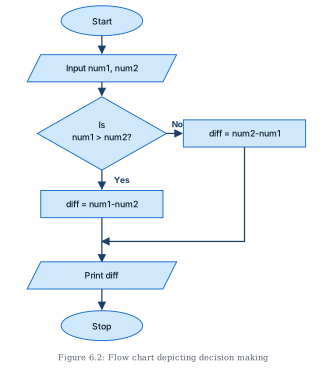
The chapter's opening program printed the difference of two numbers and could produce a negative result. To always show a positive difference, the program must first decide which number is bigger and subtract the smaller one from it. The flowchart in Figure 6.2 shows exactly this logic: the decision is based on the values entered for the two numbers.
The if statement
The simplest selection statement runs a block of statements only when a condition is true:
if condition:
    statement(s)
If the condition is true, the indented statements execute; if it is false, they are skipped. The indentation signals that the block's execution depends on the condition. There is no limit on how many statements may appear in the block under an if.
Example — declare a person eligible to vote when their age is 18 or more:
age = int(input("Enter your age "))
if age >= 18:
    print("Eligible to vote")
Here nothing at all is printed when the age is below 18 — the program simply moves on.
The if..else statement
A variant called if..else lets us write two alternative paths; the condition decides which one runs:
if condition:
    statement(s)
else:
    statement(s)
Extending the voting example so that an ineligible user also gets a message:
age = int(input("Enter your age: "))
if age >= 18:
    print("Eligible to vote")
else:
    print("Not eligible to vote")
Exactly one of the two blocks executes on any run — never both, never neither.
Using the same construct, the difference program can be corrected to always output a positive difference. Following the Figure 6.2 flowchart, the program tests whether the first number is greater than the second and subtracts accordingly — two blocks are needed because either number may be the larger one:
# Positive difference of two numbers
x = int(input("Enter first number: "))
y = int(input("Enter second number: "))
if x > y:
    gap = x - y
else:
    gap = y - x
print("The difference of", x, "and", y, "is", gap)
Enter first number: 5
Enter second number: 6
The difference of 5 and 6 is 1
Chaining conditions with elif
Often several conditions must be checked, leading to many alternatives. For this, conditions are chained using elif (short for else..if):
if condition:
    statement(s)
elif condition:
    statement(s)
elif condition:
    statement(s)
else:
    statement(s)
You may use as many elif clauses as there are conditions to check. The conditions are tested from the top: if the first is false, the next is tried, and so on. As soon as one condition is true, its indented block executes and the whole if statement terminates — no later condition is even looked at. The final else (optional) catches the case where none of the conditions held.
Example — classify a number as positive, negative or zero (three mutually exclusive cases):
n = int(input("Enter a number: "))
if n > 0:
    print("Number is positive")
elif n < 0:
    print("Number is negative")
else:
    print("Number is zero")
Example — respond to the colour of a traffic signal. Note how each condition uses or to accept the colour in either lower case or upper case:
colour = input("Enter the colour: ")
if colour == "red" or colour == "RED":
    print("STOP")
elif colour == "orange" or colour == "ORANGE":
    print("Be Slow")
elif colour == "green" or colour == "GREEN":
    print("Go!")
Here there is no else — a colour that matches none of the three tests produces no output.
A four-function calculator (putting it together)
Consider building a simple calculator that:
- accepts two numbers from the user;
- asks for one of the operators
+,-,*,/, and shows an error message for anything else; - for
-, displays only the positive difference; - for
/, refuses to divide when the second number is 0 and asks for a value other than 0.
# A four-function calculator
answer = 0
first = float(input("Enter value 1: "))
second = float(input("Enter value 2: "))
symbol = input("Enter any one of the operator (+,-,*,/): ")
if symbol == "+":
    answer = first + second
elif symbol == "-": …
Drawn by us to help you understand the concept clearly, and verified to make sure it's accurate. For exams, practice from your NCERT textbook's own diagram.
Figure 6.2 is the flowchart of the positive-difference logic — the decision-making version of the two-number difference program (Programs 6-1 and 6-2). It shows, in standard flowchart notation, how a program can take one of two paths depending on the data.
Reading it top to bottom:
- An oval terminator labelled "Start" opens the chart, with an arrow leading down.
- A parallelogram (the input symbol) reads the two values: "Input num1, num2".
- The flow then reaches a diamond — the decision symbol — asking "Is num1 > num2?". This is the heart of the figure: a question with exactly two exits.
- If the answer is Yes, the flow continues straight down into a rectangle (a process step) that computes
diff = num1 - num2— the larger value minus the smaller. - If the answer is No, an arrow leaves the diamond to the right into a second rectangle computing
diff = num2 - num1. Its arrow then travels down and back left, rejoining the main flow at the arrow that enters the print step — the two branches merge again. - The merged flow enters a parallelogram (output symbol) "Print diff", and finally an oval terminator "Stop". …