Computer Science · Ch 1 — Exception Handling in Python
The raise Statement
The raise Statement
The raise Statement
The raise statement is the tool Python gives you to deliberately throw an exception. You are not waiting for an error to happen — you are actively creating one when your code detects a condition that should not be allowed.
The syntax is straightforward:
raise exception-name[(optional argument)]
The optional argument is almost always a string — a custom message that will be displayed when the exception is raised. For instance, if you write raise Exception("OOPS : An Exception has occurred"), that exact message will appear alongside the standard error description when the program runs.
The error you raise can be either a built-in exception (like IndexError, ValueError, TypeError) or a user-defined exception (a custom class you create yourself). The textbook shows both possibilities.
Raising a Built-in Exception
Consider a situation where you have a list numbers and a variable length that holds a value larger than the list's actual length. You can deliberately raise an IndexError like this:
numbers = [10, 20, 30]
length = 5
if length > len(numbers):
    raise IndexError
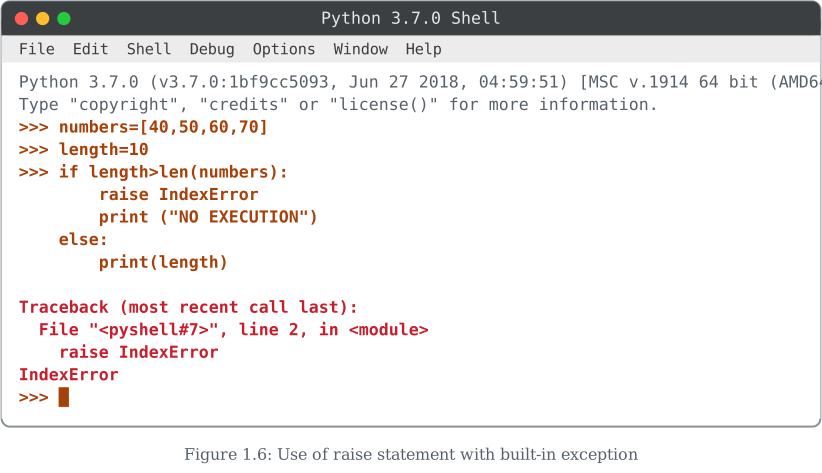
In this case, the user has raised the exception but has not provided any explicit error message. Python will still display its own default message for IndexError. Crucially, the statement immediately following the raise statement will never be executed — the program's flow jumps straight to the exception handler (or crashes if none exists). So if you had a print("NO EXECUTION") line right after the raise, it would not appear in the output.
Once a raise statement executes, control leaves the current block immediately. Any code after the raise in the same block is dead code — it will never run.
The Stack Traceback
When an exception is raised (whether by you or by Python itself), Python does not just print the error message. It also prints a stack traceback — a structured block of text that shows the sequence of function calls that led to the point where the exception occurred.
In the textbook's example (Figure 1.6), the error is encountered in the most recently called function that was executed. The traceback tells you exactly which function, which line, and in what order the calls happened. This is invaluable for debugging because it shows the path your program took before it broke.
The concept of a "stack" (the call stack) is introduced formally in Chapter 3 of the NCERT textbook. For now, understand that a stack traceback is like a breadcrumb trail of function calls — it tells you how you got to the error.
Key Points to Remember
- The
raisestatement is used to explicitly throw an exception — you are not waiting for Python to detect an error; you are creating one. …
Drawn by us to help you understand the concept clearly, and verified to make sure it's accurate. For exams, practice from your textbook's own diagram.
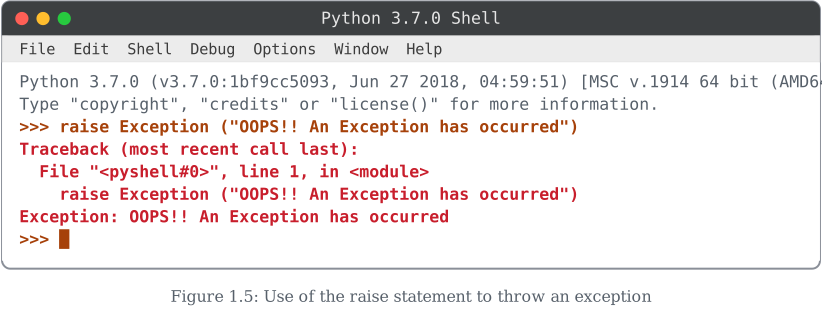
Here the student deliberately triggers an exception using Python's raise statement: raise Exception ("OOPS!! An Exception has occurred"). Unlike Figures 1.1–1.4, where the error arose naturally from a mistake (bad syntax, division by zero, an undefined name), this exception is created and thrown on purpose, using the generic base class Exception with a custom message.
The Shell responds with the same familiar traceback shape — Traceback (most recent call last):, the file/line reference, the failing line repeated, and finally Exception: OOPS!! An Exception has occurred. Since nothing catches this exception, it propagates all the way up and Python simply reports it and returns to the >>> prompt. …
Drawn by us to help you understand the concept clearly, and verified to make sure it's accurate. For exams, practice from your textbook's own diagram.
This example combines raise with a specific built-in exception class rather than the generic Exception used in Figure 1.5. The student defines numbers=[40,50,60,70] and length=10, then writes:
if length>len(numbers):
    raise IndexError
    print ("NO EXECUTION")
else:
    print(length)
Since len(numbers) is 4 and length is 10, the condition length>len(numbers) is true, so the if branch runs and immediately executes raise IndexError. Because raise stops execution of the block right there, the following print ("NO EXECUTION") line never runs — its name is a hint that it is meant to be unreachable in this run. The Shell shows the resulting traceback ending in a bare IndexError (no custom message was supplied, unlike Figure 1.5). …