Electronics · Ch 12 — C Programming
Introduction to C — program structure, tokens, data types, operators and I/O
Introduction to C — program structure, tokens, data types, operators and I/O
What C is, and where it came from
C is a powerful, flexible and portable programming language with an elegantly structured design. Because it combines the convenience of a high-level language with elements of low-level assembly programming, a single language can be used for both systems programming and applications programming.
The C language was developed by Dennis Ritchie (1941–2011). It did not appear out of nowhere — it grew out of a line of earlier languages, and it has itself been revised and improved over time. The revised version carrying the newer features is referred to as C99.
The history and development of C
| Year | Language / version | Originator |
|---|---|---|
| 1960 | ALGOL | International Group |
| 1967 | BCPL | Martin Richards |
| 1970 | B | Ken Thomson |
| 1972 | Traditional C | Dennis Ritchie |
| 1978 | K & R C | Kernighan and Ritchie |
| 1990 | ANSI C | ISO Committee |
| 1999 | C99 | Standardization Committee |
Features of C
- C can be used to write any complex program because of its rich set of built-in functions and operations.
- The C compiler combines the capability of an assembly language with the features of a high-level language, which makes it well suited to uniting system software and business packages.
- C programs are efficient and fast — the textbook notes them running about 50 times faster than BASIC.
- C has only 32 keywords and is highly portable: a program written on one computer runs on another with little or no modification, which matters when moving to new machines with a different operating system.
- C is well suited to structured programming — its modular structure eases debugging, testing and maintenance.
- C can extend itself: user-defined functions can be added continuously to the C library, simplifying later programming.
Basic structure of a C program
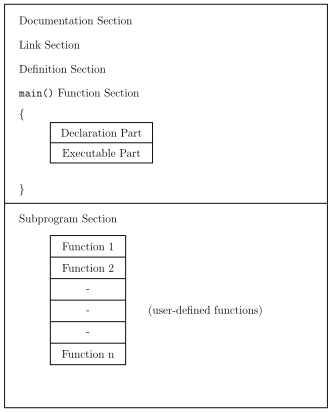
A C program is a group of building blocks called functions. A function is a subroutine — a set of one or more statements that together perform a specific task. To write a C program we first create the functions, then put them together. A well-formed C program is organised into the following sections, top to bottom:
- Documentation Section — comments describing the program.
- Link Section — instructions to link library files (e.g.
#include). - Definition Section — symbolic constant/macro definitions (e.g.
#define). - Global Declaration Section — variables used across functions.
main()Function Section — enclosed in braces{ }, containing a declaration part and an executable part.- Sub-program Section — the user-defined functions (Function 1, Function 2, … Function n).
Execution of every C program begins at main(). This overall layout is shown in Figure 12.1.1.
Format of a simple C program
A simple program has the shape:
main()
{
    /* program statements */
}
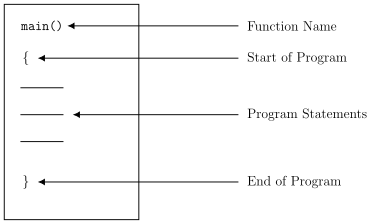
The parts (shown in Figure 12.1.2) are:
- The first line names the program
main; execution begins here.main()is a special function that tells the C system where the program starts. - The empty parentheses after
mainshow thatmaintakes no arguments (no parameters). - The opening brace
{marks the beginning of the functionmain, and the closing brace}marks its end (and the end of the program). - All statements between the braces form the body of the function — the instructions that do the work.
Comments. Lines beginning with /* and ending with */ are comment lines. They are written to make a program easier to read and understand, are not executable, and are ignored by the compiler. Comments cannot be nested — you cannot place one comment inside another.
The C preprocessor
The preprocessor is a distinctive feature of C. It provides tools not available in many other high-level languages that make programs easier to read, easier to modify, portable and more efficient. The preprocessor works on the source code before it passes to the compiler, acting on lines called preprocessor directives. Every directive:
- begins with the symbol
#(hash) in column one, and - does not end with a semicolon.
The two most commonly used directives are #define (a macro substitution) and #include (specifies files to be included).
The #define directive. #define is a preprocessor directive (not a statement), placed at the beginning of the program before main(). Its general form is:
#define identifier string
If it appears at the start of a program, the preprocessor replaces every occurrence of the identifier in the source code with the string. A simple macro of this kind defines a symbolic constant:
#define COUNT   200
#define FALSE   0
#define CAPITAL "BANGALORE"
#define PI      3.1415926
The #include directive
An external file containing functions or macro definitions can be brought into a program with #include, so those functions or macros need not be rewritten. There are two forms:
#include "file name"    /* file named within double quotes */
#include <file name>    /* file named within angle brackets */
An included file may itself include other files, but a file cannot include itself. For example, if SYNTAX.C holds syntax definitions, STAT.C holds statistical functions and TEST.C holds test functions, they can be reused simply by including them:
#include <stdio.h>
#include <SYNTAX.C>
#include <STAT.C>
#include <TEST.C>
#define M 100
main()
{
    /* program statements */
}
Note that each included file name is enclosed in angle brackets <...> (or double quotes) — the delimiters are required.
Writing C programs
A few habits keep C programs readable:
- Use lowercase. C statements are written in lowercase; uppercase is reserved mainly for symbolic constants.
- C is free-form, so several statements could be crammed onto one line, and even a whole program could be written on a single line, e.g.
main() { printf("hello C"); }
but this style makes programs hard to understand and should be avoided — write each statement on its own line.
Executing a C program involves a series of steps, the same across operating systems (only the system commands and file-naming conventions differ — the two popular ones mentioned are UNIX and MS-DOS):
- Creating the program.
- Compiling the program.
- Linking the program with the functions needed from the C library.
- Executing the program.
Process of compiling and running a C program
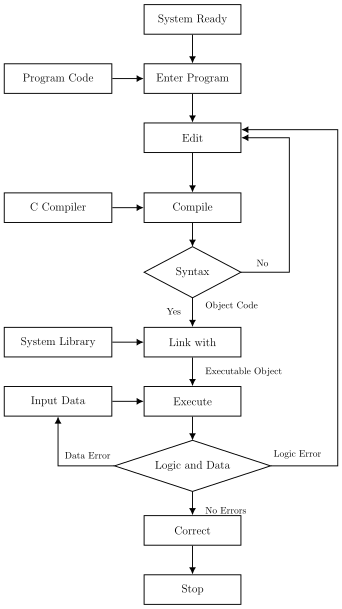
The flow from typed source to a correct running program is shown in Figure 12.1.3. In outline: the system is made ready, the program is entered and edited, then compiled. If the compiler finds a syntax problem, control loops back to editing; otherwise it produces object code, which is linked with the system library into an executable object. On execution, input data is supplied; if a data error occurs control returns to the input step, and if a logic error occurs control returns to editing. When there are no errors the result is correct and the process stops.
Debugging a C program
Debugging is the process of detecting and correcting errors in a program. A debugger takes the object program as input, runs it, and helps eliminate mistakes in the source program. Programmers generally make three types of errors:
- Syntax errors — caused by violating the grammar (rules) of the language. The compiler detects them and displays an error message giving the line number. For example, an assignment statement
variable = expression;typed without the terminating semicolon produces a missing-semicolon error. - Logical errors — mistakes made while coding (writing a program is called coding). The program runs but produces the wrong results. These are hard to find because the compiler does not report them; they are removed by tracing and running with sample data, by inserting print statements at suitable points, or by using a debugger.
- Run-time errors — errors that occur while the program is running, such as an infinite loop that produces no output, divide-by-zero, null pointer assignment, data overflow, device errors, improper sequencing of constructs, or errors in the system software.
Testing is the process of executing a program to check the correctness of its outputs, by running it with different sets of data; logical errors are the outcome of this process.
Running the program. Execution takes place in the Central Processing Unit (CPU) in three steps:
- understand the instructions,
- store data and instructions, and
- perform computations. Instructions stored in RAM are fetched one by one to the ALU, the operations are performed, and the processed data is stored back in RAM and finally sent to the output devices.
C language fundamentals
C is both a general-purpose and a specific-purpose language. A program is a sequence of precise instructions formed using certain symbols and words, written according to rigid rules known as syntax rules. Like any language, C has its own vocabulary and grammar.
Character set
Characters are used to form words, numbers and expressions. The C character set is grouped into four categories:
- Letters,
- Digits,
- Special Characters,
- White Spaces. White spaces may separate words, but they are prohibited between the characters of a keyword or an identifier. The full set is listed in Table 12.1.1.
C tokens
The basic and smallest units of a C program are called tokens. There are six kinds:
- Keywords
- Identifiers
- Constants
- Strings
- Operators
- Special Symbols
Keywords and identifiers. Every word in a C program is either a keyword or an identifier. Keywords have a fixed meaning that cannot be changed and must be written in lowercase; C has exactly 32 of them (Table 12.1.2). Identifiers are names given to program elements such as variables, arrays and functions — sequences of letters and digits that begin with a letter.
Rules for forming an identifier name:
- The first character must be a letter (upper- or lowercase) or an underscore
_. - Every succeeding character must be a letter or a digit.
- Only the first 31 characters are significant.
- Keywords cannot be used as identifiers.
- No special character or punctuation is allowed except the underscore
_. - No two successive underscores are allowed.
- An identifier must not contain a white space.
Constants
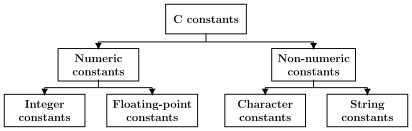
A constant is a quantity that does not change during program execution. Constants are of two broad kinds — numeric and non-numeric — as classified in Figure 12.1.5.
Numeric constants
- Integer constant — a whole number: a sequence of digits with no decimal point, optionally preceded by a
+or-sign. General form:[sign][digits]. Examples:679,0. Integers may be written as decimal (-228,+55,-123450), octal (021,066,041) or hexadecimal (0x2f,0x7a,0x629). - Floating (real) constant — a number written with a decimal point: a sequence of digits with a decimal point, optionally signed. General form:
[sign][integer part][decimal point][fractional part]. Examples:-679.1,+28.75,0.0,0.000125,82.0,-0.123e-5(wheree-5means ).
Non-numeric constants
- Character constant — a single character enclosed within a pair of apostrophes:
'b','?','#',' '(blank). - String constant — a sequence of printable characters enclosed within a pair of double quotes:
"Hi","Bangalore","2013","X+5","WELL DONE". Note that"Y"(a string) is not the same asY. A string constant is terminated internally by a null character\0.
Backslash (escape sequence) constants. A backslash constant is a two-character combination whose first character is always the backslash \. These are also called escape sequences and are used in output statements — for example \n for a new line and \t for a horizontal tab. The full set is listed in Table 12.1.7.
Variables
A variable is a quantity that can change during program execution. Variables are names that identify particular program elements, so they are also called identifiers. A variable represents a particular memory location where data can be stored; variables can denote constants, functions, arrays, fields of a structure, names of files and so on. Examples: sum, area, height, weight, age, city. The rules for forming variable names are the same as those for identifiers (see Table 12.1.3 for valid vs invalid examples).
Declaration of variables. All variables must be declared before use; declaration reserves memory for them. Syntax:
data_type varlist ;
where data_type is a basic type (int, float, char, double), varlist is one or more variables of that type separated by commas, and the semicolon ; ends the declaration. Examples:
int    length;
float  area;
char   ch;
double density;
int    x, y, z;
float  p, q, array[25];
Assigning values to variables. Giving a value to a variable is called assignment, done with the assignment operator =. Syntax: variable_name = value ;. A value may be assigned within the declaration (this is called initialization):
int x = 1;
char ch = 'y';
double r = 0.1234e-4;
or in the executable part, where the data type is not repeated:
x = 10;
sum = 300.00;
ch = 'y';
Data types
Data types indicate the kind of data a variable can hold. In C they fall into three categories: 1. Built-in data types, 2. Derived data types, 3. User-defined data types. (Derived and user-defined types are covered later in the chapter; the built-in types are described here.)
Built-in data types are the basic types, each designating a single value. C has four fundamental built-in types:
- Integer,
- Real / floating-point,
- Double-precision real,
- Character.
There is also one non-specified type,
void, which specifies nothing. Their keywords, sizes and ranges are given in Table 12.1.4.
- (a)
int— the keyword for an integer. The range ofintdepends on the word length of the computer (the number of bits the processor can access at a time). On the standard C implementation used here,intoccupies 2 bytes (16 bits) and therefore holds values from to , i.e. −32,768 to +32,767.
The textbook's worked range for int is misprinted. It describes an 8-bit computer and prints the formula , yet lists the values −32,768 to +32,767. Those values are actually the 16-bit (2-byte) range to ; note that , not 32,768. Table 12.1.4 itself correctly gives int a size of 2 bytes with the −32,768 to +32,767 range — so use the 2-byte range shown here.
- (b)
float— the keyword for a floating-point (real) number. It is called floating point because the decimal point can shift left or right of the digits during manipulation. Size 4 bytes; range about to . Valid vs invalid float constants are shown in Table 12.1.5 (for example,-369.25and3.6925e+02are valid, while2,00is invalid because no comma is allowed, and-2.4.2is invalid because it has two decimal points). - (c)
char— the keyword for character-type data. A character constant is any single character enclosed within a pair of apostrophes:'a','b','@','5','?',' '(blank). Character data takes 8 bits of storage; acharmay be signed (−128 to +127) or unsigned (0 to 255). Each character has an ASCII value (Table 12.1.6). - (d)
double— the keyword for a double-precision floating-point number. Afloatstores a maximum of about 6 digits after the decimal point, whereas adoublestores about 16 significant digits — useful when higher precision is needed.
Statements and arithmetic expressions
A statement is an instruction to the computer to perform a specific operation. It may be a declaration, an input/output action, an arithmetic or logical operation, an assignment, or a control statement.
An arithmetic expression is a series of variable names and constants connected by arithmetic operation symbols (addition, subtraction, multiplication, division and remainder). Any ordinary mathematical expression must be rewritten into its C-equivalent form before it can be used in a program. For example, the mathematical form becomes (3*x+2)*(4*y+z), and becomes sqrt(a*a+b*b). When an expression mixes operators, evaluation follows operator priority — for instance a + b*c/d - e is evaluated as b*c first, then (b*c)/d, then the additions and subtractions from left to right.
Operators
An operator is a symbol that tells the computer to perform a mathematical or logical operation; operators manipulate data and variables. C operators are classified into eight groups:
- Arithmetic,
- Relational,
- Logical,
- Bitwise,
- Assignment,
- Conditional,
- Increment/Decrement, and
- other special operators.
(i) Arithmetic operators (Table 12.1.10): +, -, *, /, and % (modulo). Integer division truncates the fractional part, and % gives the remainder of an integer division. If a = 16 and b = 3, then a-b = 13, a+b = 19, a*b = 48, a/b = 5 (the fraction is dropped) and a%b = 1. The remainder takes the sign of the dividend: -16 % 3 = -1, while 16 % -3 = 1.
(ii) Relational operators (Table 12.1.11): <, <=, >, >=, == and !=, used to compare two operands. The result is TRUE (a non-zero value, taken as 1) or FALSE (0). For a = 5, b = 6, c = 1, the expression a>b is false (0) while (a+c)==b is true (1).
(iii) Logical operators (Table 12.1.13): logical AND &&, logical OR || and logical NOT !. && and || are binary, ! is unary. && is true when both operands are non-zero; || is true when at least one operand is non-zero; ! makes a zero operand true. Truth tables are given in Table 12.1.14.
(iv) Bitwise operators (Table 12.1.15) work bit by bit: & (bitwise AND), | (bitwise OR), ^ (exclusive-OR / XOR), ~ (1's complement), << (left shift) and >> (right shift). For 8-bit values A = 5 = 0000 0101 and B = 23 = 0001 0111: A&B = 0000 0101, A|B = 0001 0111, A^B = 0001 0010. The complement ~ flips every bit.
(v) Assignment operators (Table 12.1.17): the plain = plus the compound forms +=, -=, *=, /=, %=, <<=, >>=, &=, ^=, |=. Each is shorthand: a += b; means a = a + b;.
(vi) Conditional (ternary) operator. The ? operator tests a relationship using three operands. General form: <expression> ? <value1> : <value2> — the expression is evaluated, and if it is true the whole thing takes value1, otherwise value2. For example, c = b < a ? b : a; assigns to c the smaller of a and b.
(vii) Increment and decrement operators. ++ increases an integer variable by 1 and -- decreases it by 1. Each can be placed before the variable (pre-form, e.g. ++a) or after it (post-form, e.g. a++); both change the value by 1, but they differ in when the change is applied within a larger expression.
(viii) Other operators. The comma operator , links related expressions (e.g. int a, b = 8, c;). The sizeof operator is a unary operator that returns the size, in bytes, of a data type, constant, array or structure — for example sizeof(int) gives 2, sizeof(float) gives 4, sizeof(double) gives 8 and sizeof(char) gives 1.
Operator precedence in C …
Drawn by us to help you understand the concept clearly, and verified to make sure it's accurate. For exams, practice from your textbook's own diagram.
Figure 12.1.1 — a block diagram of a complete C program. The upper region (the main program) stacks, top to bottom: Documentation Section, Link Section, Definition Section, Global Declaration Section, and the main() Function Section, whose braces { } enclose a small two-row box labelled Declaration Part (top) and Executable Part (bottom). Below a divider lies the Sub-program Section, a vertical stack of boxes Function 1, Function 2, … Function n, annotated 'user-defined functions'. It matters because it shows the fixed o …
Drawn by us to help you understand the concept clearly, and verified to make sure it's accurate. For exams, practice from your textbook's own diagram.
Figure 12.1.2 — a box containing main(), {, a few blank statement lines, and }, with labels pointing outward: main() → Function Name; { → Start of Program; the middle lines → Program Statements; } → End of Program. It helps a beginner map each vi …
Drawn by us to help you understand the concept clearly, and verified to make sure it's accurate. For exams, practice from your textbook's own diagram.
Figure 12.1.3 — a top-down flowchart: System Ready → Enter Program (fed by Program Code) → Edit → Compile (fed by C Compiler) → Syntax? decision. On 'No' it loops back to Edit; on 'Yes' the Object Code is Linked with the System Library into an Executable Object, which is then Executed (fed by Input Data). A Logic-and-Data? decision routes a Data Error back to the input step and a Logic Error back to Edit; with No Errors the result is Correct and the process Stops. It shows the …
Drawn by us to help you understand the concept clearly, and verified to make sure it's accurate. For exams, practice from your textbook's own diagram.
Figure 12.1.5 — a classification tree. The root 'C constants' branches into 'Numeric constants' and 'Non-numeric constants'. Numeric constants branch into 'Integer constants' and 'Floating-point constants'; non-numeric constants branch into 'Character constants' and 'String constants'. It organise …
| Group | Members |
|---|---|
| Alphabets (uppercase) | A B C … Z |
| Alphabets (lowercase) | a b c … z |
| Digits | 0 1 2 3 4 5 6 7 8 9 |
| Special characters | , comma . period : colon ; semicolon ' apostrophe " quotation mark ? question mark ! exclamation mark _ underscore # hash = equal sign | pipeline + plus - minus * asterisk / slash % percentage & ampersand ^ caret ~ tilde < less than > greater than \ backslash ( ) parentheses [ ] brackets { } braces |
| auto | double | int | struct |
| break | else | long | switch |
| case | enum | register | typedef |
| char | extern | return | union |
| const | float | short | unsigned |
| continue | for | signed | void |
A token is the basic and smallest unit of a C program. C has six kinds of tokens: keywords, identifiers, constants, strings, operators and special symbols. Keywords have a fixed meaning and are always lowercase; identifiers are user-given …
| Valid variable | Invalid variable | Remark |
|---|---|---|
| marks | 8xy | a numeric first character is not permitted |
| TOTAL_MARK | TOTAL MARK | a blank space is not permitted |
| gross_salary_2013 | gross-salary-2013 | a hyphen is not permitted |
| area_of_circle() | area__of__circle | a double underscore is not permitted |
| Backslash constant | Meaning |
|---|---|
\a | system alarm (bell) |
\b | backspace |
\f | form feed |
\n | new line (line feed) |
\r | carriage return |
\t | horizontal tab |
\v | vertical tab |
\" | double quote |
\' | apostrophe (single quote) |
| Type | Keyword | Size in bytes | Range of values |
|---|---|---|---|
| Integer | int | 2 | −32,768 to 32,767 |
| Real (floating-point) | float | 4 | 3.4e−38 to 3.5e+38 |
| Double precision | double | 8 | 1.7e−308 to 1.7e+308 |
| Character constant | ASCII value |
|---|---|
'A' | 65 |
'B' | 66 |
'Z' | 90 |
'a' | 97 |
'z' | 122 |
'0' | 48 |
'9' | 57 |
'&' | 38 |
| Operator | Meaning |
|---|---|
+ | addition or unary plus |
- | subtraction or unary minus |
* | multiplication |
/ | division |
| Operator | Meaning |
|---|---|
< | lesser than |
<= | less than or equal to |
> | greater than |
>= | greater than or equal to |
| Operator | Meaning | Description |
|---|---|---|
&& | logical AND | true if both operands are non-zero |
|| | logical OR | true if at least one operand is non-zero |
| Operator | Name | Meaning |
|---|---|---|
& | ampersand | bitwise AND |
| | pipeline | bitwise OR |
^ | caret | exclusive-OR (XOR) |
~ | tilde | 1's complement |
<< | double less-than | left shifting of bits |
| Operator | Description | Shorthand | Equivalent |
|---|---|---|---|
= | assignment | c = a+b; | c = a+b |
+= | add | a += b; | a = a+b |
-= | subtract | a -= b; | a = a-b |
*= | multiply | a *= b; | a = a*b |
/= | divide | a /= b; | a = a/b |
%= | modulus | a %= b; | a = a%b |
<<= | left shift | a <<= b; | a = a<<b |
>>= | right shift | a >>= b; | a = a>>b |
&= | bitwise AND | a &= b; | a = a&b |
Conditional operator: <expression> ? <value1> : <value2> — evaluates the expression, taking value1 if it is true and value2 if false (e.g. c = b < a ? b : a;). Type casting: (data type) variable — forces a value to a chosen basic type, e.g. 1/(float)x yiel …
| # | Category | Operators | Associativity |
|---|---|---|---|
| 1 | Postfix | () [] -> ++ -- | left to right |
| 2 | Unary | + - ! ~ ++ -- (type) * & sizeof | right to left |
| 3 | Multiplicative | * / % | left to right |
| 4 | Additive | + - | left to right |
| 5 | Shift | << >> | left to right |
| 6 | Relational | < <= > >= | left to right |
| 7 | Equality | == != | left to right |
| 8 | Bitwise | & ^ | | left to right |
| 9 | Logical | && || | left to right |
| 10 | Conditional | ? : | right to left |
| Type | Input function(s) | Output function(s) |
|---|---|---|
| Formatted | scanf() | printf() |
| Character group | Meaning |
|---|---|
%c | a single character |
%d | a decimal integer |
%e | a floating-point number (exponential form) |
%f | a floating-point number |
%h | a short int |
%i | a decimal, hexadecimal or octal number |