Electronics · Ch 12 — C Programming
Loops, Functions and Flowcharts
Loops, Functions and Flowcharts
[!NOTE]
In this KTBS textbook the looping statements, the section on C functions, the header-file descriptions and the standard flowchart symbols are printed as plain red headings without their own section numbers after Section 12.2 (the book prints no "12.3", "12.4", … for them). They are grouped together here under one heading for easy reference and study.
Loop (iterative) control statements
A loop repeats a group of statements again and again until a specified condition is satisfied; this is also called repetitive or iterative execution. Every loop has two essential parts: the body of the loop — the statements that are repeated — and a control (test) statement that decides whether to repeat once more or to stop. C provides three looping constructs — while, do-while and for — together with the break and continue statements that alter the normal flow inside a loop.
While statement
The while loop runs its body as long as a condition stays true. Because the condition is tested before the body is entered, it is a pre-test loop — if the condition is false at the very start, the body never runs even once.
while (logexp)
{
    statement;
}
Here while is a keyword and logexp is a logical expression giving true or false; statement may be simple or compound. On each pass the condition is checked: while it is true the body runs and control loops back to the test; when the condition becomes false, control leaves the loop and moves to the next statement.
do-while statement
The do-while loop is a post-test loop: the body executes first and the condition is tested afterwards, so the body always runs at least once, even if the condition is false the very first time.
do
{
    statement;
} while (logexp);
Here do and while are keywords, statement may be simple or compound, and logexp is the logical expression tested at the bottom of the loop. If it is true, control loops back to do; if false, control passes to the statement after the loop. Note the semicolon that ends the while (logexp); line — it is required in the do-while form.
for statement
The for loop is used when the number of repetitions is known in advance. It gathers the loop's initialization, test and update into a single header line.
for (expression1; expression2; expression3)
{
    statement;
}
expression1initializes the loop index once, before the loop begins.expression2is the test condition; it is checked before each pass, and the loop continues while it is true.expression3modifies (usually increments) the loop index after every pass — the step increment.
The statement is the body of the for loop and may be simple or compound. When the initial value, the final value and the step are known, the number of times the body runs can be found from the boxed formula in the card below.
break statement
The break statement immediately terminates the loop (or exits a switch case) that encloses it and hands control to the first statement after that loop or switch. It is placed among the loop's statements, usually guarded by a condition:
/* ... */
if (some_condition)
    break;      /* leave the loop right now */
/* ... */
continue statement
The continue statement does not leave the loop. Instead it acts as a bypass: it skips the remaining statements in the current pass of the loop body and transfers control back to the loop's control/test for the next iteration.
/* ... */
if (some_condition)
    continue;   /* skip the rest of this pass, go to the next */
/* ... */
C functions
A function is a self-contained set of instructions that carries out one particular task — for example, finding the cube root of a number — and returns a single value after it finishes executing. C functions are of two kinds:
- Standard (library) functions — ready-made functions supplied in the compiler's library files, such as
sqrt(),cbrt(),log(),sin()andpow(). - User-defined functions — functions the programmer writes when the required task is not covered by the library. They are sub-programs and may be placed before or after the
main()function.
Every C program is itself built around the main() function. A minimal example:
#include <stdio.h>
void main()
{
    printf("Welcome to PUC\n");
}
which displays: Welcome to PUC.
[!NOTE]
The book lists the cube-root library function as cubrt(); in standard C the function is named cbrt() (declared in math.h).
Header files
A header file (with a .h extension) declares the library functions, macros and types that a program may use; it is brought into a program with an #include directive at the top. Three commonly used header files are:
conio.h— a console input/output header, used mostly by MS-DOS-era compilers to read from and write to the console and to clear the screen. It declares helpers such asclrscr(clears the screen),putch(writes a character/string directly to the console),getch(reads a character directly from the console without buffering and without echoing it) andcprintf(formats values and writes them directly to the console).stdio.h— the standard input/output header. It defines the input/output function types and macros and makes up nearly one-third of the standard library, providing variable types, several macros and many I/O functions — for examplefclose(closes a stream, flushing all its buffers) andclearerr(clears the end-of-file and error indicators of a given stream). …
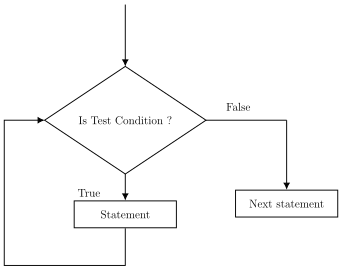
Drawn by us to help you understand the concept clearly, and verified to make sure it's accurate. For exams, practice from your textbook's own diagram.
Redraw of the while-loop flowchart printed on textbook page 513. Flow enters a decision diamond 'Is test condition?'. The 'True' exit leads to a rectangle 'Statement' and then loops back up to the decision; the 'False' exit leads to 'Next statement'. Because the test com …
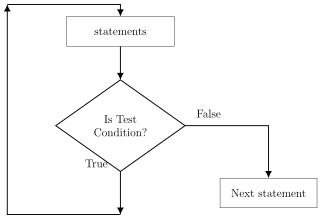
Drawn by us to help you understand the concept clearly, and verified to make sure it's accurate. For exams, practice from your textbook's own diagram.
Redraw of the do-while flowchart printed on textbook page 515. Flow enters a rectangle 'statements' first, then reaches a decision diamond 'Is test condition?'. The 'True' exit loops back up to 'statements'; the 'False' exit leads to 'Next statement'. Shows that the body execu …
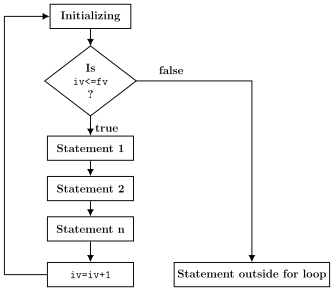
Drawn by us to help you understand the concept clearly, and verified to make sure it's accurate. For exams, practice from your textbook's own diagram.
Redraw of the for-statement flowchart printed on textbook page 518. An 'Initializing' box leads to a decision diamond 'Is iv <= fv ?' (iv = initial value, fv = final value). The 'true' exit runs the body statements followed by 'iv = iv + 1', which loops back to the test; the 'false' …
…
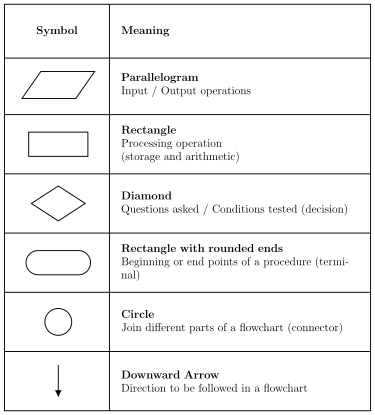
Drawn by us to help you understand the concept clearly, and verified to make sure it's accurate. For exams, practice from your textbook's own diagram.
Own drawing of the standard flowchart symbols shown on textbook pages 526-527, recreated purely from the facts (each shape and the operation it stands for). Panel shows: a parallelogram (input/output), a rectangle (processing), a diamond/rhombus (decision), a rounded-end rectangle (start/stop terminator), a circle (connector) and a down …