Computer Science · Ch 1 — Computer System
Introduction to Computer System
Introduction to Computer System
A computer is an electronic device that can be programmed — it accepts data as input, processes that data according to instructions, and produces a result as output. This input → process → output cycle is the defining behaviour of every computing device, whatever its size or shape.
When a computer works together with the additional hardware and software around it, the complete arrangement is called a computer system. A computer system is not a single part but a team of components working as one unit:
- Central Processing Unit (CPU) — carries out the actual processing.
- Memory — holds the data and instructions while they are being worked on.
- Input/Output (I/O) devices — bring data into the system and deliver results out of it.
- Storage devices — keep data and programs permanently for later use.
All of these components function together as a single unit to deliver the desired output. None of them is useful in isolation — the CPU needs memory to fetch instructions from, memory needs input devices to receive data, and the user needs output devices to see the result.
Computer systems come in many forms
A computer system is not only the desktop PC in a lab. It can take many forms and sizes:
- a high-end server running services for thousands of users,
- a personal desktop computer,
- a laptop,
- a tablet computer, or
- a smartphone.
All of these, despite their very different appearances, share the same basic organisation of CPU + memory + input/output + storage.
The block diagram
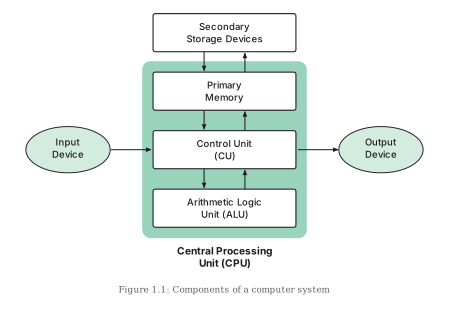
Figure 1.1 presents this organisation as a block diagram. The CPU sits at the centre (containing the Control Unit and the Arithmetic Logic Unit), primary memory connects to the CPU, secondary storage devices connect through primary memory, and input and output devices connect at either side. The directed lines (arrows) in the diagram represent the flow of data and signals between the components — showing which component sends information to which.
The three sub-sections that follow look at the main components one by one: the CPU (1.1.1), input devices (1.1.2) and output devices (1.1.3).
Drawn by us to help you understand the concept clearly, and verified to make sure it's accurate. For exams, practice from your NCERT textbook's own diagram.
Figure 1.1 is the block diagram of a complete computer system — the single picture that the whole chapter keeps returning to. At its centre sits a large rounded block representing the Central Processing Unit (CPU). Inside this block are the CPU's two main components, stacked one above the other: the Control Unit (CU) on top and the Arithmetic Logic Unit (ALU) below, joined by a double-headed arrow to show that the two constantly exchange signals — the CU directs, the ALU computes.
Above the CPU block, and outside it, sits the Primary Memory, connected to the CPU by another double-headed arrow: the CPU fetches instructions and data from primary memory and writes results back, so traffic flows in both directions. Above primary memory are the Secondary Storage Devices, again linked by a double-headed arrow — showing that permanent storage exchanges its contents with primary memory (not with the CPU directly; everything the CPU touches must pass through primary memory first).
On the left of the CPU is the Input Device, with a single arrow pointing into the Control Unit — input flows one way, from the outside world into the system. On the right is the Output Device, receiving a single arrow from the Control Unit — results flow one way, out to the user.
The directed lines in the diagram represent the flow of data and signals between components. Reading the arrows tells the story of every computation: data enters through the input device, is held in primary memory, is processed by the ALU under the CU's control, and the result travels out through the output device — with secondary storage keeping whatever must survive beyond the session.