Computer Science · Ch 7 — Functions
Arguments and Parameters
Arguments and Parameters
In the previous example, addnum() collected its numbers from the user inside the function. A user defined function can instead receive values at the moment it is called. This is where two closely related terms come in:
- An argument is a value passed to the function during the function call.
- A parameter is the name in the function header that receives the corresponding argument.
Passing an argument to a function
The task: display the sum of the first n natural numbers, where n is passed as an argument. Requirements — (1) n is passed as an argument, (2) calculate the sum of the first n natural numbers, (3) display the sum.
# Sum of the first n natural numbers

# function header — n is the PARAMETER
def sumSquares(n):
    sum = 0
    for i in range(1, n + 1):
        sum = sum + i
    print("The sum of first", n, "natural numbers is:", sum)

num = int(input("Enter the value for n: "))
# num is the ARGUMENT, referring to the value the user typed
sumSquares(num)      # function call
Suppose the user enters 5. Then num refers to the value 5 and is used as the argument in the call sumSquares(num). When the call transfers control to def sumSquares(n):, the parameter n also refers to that same value 5 — argument and parameter are two names bound to one value (this is exactly what Figure 7.3 illustrates).
Argument and parameter share the same identity — id()
Since num and n refer to the same value, they must have the same identity. Python's built-in id() function reveals the identity of the object a name refers to, so we can verify this directly.
The task: a function accepts an integer and increments it by 5, displaying the id of the argument before the call, and the id of the parameter before and after the increment — to check whether the parameter gets a new memory location.
# Add 5 to a user-input number, watching the ids

def incrValue(num):
    # id of the parameter BEFORE the increment
    print("Parameter num has value:", num, "\nid =", id(num))
    num = num + 5
    # id of the parameter AFTER the increment
    print("num incremented by 5 is", num, "\nNow id is", id(num))

number = int(input("Enter a number: "))
print("id of argument number is:", id(number))   # id of the argument
incrValue(number)
A sample run (the actual id values differ from machine to machine and run to run):
Enter a number: 8
id of argument number is: 1712903328
Parameter num has value: 8
id = 1712903328
num incremented by 5 is 13
Now id is 1712903408
Read the output carefully:
- Before the increment, the argument
numberand the parameternumprint the same id — they refer to the same object holding 8. - After
num = num + 5, the parameter's id changes:numnow refers to a new object holding 13, whilenumberoutside still refers to 8. Figure 7.4 pictures exactly this before/after situation.
Argument and parameter may share a name
Nothing stops the argument and the parameter from having the same name. The task: a user defined function myMean() calculates the mean of floating point values stored in a list. Requirements — (1) one parameter, a list of floating point values; (2) mean = sum of all the numbers divided by how many there are.
# Function to calculate the mean of values in a list

def myMean(myList):
    total = 0
    count = 0
    for i in myList:
        total = total + i     # add each element to total
        count = count + 1     # count the elements
    mean = total / count
    print("The calculated mean is:", mean)

myList = [1.3, 2.4, 3.5, 6.9]
myMean(myList)    # the argument is also called myList
The calculated mean is: 3.[PII:card]
One more numeric example — factorial
The task: a user defined function calcFact() calculates and displays the factorial of a number passed as an argument.
# Function to calculate a factorial

def calcFact(num):
    fact = 1
    for i in range(num, 0, -1):
        fact = fact * i
    print("Factorial of", num, "is", fact)

num = int(input("Enter the number: "))
calcFact(num)
Enter the number: 5
Factorial of 5 is 120
Note that because multiplication is commutative, 5! = 54321 gives the same result as 12345 — so the loop may run downwards (as here) or upwards.
(A) Strings as parameters
The arguments passed so far were all numeric, but functions accept string arguments just as readily. The task: a function accepts a first name and a last name, concatenates them into a full name, and displays Hello followed by the full name (input Gyan and Vardhan should print Hello Gyan Vardhan). Requirements — two parameters for the two names; concatenate with the + operator, keeping a space between them; display the result.
# Function to display a full name

def fullname(first, last):
    # + concatenates strings; " " puts a space between the names
    fullname = first + " " + last
    print("Hello", fullname)

first = input("Enter first name: ")
last = input("Enter last name: ")
fullname(first, last)    # function call
Enter first name: Gyan
Enter last name: Vardhan
Hello Gyan Vardhan
(B) Default parameters
Python allows a parameter to carry a default value — a pre-decided value that the parameter takes when the function call does not supply its corresponding argument.
The task: accept the numerator and denominator of a fraction and call a user defined function mixedFraction() when the fraction is not a proper fraction. The default value of the denominator is 1. The function displays a mixed fraction only if the fraction does not evaluate to a whole number.
# Display a mixed fraction for an improper fraction

def mixedFraction(num, deno = 1):     # deno has default value 1
    remainder = num % deno
    # does the fraction evaluate to a whole number?
    if remainder != 0:
        quotient = int(num / deno)
        print("The mixed fraction =", quotient, "(", remainder, "/", deno, ")")
    else:
        print("The given fraction evaluates to a whole number")

num = int(input("Enter the numerator: "))
deno = int(input("Enter the denominator: "))
print("You entered:", num, "/", deno)
if num > deno:                        # improper fraction?
    mixedFraction(num, deno)          # function call
else:
    print("It is a proper fraction")
Enter the numerator: 17
Enter the denominator: 2
You entered: 17 / 2
The mixed fraction = 8 ( 1 / 2 )
``` …
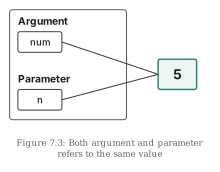
Drawn by us to help you understand the concept clearly, and verified to make sure it's accurate. For exams, practice from your textbook's own diagram.
Figure 7.3 illustrates the relationship between an argument and a parameter using the sum-of-natural-numbers program, where the user has entered 5.
The diagram has an outer box labelled Argument at the top, containing a small box named num — the variable in the main program that holds what the user typed and is passed in the call sumSquares(num). Below it, labelled Parameter, is a small box named n — the name in the function header def sumSquares(n): that receives the passed value. Lines from both num and n converge on a single box to the right containing the value 5. …
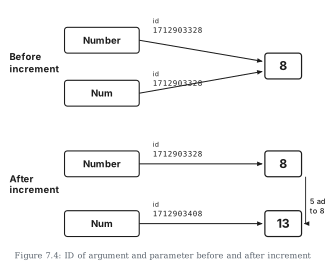
Drawn by us to help you understand the concept clearly, and verified to make sure it's accurate. For exams, practice from your textbook's own diagram.
Figure 7.4 is a two-part memory diagram that traces what happens to the argument and the parameter of the increment program (incrValue()) when the parameter is reassigned. The program passed the number 8 as the argument Number, received it in the parameter Num, then executed num = num + 5.
Top part — "Before increment": the boxes Number and Num both carry the same id, 1712903328, and both have arrows pointing to one shared box containing 8. Argument and parameter are two names for a single object — exactly the situation Figure 7.3 established.
Bottom part — "After increment": the picture splits. Number still has id 1712903328 and still points to the box containing 8 — the argument outside the function is untouched. But Num now carries a new id, 1712903408, and points to a new box containing 13, annotated "5 added to 8". …