Computer Science · Ch 7 — Functions
Flow of Execution
Flow of Execution
Flow of execution is the order in which the statements of a program are actually executed.
The Python interpreter begins at the first statement of the program and executes statements one by one, top to bottom — until functions enter the picture:
- When the interpreter meets a function definition, the statements inside it are not executed at that moment. The body waits until the function is called.
- When the interpreter meets a function call, the flow deviates: instead of moving to the next line, control jumps into the called function, executes its statements, and then comes back to the point of the call so the remaining statements can run.
So when reading a program, we should not simply read top to bottom — we should follow the flow of control, jumping into each function at its call and back out at its end.
Define before you call
A function must be defined before its call in the program. See what happens when the call comes first:
# Function call placed BEFORE the definition

helloPython()                  # function call

def helloPython():             # function definition
    print("I love Programming")
Running this produces an error of the form:
Traceback (most recent call last):
  File "Prog.py", line 3, in <module>
    helloPython()   # function call
NameError: name 'helloPython' is not defined
The interpreter complains that the function is "not defined" even though a definition exists further down. Why? When the call is reached, control must jump to the function's definition — but the interpreter, working top to bottom, has not seen that definition yet, so it raises the error. The fix is simply to place the definition first:
def helloPython():             # function definition
    print("I love Programming")

helloPython()                  # function call
Tracing the order of execution
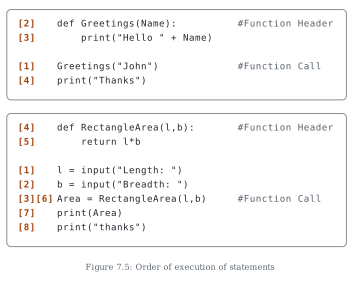
Figure 7.5 traces the flow of execution through two small programs, numbering each statement (in square brackets) in the order it runs. In the first, a Greetings function's call runs first [1], control then jumps to the header [2] and body [3], and finally returns for the last print [4]. In the second, the input statements run first, the call statement is visited twice — once to make the call [3] and again to receive the returned value [6] — with the function header [4] and its return [5] executed in between. The bracketed numbers make visible exactly how control leaves the straight top-to-bottom path at a call and comes back afterwards.
Returning multiple values — the tuple
Sometimes a function needs to return more than one value. In Python, multiple values are returned packed in a tuple (tuples are covered in detail in Chapter 10).
The task: a function accepts the length and breadth of a rectangle and returns both its area and its perimeter.
# Function returning area AND perimeter of a rectangle

def calcAreaPeri(length, breadth):
    area = length * breadth
    perimeter = 2 * (length + breadth)
    # a tuple of 2 values is returned
    return (area, perimeter)

l = float(input("Enter length of the rectangle: "))
b = float(input("Enter breadth of the rectangle: "))
# the tuple's values are assigned in the order they were returned
area, perimeter = calcAreaPeri(l, b)
print("Area is:", area, "\nPerimeter is:", perimeter)
Enter length of the rectangle: 45
Enter breadth of the rectangle: 66
Area is: 2970.0
Perimeter is: 222.0
The caller unpacks the returned tuple into two variables — area, perimeter = calcAreaPeri(l, b) — in the same order the function returned them.
A program with two cooperating functions — the traffic light
The task: simulate a traffic light using two user defined functions.
trafficLight()accepts the colour from the user and displays an error message if the input is anything other thanRED,YELLOWorGREEN. Otherwise it callslight()and, depending on the returned value, displays: a) a "STOP, your life is precious" message when the value is 0; b) a "please wait / go slow" message when the value is 1; c) a "GO! thank you for being patient" message when the value is 2.light(colour)accepts the colour string as an argument and returns 0 forRED, 1 forYELLOWand 2 forGREEN.- After
trafficLight()finishes, the program displays "SPEED THRILLS BUT KILLS".
# Simulating a traffic light with two functions

def trafficLight():
    signal = input("Enter the colour of the traffic light: ")
    if signal not in ("RED", "YELLOW", "GREEN"):
        print("Please enter a valid Traffic Light colour in CAPITALS")
    else: …
Drawn by us to help you understand the concept clearly, and verified to make sure it's accurate. For exams, practice from your textbook's own diagram.
Figure 7.5 shows two boxed code listings in which every line carries a number in square brackets giving the order in which it is actually executed — making the flow of execution visible.
First box (a void function):
[2] def Greetings(Name):          # Function Header
[3]     print("Hello " + Name)
[1] Greetings("John")             # Function Call
[4] print("Thanks")
The first statement to run is the call Greetings("John") [1] — the def block above it was only registered, not executed. The call sends control to the function header [2] and then the body [3]; when the function ends, control returns and the final print runs [4].
Second box (a function that returns a value):
[4] def RectangleArea(l,b):       # Function Header
[5]     return l*b
[1] l = input("Length: ")
[2] b = input("Breadth: ")
[3][6] Area = RectangleArea(l,b)  # Function Call
[7] print(Area)
[8] print("thanks")
Execution begins with the two input statements [1] and [2]. The assignment line is special — it is numbered twice, [3] and [6]: at step [3] the call RectangleArea(l,b) is made, control jumps to the header [4] and the return statement [5], and at step [6] control comes back to the same line so the returned value can be assigned to Area. The two prints then finish the program [7], [8]. …