Computer Science · Ch 11 — Societal Impact
Impact on Health
Impact on Health
Digital technology has penetrated every field, and one consequence is that we spend ever more hours in front of screens — mobile, laptop, desktop, television, gaming console, music or sound device. This section looks at what that does to the body and mind, and how the science of ergonomics helps limit the damage.
Two distinct health risks
- Improper posture: interacting with devices in a bad posture harms us both physically and mentally.
- Excessive time online: spending too much time on the Internet can be addictive, and has a negative impact on our physical and psychological well-being.
The good news: these concerns can be addressed to a fair extent by taking care of how we position our devices and how we position our own posture.
Ergonomics
Ergonomics is a branch of science that deals with designing or arranging workplaces — including the furniture, equipment and systems — so that the workplace becomes safe and comfortable for the user. Its payoff is a reduction in strain on the body, including the fatigue and injuries caused by prolonged use.
Eye strain
When we look continuously at a screen — watching, typing, chatting or playing games — our eyes are continuously exposed to the glare from the screen. Looking at small handheld devices makes it worse. Eye strain is the symptom most commonly complained of by users of digital devices.
Remedies:
- Ergonomic viewing: maintaining the correct viewing distance and angle, along with proper positioning, helps.
- Breaks: to relieve dry, watering or itchy eyes, periodically focus on distant objects and take breaks for outdoor activities.
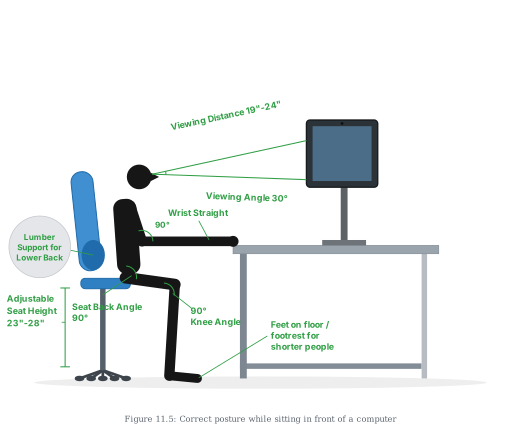
Correct posture (Figure 11.5)
Figure 11.5 shows the posture to maintain to avoid fatigue from prolonged computer use: sitting upright with the screen at a proper viewing distance and angle, wrists straight, back and knees at right angles, seat height adjustable, lower back supported, and feet resting flat on the floor (with a footrest for shorter users).
Following ergonomic recommendations for arranging the workspace prevents bad posture, backaches, and neck and shoulder pains.
Wrists, fingers and general fatigue
- Keyboard overuse — whether a physical keyboard or a touchscreen-based virtual keyboard — when the setup is not ergonomically aligned, can produce a painful condition of the wrists and fingers that may need medical help in the long run.
- Stress, physical fatigue and obesity are further impacts the body may face when too much time is spent on digital devices.
Device safety — keeping the computer itself healthy
The section pairs user health with the "good health" of the computer system:
- Clean regularly to keep dust off, using a liquid solution specifically formulated for cleaning electronic screens.
- Wipe the monitor's screen often with a regular microfibre soft cloth (the kind used for spectacles).
- Keep the device away from direct heat and sunlight, in a room with enough ventilation for air circulation. …
Drawn by us to help you understand the concept clearly, and verified to make sure it's accurate. For exams, practice from your textbook's own diagram.
This is the chapter's ergonomics diagram — a side-view illustration of the correct posture for sitting in front of a computer, with every element of a healthy workstation measured and labelled. A black silhouette of a person, facing right, sits upright at a workstation: a blue office swivel chair with a five-wheel base, an adjustable central column and a lumbar cushion, before a grey desk holding a monitor at the person's eye level. The forearm rests level with the desk, and green annotation lines with bold labels mark each rule of posture.
Reading the annotations:
- Viewing Distance 19"–24" — a line from the eyes to the screen shows how far the monitor should sit from the face.
- Viewing Angle 30° — a second line angled downward from the eyes to the screen: you should look slightly down at the display, not up.
- Wrist Straight — with a 90° angle circle drawn at the elbow: forearms level, wrists unbent, so typing does not strain the wrist. Section 11.7 warns that keyboard overuse without this alignment can cause painful wrist and finger conditions needing medical help.
- Seat Back Angle 90° — an angle circle at the hip: sit upright, back perpendicular to the thighs, not slouched.
- 90° Knee Angle — an angle circle at the knee: thighs level, lower legs vertical.
- Adjustable Seat Height 23"–28" — marked beside the chair's column; the chair must adjust so the other angles can all be achieved.
- Lumber Support for Lower Back — a circular callout at the far left points to the lumbar cushion supporting the natural curve of the lower back.
- Feet on floor / footrest for shorter people — the feet rest flat on the floor; shorter users should use a footrest rather than let their feet dangle. …