Informatics Practices · Ch 5 — Internet and Web
Add-Ons and Plug-ins
Add-Ons and Plug-ins
Add-Ons and Plug-ins
Add-ons and plug-ins are tools that extend and modify the functionality of a browser. Both boost browser performance, but they are fundamentally different from each other.
Plug-in — A plug-in is a complete program, often a third-party software, that is installed on the host computer. The browser can use it for multiple functionalities, and other applications can also use it. For example, Flash and Java are plug-ins. A Flash player is required to play a video in the browser.
Add-on — An add-on is not a complete program. It is used to add only a particular functionality to the browser. In some browsers, an add-on is also referred to as an extension. Adding the functionality of a sound and graphics card is an example of an add-on.
The key difference: a plug-in is a full program usable by many applications, while an add-on is a small addition that works only within the browser.
How to Manage Add-ons and Plug-ins
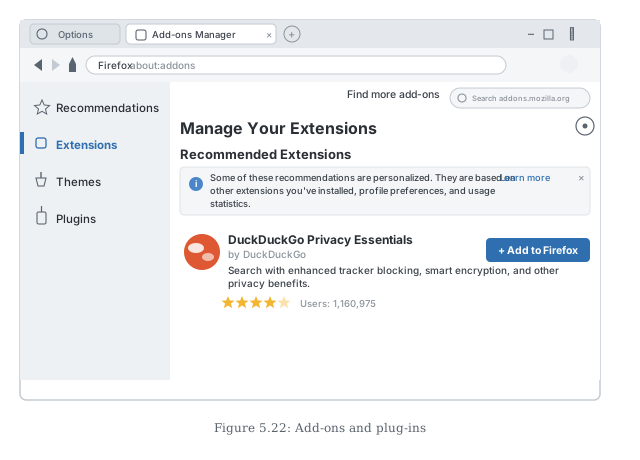
To add an extension (add-on):
- Click the Options button on the top right corner of the browser.
- Select the Add-ons option.
- Click the Extensions Panel option on the left.
- On the right, options to Manage your Extensions will appear.
- You will see a list of enabled, disabled, and recommended extensions.
- Make the desired selections and close the add-ons window.
To add plug-ins:
- Click Plug-ins options on the left side of the browser window.
- Make the desired selections to enable or disable the required plug-ins.
Summary Table
| Feature | Plug-in | Add-on (Extension) |
|---------|---------|-------------------| …
Drawn by us to help you understand the concept clearly, and verified to make sure it's accurate. For exams, practice from your textbook's own diagram.
This screenshot introduces add-ons: pieces of software installed into the browser to extend what it can do. The Add-ons Manager opens in its own tab, with a sidebar separating Extensions, Themes and Plugins — the different kinds of additions a browser accepts. The recommended-extension card shown, DuckDuckGo Privacy Essentials with its description, star rating, user count and an 'Add to Firefox' button, demonstrates the full flow of extending a browser: browse or search …