Informatics Practices · Ch 5 — Internet and Web
Local Area Network (LAN)
Local Area Network (LAN)
A Local Area Network is a network that connects devices kept within a limited physical distance. The key idea is short range — a LAN does not stretch across cities or countries.
The devices that can be part of a LAN include computers, mobile phones, tablets, a mouse, a printer, and other peripherals. The geographical area covered by a single LAN can be as small as a single room, a floor, or a laboratory. It can also cover an entire office with one or more buildings on the same premises, a school, a college, or a university campus.
How devices are connected in a LAN
The physical connection in a LAN can be made using several types of media:
- Wires (general cabling)
- Ethernet cables (the most common wired standard)
- Fibre optics (for higher speeds over longer distances within the LAN)
- Wi-Fi (wireless radio waves)
Security and sharing
A LAN is comparatively secure because only authentic users — those who are part of the network — can access other computers or shared resources. This means an outsider cannot simply connect and view files. Users on a LAN can:
- Print documents using a printer that is shared on the network.
- Upload and download documents and software to and from a local server (a central computer that stores files for the network).
Speed and range
LANs provide short-range communication with high-speed data transfer. The maximum range of a typical LAN is about 1 kilometre.
Data transfer speeds in a LAN are quite high. The book gives two specific standards:
- Ethernet: 10 Mbps (Megabits per second)
- Gigabit Ethernet: 1000 Mbps (Megabits per second)
Ethernet is not just a cable — it is a set of rules (a protocol) that decides how computers and other devices connect with each other through cables in a LAN.
Summary of key features
| Feature | Detail |
|---------|--------| …
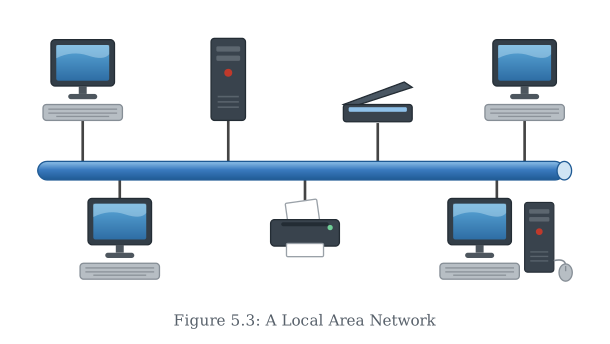
Drawn by us to help you understand the concept clearly, and verified to make sure it's accurate. For exams, practice from your textbook's own diagram.
Figure 5.3 is a schematic diagram of a Local Area Network. It shows a small, confined space — a single room or a floor of a building — with a handful of devices connected to a central switch or hub. The devices drawn as icons include a few desktop computers, a printer, and possibly a local server. All of these are linked by solid lines representing wired connections (Ethernet cables) that run from each device to the central switch.
The layout makes the network’s limited geographical scope immediately clear: everything fits within a single room or a small office floor. There are no arrows or labels for external connections like the internet — the focus is entirely on the local interconnection. The central switch acts as the meeting point, showing that all communication between devices passes through it. The printer is shown connected to the switch, not directly to a computer, which illustrates that any authenticated user on the LAN can send a print job to it. …