Computer Science · Ch 2 — Encoding Schemes and Number System
Introduction
Introduction
Every key you press on a keyboard is in a form you can recognise — letters, digits, symbols. A computer, however, works only in the binary language of 0s and 1s (as seen in the previous chapter). So how does a human-readable keystroke become something the machine can process? The answer is a two-step translation: the key is first mapped to a unique code value, and that code is then converted into its binary equivalent.
From keystroke to binary
Worked example (Example 2.1). When you press the key A:
Key pressed   :  A
Mapped code   :  65        (a decimal code value)
Binary form   :  1000001   (what the computer actually stores/processes)
The same idea applies to non-English scripts. Pressing the Hindi letter अ on a Hindi keyboard maps it internally to the hexadecimal value 0905, whose binary equivalent is:
(0905)16 → 0000100100000101
What is encoding?
The mechanism of converting data into an equivalent cipher using a specific code is called encoding.
Cipher — something converted into a coded form to hide or conceal it from others. Converting content to a cipher is also called encryption; the receiver reverses the process (decryption) to recover the original content.
Why is 'A' always 65?
Two natural questions arise:
- Why is the code value 65 used for the key A and not some other value?
- Is the same value used on every keyboard, whatever its make?
Yes — it is the same on all keyboards. This uniformity is possible because of standard encoding schemes, in which every letter, numeral and symbol is assigned one unique, agreed-upon code. Because the standard is shared, any computer anywhere interprets code 65 as the letter A.
The well-known standard encoding schemes — ASCII, ISCII and UNICODE — are described in the sections that follow. After that, the chapter turns to the number systems (decimal, binary, octal, hexadecimal) these codes live in, and to conversion between number systems.
Drawn by us to help you understand the concept clearly, and verified to make sure it's accurate. For exams, practice from your textbook's own diagram.
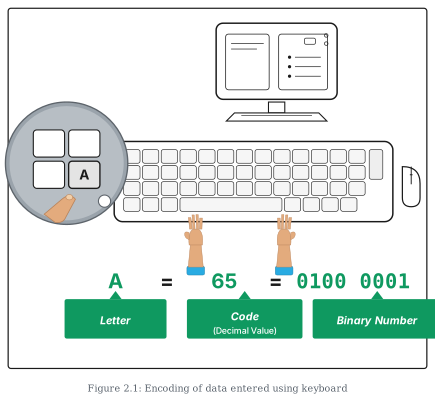
This figure illustrates the complete journey of a keystroke — from a human finger pressing a key to the binary pattern the computer actually processes.
The scene shows a desktop computer setup drawn inside a thin rectangular border: a monitor on a stand behind a full keyboard, with a mouse to the right, and two hands typing on the keys. A magnifying circle at the upper left zooms in on the crucial moment: a fingertip pressing the 'A' key. The zoom is the figure's way of saying "watch what happens to this one key".
Below the keyboard, the outcome of that keystroke is written as a single horizontal relation:
A = 65 = 0100 0001
Under each element of the relation, an upward arrow rises from a labelled box identifying what each item is:
- A — labelled Letter: the human-recognisable character on the key.
- 65 — labelled Code (Decimal Value): the unique code the key is internally mapped to under the standard encoding scheme (65 is the ASCII value of 'A').
- 0100 0001 — labelled Binary Number: the equivalent binary value, the only form the computer can actually work with.
The teaching point is the two-step translation at the heart of encoding: key → standard code → binary. The letter belongs to our world, the decimal code 65 is the agreed standard mapping (the same on every keyboard, whatever its make), and the binary string is the machine's representation of that code. Every character you type undergoes exactly this pipeline.