Worked Examples · Example 2.1
Q.When the key ‘A’ is pressed (Figure 2.1), it is internally mapped to a decimal value 65 (code value), which is then converted to its equivalent binary value for the computer to understand.
Yanam BieapTextbookSubjective· 2mImportance★★★★★est
2% · 1/45 Questions
You're viewing a preview — the full solution, concept, methods & PYQ mapping are locked.
Start your 14-day free trial to unlock the full solution →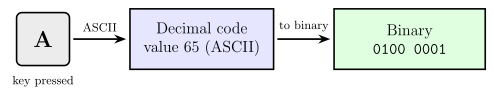
A pressed key never reaches the computer as a letter — 'A' is first mapped to its ASCII code value 65, and that decimal code is stored and processed as its binary equivalent (1000001)2.
The idea (what Figure 2.1 illustrates). A computer's circuits understand only two states (0/1), so every character must become a number, and every number must become bits:
- Key press — you press 'A' on the keyboard.
- Code mapping — the keyboard/system maps the key to its ASCII code value: 'A' -> 65.
- Binary conversion — 65 is represented in binary for storage and processing.
Converting 65 to binary by repeated division by 2:
| Division | Quotient | Remainder |
|---|---|---|
| 65 / 2 | 32 | 1 |
| 32 / 2 | 16 | 0 |
| 16 / 2 | 8 | 0 |
| 8 / 2 | 4 | 0 |
| 4 / 2 | 2 | 0 |
| 2 / 2 | 1 | 0 |
| 1 / 2 | 0 | 1 |
Reading remainders bottom-up: (65)10 = (1000001)2 — a 7-bit ASCII pattern.
Check in Python:
print(ord("A"), format(ord("A"), "07b"))
Unlock everything free for 14 days
- Full step-by-step solutions
- Concept-first explanations
- Methods, shortcuts & mistakes
- PYQ mapping + timed mock tests
Full access for 14 days. No credit card required.