Computer Science · Ch 6 — Flow of Control
Continue Statement
Continue Statement
Where break abandons a loop entirely, the continue statement abandons only the current iteration. When continue is encountered, control skips the remaining statements in the body of the loop for that pass and jumps back to the beginning of the loop for the next iteration. The loop's condition is then evaluated as usual: if it is still true, the loop is entered again; if not, control transfers to the statement immediately following the loop. The book's flowchart of continue (printed as Figure 6.6) shows this path: on continue, the flow loops straight back to the loop condition instead of falling through the rest of the body.
continue in action
# Print the values 1 to 6, skipping 3
n = 0
for n in range(6):
    n = n + 1
    if n == 3:
        continue
    print('Num has value ' + str(n))
print('End of loop')
Num has value 1
Num has value 2
Num has value 4
Num has value 5
Num has value 6
End of loop
``` …
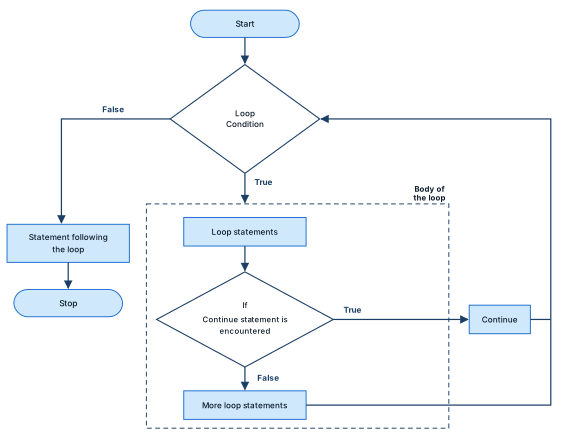
Drawn by us to help you understand the concept clearly, and verified to make sure it's accurate. For exams, practice from your NCERT textbook's own diagram.
This flowchart shows how a continue statement redirects the flow of control inside a loop. (It is printed as Figure 6.6, though the body text refers to it as "Figure 6.7" — an NCERT misprint.)
Its layout mirrors the break-statement flowchart, but the escape arrow leads somewhere different:
- An oval terminator "Start" at the top leads down into a diamond labelled "Loop Condition".
- If the condition is False, an arrow exits the diamond to the left and turns down into a rectangle "Statement following the loop", then to the terminator "Stop" — the loop's normal ending.
- If the condition is True, the flow enters the loop's body, drawn as a dashed rectangle labelled "Body of the loop" at its top-right corner. Inside it, in order:
- a rectangle "Loop statements" — the part of the body before the continue check;
- a diamond "If Continue statement is encountered";
- a rectangle "More loop statements" — the rest of the body.
- From the continue diamond, the True exit goes right into a small rectangle labelled "Continue", and from there the arrow runs up the right-hand side back into the "Loop Condition" diamond. This is the essence of
continue: the remaining statements of the body ("More loop statements") are skipped for the current iteration only, and control jumps straight back to the loop's condition to begin the next iteration. - The False exit of the continue diamond falls through into "More loop statements" as usual; its outgoing arrow runs out to the right and climbs the same right-hand line back into "Loop Condition" — the ordinary loop-back. …