Informatics Practices · Ch 6 — Societal Impacts
Impact on Health
Impact on Health
Impact on Health
Digital technologies have become deeply embedded in nearly every field, which means we now spend far more time in front of screens — mobile phones, laptops, desktops, televisions, gaming consoles, music players, and other sound devices. This shift brings convenience, but it also brings risk.
When we interact with these devices in an improper posture, the consequences can be serious — both physically and mentally. Spending too much time on the Internet can become addictive, and that addiction takes a toll on our physical health and psychological well-being. The good news is that many of these health concerns can be reduced by paying attention to two things: how we position our devices, and how we position our own body.
Ergonomics
Ergonomics is the branch of science that deals with designing or arranging workplaces — including furniture, equipment, and systems — so that they become safe and comfortable for the user. The goal of ergonomics is to reduce the strain on our bodies, including the fatigue and injuries that come from prolonged use of digital devices.
Eye Strain
When we continuously look at a screen for watching, typing, chatting, or playing games, our eyes are exposed to the glare coming from the screen. Looking at small handheld devices makes this problem worse. Eye strain is one of the most common symptoms reported by users of digital devices.
To reduce eye strain, you can maintain the correct viewing distance and angle, and position the device properly. If your eyes become dry, watery, or itchy, it helps to periodically focus on distant objects and take breaks for outdoor activities.
Correct Posture
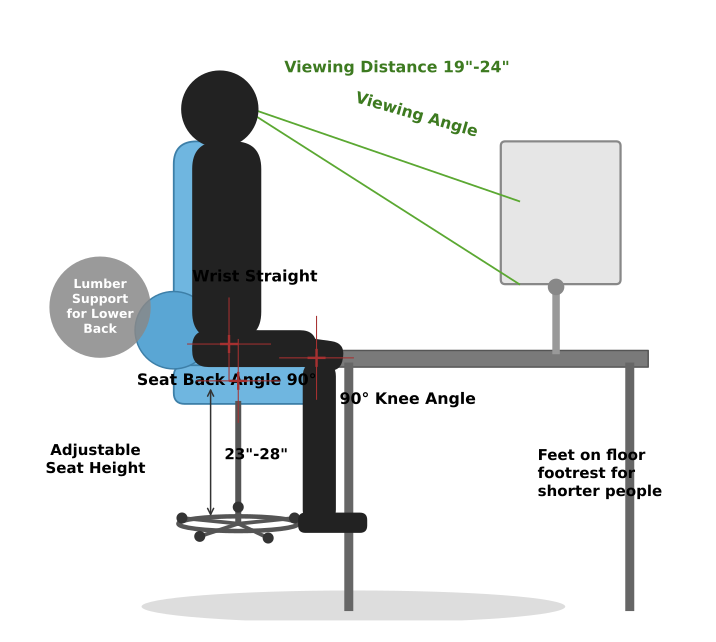
Figure 6.5 in the textbook shows the recommended posture for sitting in front of a computer. The key points are:
- Viewing distance: Keep the screen 19 to 24 inches away from your eyes
- Viewing angle: Position the screen so you look slightly downward at it
- Wrist position: Keep your wrists straight, not bent up or down
- Seat back angle: Sit with your back at a 90-degree angle to your thighs
- Knee angle: Keep your knees bent at 90 degrees
- Seat height: Adjust the seat so your feet rest flat on the floor — use a footrest if you are shorter
- Lower back support: Use lumbar support for your lower back
Other Physical Problems
Bad posture can lead to backaches, neck pain, and shoulder pain. These can be prevented by arranging your workspace according to ergonomic principles.
Overuse of keyboards — whether physical keyboards or the virtual keyboards on touchscreens — can cause a painful condition in the wrists and fingers if the keyboard is not aligned ergonomically. In the long run, this may require medical help.
Stress, physical fatigue, and obesity are other impacts that the body may face if you spend too much time using digital devices.
Maintaining a Balance …
Drawn by us to help you understand the concept clearly, and verified to make sure it's accurate. For exams, practice from your NCERT textbook's own diagram.
Figure 6.5 is a labelled diagram of a person seated at a computer workstation, shown from the side. It is designed to illustrate the ideal ergonomic setup that minimises strain during prolonged computer use.
The diagram centres on a person sitting in an adjustable chair at a desk. The computer monitor is placed directly in front of them, on the desk. Several key body parts and angles are marked with labels and arrows.
Starting from the top: the top of the monitor screen is aligned with the person’s eye level. An arrow labelled Viewing Angle points from the eyes to the centre of the screen, indicating that the gaze should be slightly downward, not up or down sharply. A horizontal double-headed arrow labelled Viewing Distance runs between the eyes and the screen, with the text 19"-24" written beside it — this is the recommended arm’s-length distance.
The person’s back is straight and pressed against the chair’s backrest. A label points to the Lumbar Support for Lower Back — a curved bulge in the chair’s backrest that fills the natural inward curve of the lower spine. The Seat Back Angle is marked as 90° (a right angle between the thighs and the torso). The Seat Height is adjustable, and the label 23"-28" indicates the recommended height range from the floor to the seat.
The forearms are roughly horizontal, and the wrists are straight — a label reads Wrist Straight 90°, meaning the hands are not bent up or down. The keyboard and mouse are positioned so that the elbows are at about a right angle (90°) and the wrists remain neutral.
The knee angle is also marked as 90° — the thighs are parallel to the floor, and the lower legs are vertical. The feet are flat on the floor (or on a footrest for shorter people, as noted in the caption). A label says Feet on floor footrest for shorter people. …