Electronics · Ch 13 — Modern Communication Systems
Internet, Wi-Fi, Bluetooth, Optical Fibre and Satellite Communication
Internet, Wi-Fi, Bluetooth, Optical Fibre and Satellite Communication
This section groups five closely related communication technologies — the Internet, Wi-Fi, Bluetooth, optical-fibre communication and satellite communication — each treated under its own heading below.
The Internet (13.2.1)
The Internet is a worldwide interconnection of millions of computers through a complex web of networks — in effect, a network of networks that acts as an inexpensive medium of communication. It is a public data-communication network used by millions of people to exchange business and personal information. Users reach it through a laptop, a cell phone or a PDA (Personal Digital Assistant) by a wired or wireless connection to an ISP (Internet Service Provider).
Growth of the Internet. In the 1970s the Advanced Research Projects Agency (ARPA) of the United States began linking together sites across the country, forming ARPANET. The network spread from military use to government, then to educational institutions, and finally became public in the early 1990s. Today the Internet is used chiefly to (a) communicate and (b) share resources.
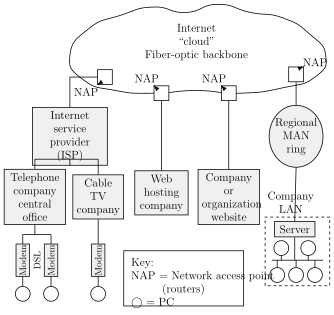
Architecture. A connection is obtained from an ISP, which serves both individuals and organisations. The ISP supplies communication software, e-mail, chat and e-commerce facilities, and can host or help build websites. As shown in Figure 13.2.1, an ISP has one or more towers to which thousands of subscriber cables and modems connect; ISPs are in turn joined to one another through a Network Access Point (NAP) onto the Internet "cloud" or backbone.
Protocols. A protocol is a set of rules and procedures the system follows in order to communicate. Many protocols are in use, including:
- TCP — transmission control protocol
- IP — Internet protocol
- FTP — file transfer protocol
- HTTP — hyper text transfer protocol
Internet address (URL). Every individual or computer on the Internet is given a unique address called the Internet address or Universal Resource Locator (URL). A URL is a comprehensive pointer to what you want on the Internet and where it is found. An IP address is only the address of a computer — it gives the location — whereas a URL specifies the location, the protocol and the specific resource. IP addresses are limited in number, but URLs are effectively unlimited. The usual format of a URL is:
scheme//www.username.domain(host)/filename
For example, http://www.google.com/index.html indicates a protocol (http), a host name (www.google.com) and a file name (index.html).
[!NOTE] The official KTBS corrigendum revises this topic. The book as printed gave the URL format as www.username@host.domain and described a separate "User Name" part joined to the host by an "@" symbol; the corrigendum replaces that with the scheme//host/filename format shown above and removes the "@"-style breakdown and its e-mail-style example addresses. We follow the corrected version.
Two related terms remain part of the address:
- WWW (World Wide Web): a server-based application that lets subscribers access the services offered on the web.
- HOST: the part of the address identifying the computer, user, service provider or search engine (examples: iisc, bsnl, google, facebook).
- DOMAIN: the last part of the address, identifying the type of organisation using the Internet — for example .com (a commercial company), .edu (an educational institution), .net (an ISP), and country codes such as .in, .uk or .us.
Typical Internet addresses written in this style include www.pue.kar.nic.in and www.google.com.
Wi-Fi (13.2.2)
Wi-Fi is the trade name of the wireless local-area-networking (WLAN) technology defined by the IEEE 802.11 family of standards. It is available in several forms suited to different needs — the technical details of the common standards are collected in Table 13.2.2. Wi-Fi uses the 2.4 GHz and 5.8 GHz bands to carry high-speed data over a range of up to about 100 metres. Each band is further divided into channels of fixed bandwidth; for instance, the 802.11b standard operating from 2.4 GHz to 2.4835 GHz provides 11 channels, each of 22 MHz bandwidth.
Principle of operation. Wi-Fi uses Carrier Sense Multiple Access with Collision Avoidance (CSMA/CA) to reduce clashes between the wireless nodes trying to reach the Access Point (AP). Each transceiver listens before it transmits: if the channel is busy, it waits for a random period and then tries again, repeating until the channel is free.
Advantages and applications.
- It is widely used to access the Internet through hotspots with a laptop.
- It is reliable, flexible and affordable.
- It makes LAN deployment cheaper, including in places where cables cannot easily be run — outdoor areas or historical buildings, for example.
- Wi-Fi network adapters are now built into most laptops, and chipset prices keep falling.
- Different competitive brands of access points and client cards inter-operate at a basic level; unlike a mobile phone, any standard Wi-Fi device works anywhere in the world.
Bluetooth (13.2.3)
Bluetooth is a wireless technology standard for exchanging data over short distances using short-wavelength microwave transmissions in the ISM (Industrial, Scientific and Medical) band from 2400 MHz to 2480 MHz, between fixed and mobile devices. It forms a Personal Area Network (PAN), automatically setting up ad-hoc links between nearby transceivers. It was developed by the cell-phone company Ericsson as a cable replacement, originally to allow hands-free phone use by removing the wire between a cell phone and its headset. Bluetooth works using Frequency Hopping Spread Spectrum (FHSS) and Frequency Shift Keying (FSK) techniques. The whole transceiver is available as a single chip, containing an embedded controller, that plugs into the device to make it part of the PAN.
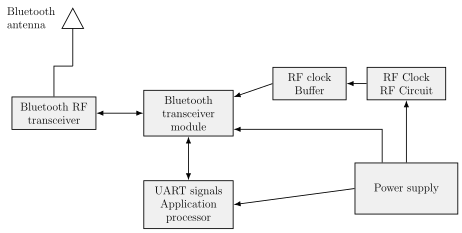
Principle of operation. As shown in the block diagram of Figure 13.2.3, a Bluetooth device constantly sends out a search signal and listens for other nearby Bluetooth-equipped devices. When another device comes within range, the two automatically interconnect and exchange data, forming a piconet. A piconet is the linking of one Bluetooth device acting as a master controller to a maximum of seven other Bluetooth slave devices. Once the PAN is established, the nodes can exchange information freely.
Comparison of Wi-Fi and Bluetooth. Wi-Fi is usually access-point-centred, with an asymmetrical client–server connection routed through the access point, whereas Bluetooth is usually a symmetrical link between two devices. Bluetooth suits simple applications needing minimal configuration — headsets and remote controls — while Wi-Fi suits applications that need client configuration and high speeds for network access. Ad-hoc connections exist for both, but a Wi-Fi ad-hoc link is not as simple to set up as a Bluetooth one.
Applications of Bluetooth include: cordless headsets for cell phones; wireless links between PCs, laptops and PDAs; wireless PC-to-printer connections; laptop-to-cell-phone links; wireless audio headsets; wireless digital-camera-to-TV connections; replacing wired RS-232 serial links in test equipment, GPS receivers, medical equipment and bar-code scanners; Bluetooth-enabled advertising hoardings; wireless bridges between two industrial Ethernet networks; wireless game controllers (such as the Sony PlayStation 3); dial-up Internet access using a data-capable mobile phone as a wireless modem; and short-range transmission of health-sensor data to a mobile phone, set-top box or tele-health device.
Optical fibre communication (13.2.4)
An optical fibre communication system uses light as the carrier of the information being sent. The light may travel through free space or, far more usefully, through a light "pipe" or "waveguide" known as a fibre-optic cable. This cable — a newer transmission medium usually made of glass or plastic — can carry enormous amounts of information over a very wide bandwidth. Where microwave frequencies can carry a few hundred telephone conversations at once, a light beam in a fibre-optic cable can carry many thousands of signals simultaneously. Using multiplexing techniques similar to those in telephone and radio systems, fibre-optic communication has an almost limitless capacity for information transfer.
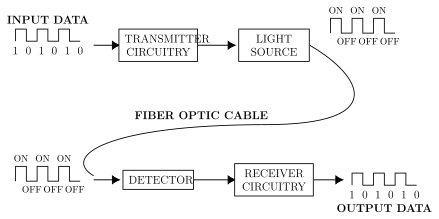
Operation (Figure 13.2.4). The information signal — voice, video or computer data — is first converted to digital form using A/D converters suited to the medium. These digital pulses switch a powerful light source ON and OFF very rapidly. In simple, low-cost, short-distance systems the light source is usually an LED emitting a low-intensity infra-red beam. The light pulses are fed into the fibre-optic cable and travel over long distances. At the receiving end a light-sensitive device (a photocell or light detector) senses the pulses and converts the light back into an electrical signal, which the receiver circuit then processes to recover the original information.
Applications of fibre-optic communication include: long-distance telephone and cable TV; LAN connections; shipboard communication; aircraft communication and controls; the link from a TV studio to its transmitter; secure communication at military bases; interconnecting measuring and monitoring instruments in plants and laboratories; nuclear-plant instrumentation; college-campus communication; closed-circuit TV for building security; and the Internet.
Satellite communication system (13.2.5) …
Drawn by us to help you understand the concept clearly, and verified to make sure it's accurate. For exams, practice from your textbook's own diagram.
Reproduces textbook Figure 13.2.1 — the simplified Internet architecture. Subscriber PCs connect through modems to an Internet Service Provider (ISP); ISPs join one another through Network Access Points (NAPs) onto the fibre-optic backbone 'cloud', which also links telephone-company offices, cable-TV and web-hosting companies and a company LAN with its server. It matters because …
A set of rules and procedures used by a communication system so that devices can exchange data correctly. Common Internet protocols are TCP (transmission control protocol), IP (Internet protocol), FTP (file transfer protocol) …
The unique Internet address of a resource. A URL specifies the location, the protocol and the specific resource, in the format scheme//www.username.domain(host)/filename — for example http://www.google.com/index.html, giving a protocol (http), a host name (www.google.com) and a file name (inde …
| IEEE Standard | Band of frequencies (GHz) | Max. data rate (Mbps) | Max. range (m) |
|---|---|---|---|
| 802.11b | 2.4 | 11 | 100 |
| 802.11a | 5 | 54 | 50 |
The trade name of the wireless LAN technology defined by the IEEE 802.11 standard. It sends high-speed data over the 2.4 GHz and 5.8 GHz bands up to about 100 m, using CSMA/CA (Carrier Sense Multiple Access with Collision Avoidance) so ea …
Drawn by us to help you understand the concept clearly, and verified to make sure it's accurate. For exams, practice from your textbook's own diagram.
Reproduces textbook Figure 13.2.3 — the block diagram of a Bluetooth system. A Bluetooth antenna feeds an RF transceiver linked to the central transceiver module, which is clocked by an RF clock circuit and buffer, driven by an application processor, and fed by a power supply. It matters because it shows the si …
A short-range wireless standard for exchanging data over short-wavelength microwaves in the ISM band (2400 MHz–2480 MHz), forming a Personal Area Network (PAN). It uses Frequency Hopping Spread Spectrum (FHSS) and Frequency Shift Keying (FSK), and was developed as …
The network formed when one Bluetooth device acting as a master controller links to a maximum of seven other Bluetooth slave devices. Once the piconet is set up, the devices can exc …
Drawn by us to help you understand the concept clearly, and verified to make sure it's accurate. For exams, practice from your textbook's own diagram.
Reproduces textbook Figure 13.2.4 — the block diagram of a fibre-optic communication system. Input digital data drives the transmitter circuitry and a light source (an LED), whose ON/OFF light pulses pass through the fibre-optic cable to a detector; the receiver circuitry then recovers the original output data. It matters because it shows how informa …
Drawn by us to help you understand the concept clearly, and verified to make sure it's accurate. For exams, practice from your textbook's own diagram.
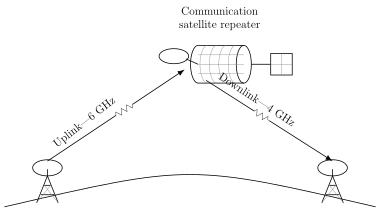
Reproduces textbook Figure 13.2.5 — a communication satellite acting as a repeater between two ground stations on the Earth's surface. The signal rising to the satellite is the uplink (~6 GHz) and the signal returning to the receiving station is the downlink (~4 GHz). It matters because it shows why a satellite is described as a relay/re …
Drawn by us to help you understand the concept clearly, and verified to make sure it's accurate. For exams, practice from your textbook's own diagram.
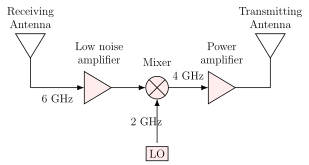
Reproduces textbook Figure 13.2.6 — the satellite transponder. The 6 GHz uplink from the receiving antenna is amplified by a low-noise amplifier, mixed with a 2 GHz local-oscillator signal to translate it to 4 GHz, amplified by a power amplifier, and radiated as the downlink from the transmitting antenna. It matters because it shows the transponder's tw …
The transmitter-receiver combination inside a communication satellite. Its two functions are amplification and frequency translation; because it cannot receive and transmit on the same frequency, it shifts the uplink frequency (e.g. 6 GHz) to a lower downlink frequency (e.g. 4 GHz). Each transponder carries one …
The uplink is the signal transmitted from the Earth station up to the satellite; the downlink is the signal retransmitted from the satellite down to the receiving station on Earth. The downlink frequency is usually lower than the uplink (typically 6 GHz up …