Informatics Practices · Ch 5 — Internet and Web
Static and Dynamic Web Pages
Static and Dynamic Web Pages
A web page is not always the same for every visitor. Whether its content stays fixed or changes based on who is viewing it depends on whether the page is static or dynamic. This distinction is fundamental to how the web works.
Static Web Pages
A static web page is one whose content always remains the same — it does not change from person to person. When a web server receives a request from a browser for a static page, it simply locates that page on its storage media and sends it directly to the client's browser. No additional processing is performed on the page.
Because of this, a static web page remains identical for all users until someone manually edits its code. These pages are generally written in HTML, JavaScript, and/or CSS, and their file extensions are typically .htm or .html.
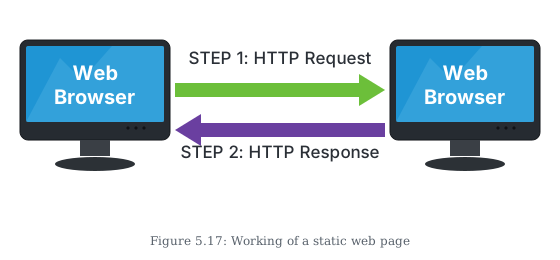
The working of a static web page follows a simple two-step cycle:
- The browser sends an HTTP Request to the web server.
- The server responds by sending the requested page as an HTTP Response.
Static pages are simple, fast to load, and easy to create, but they cannot tailor content to individual users.
Dynamic Web Pages
A dynamic web page is one whose content can be different for different users. The difference in content often arises because of different choices made by the user (e.g., selecting a product category, logging into an account, or choosing a city for weather).
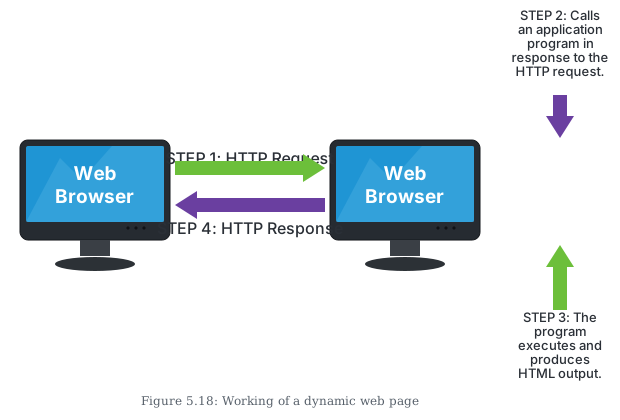
When a request for a dynamic web page reaches the web server, the server does not simply retrieve the page and send it. Before sending the requested page, the server performs additional processes, such as:
- Getting information from a database
- Updating the current date and time
- Updating weather information
- Processing user input (e.g., search queries, form submissions)
Because of this server-side processing, the content of dynamic pages changes frequently. They are more complex and therefore take more time to load than static web pages.
Dynamic web pages can be created using various server-side languages, including JavaScript (Node.js), PHP, ASP.NET, Python, Java, Ruby, and others. These languages are more complex to construct and design because the code to perform the additional operations must be added. This server-side code allows the server to change the page's content each time the page is loaded.
Furthermore, most dynamic pages are linked to databases. Each time the page is loaded, the required information from the databases is retrieved to update the web page. …
Drawn by us to help you understand the concept clearly, and verified to make sure it's accurate. For exams, practice from your textbook's own diagram.
The figure shows a simple two-step interaction between a Web Browser (on the left) and a Web Server (on the right). Both are drawn as labelled boxes. The browser represents the client machine; the server represents the remote computer that hosts the website.
Step 1 is an arrow pointing from the browser to the server, labelled HTTP Request. This arrow carries the user's request for a specific web page. The request travels over the internet to the server.
Step 2 is an arrow pointing back from the server to the browser, labelled HTTP Response. Inside the server, no processing or computation happens — the server simply locates the requested page file (a .html or .htm file) on its storage and sends that exact file back to the browser. The response arrow carries the already-stored page.
The entire diagram has only these two arrows and two boxes. There is no database, no application logic, no server-side script, and no third component. The labels "STEP 1" and "STEP 2" make the sequence clear.
The figure teaches the core idea of a static web page: the server does nothing except retrieve a fixed file and deliver it. The content is identical for every user and every request, until someone manually edits the file on the server. …
Drawn by us to help you understand the concept clearly, and verified to make sure it's accurate. For exams, practice from your textbook's own diagram.
The figure shows a four-step sequence that explains how a dynamic web page is built and delivered. On the left is the Web Browser (the client), and on the right is the Web Server. The process flows from top to bottom, with arrows and labels marking each step.
Step 1 — An arrow labelled HTTP Request points from the browser to the server. This is the user's request for a specific page, sent over the internet.
Step 2 — Inside the server, a new arrow or action shows that the server does not simply fetch a pre‑saved file. Instead, it calls an application program (often a script written in PHP, Python, Java, etc.) in response to the request. This is the key difference from a static page — the server must run code.
Step 3 — That application program executes and, as a result, produces HTML output. The figure likely shows the program interacting with a database (implied by the textbook's mention of retrieving information from a database) and then generating the page's content on the fly.
Step 4 — An arrow labelled HTTP Response goes back from the server to the browser, carrying the freshly generated HTML page. The browser then renders this page for the user. …