Informatics Practices · Ch 5 — Internet and Web
Ethernet Card
Ethernet Card
An Ethernet card is the hardware that physically connects a computer to a wired network. It is also called a Network Interface Card (NIC) or a network adapter. Without it, a desktop computer cannot join a local area network (LAN) using cables.
The card acts as the interface — the middle layer — between the computer and the network. It is a circuit board that mounts directly onto the computer's motherboard. An Ethernet cable plugs into the NIC, and through that cable the computer sends and receives data to and from the rest of the network.
Data transfer speed — Ethernet cards support a range of speeds, from as low as 10 Mbps (megabits per second) up to 1 Gbps (1000 Mbps). Most modern cards operate at 100 Mbps or 1 Gbps.
Unique identification — Every NIC comes with a permanent, factory-burned address called the MAC address (Media Access Control address). This address is unique to that card, and therefore to the computer it is installed in. The MAC address is how the network identifies which computer is which — no two NICs in the world share the same MAC address.
The textbook mentions Figure 5.7 showing a NIC, but the figure itself is not reproduced here. The key visual takeaway is that a NIC looks like a small circuit board with an Ethernet port (RJ45) on one edge, designed to be inserted into a PCI slot on the motherboard.
Summary of key points:
- Other names: Ethernet card, Network Interface Card (NIC), network adapter.
- Function: Acts as the interface between the computer and the wired network. …
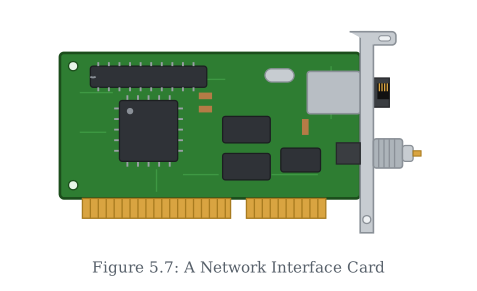
Drawn by us to help you understand the concept clearly, and verified to make sure it's accurate. For exams, practice from your textbook's own diagram.
This figure shows the hardware that gets a computer onto a wired network in the first place: the Network Interface Card, or Ethernet card. The gold edge connector along the bottom plugs the card into a slot on the motherboard, while the metal bracket exposes its connectors — notably the RJ-45 port where the Ethernet cable clicks in — outside the computer's case. The photograph makes the section's point concrete: network connectivity is not abstract; it is a physical adaptor …