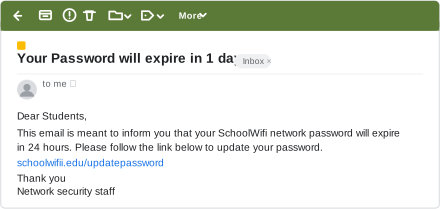
Q.A school's Class XI students received a mass email, apparently from the network staff (registered URL schoolwifi.edu), claiming their password was about to expire and instructing them to renew it at a given URL within 24 hours.
You're viewing a preview — the full solution, concept, methods & PYQ mapping are locked.
Start your 14-day free trial to unlock the full solution →This email is a phishing attempt, a type of cybercrime, designed to trick students into revealing their passwords by directing them to a fake website.
This scenario describes a classic cyber attack known as phishing, which is a significant threat in the digital world. Let's break down each part of the question.
(a) Do you find any discrepancy in this email?
Yes -- and the clearest one is right there in the link itself. The school's registered URL is schoolwifi.edu (as stated in the question), but the link printed in the email reads schoolwifii.edu/updatepassword -- spelt with a doubled "i" (wifii, not wifi). This is a classic typosquatting / lookalike-domain trick: the fake domain is one character away from the real one, close enough that a student skimming the email is unlikely to notice, but it does not actually belong to the school.
Beyond the fake domain, the email also shows the other usual red flags of phishing:
- Urgency and Threat: The email creates a sense of urgency ("password about to expire," "renew it at a given URL within 24 hours"). This is a common tactic used by phishers to pressure recipients into acting without thinking critically.
- Direct Link for Credentials: A secure system would typically direct users to the official school portal or a known, secure password management page to initiate a password reset process, rather than providing a direct link in an email that asks for immediate credential submission. The "given URL" is highly suspect.
- Lack of Personalization (Implied): While not explicitly stated, mass emails of this nature often lack specific personalization beyond the recipient's email address, which can be another red flag.
A fundamental rule of online security is: Never click on a link in an email to provide sensitive information like passwords, especially if the email creates a sense of urgency or threat. Always navigate directly to the official website by typing its URL into your browser.
(b) What will happen if a student clicks on the given URL?
If a student clicks on the given URL, they will likely be redirected to a fake website that is meticulously designed to mimic the official school's login page or password renewal portal. This fake website is controlled by the attackers.
Here's the sequence of events:
- Redirection to a Malicious Site: The URL will lead the student away from the legitimate school domain to a fraudulent website.
- Deceptive Interface: The fake website will look almost identical to the real school login page, complete with logos, branding, and input fields for username and password.
- Credential Harvesting: When the student enters their username and password into the fields on this fake site and clicks "submit" or "renew," those credentials will not be sent to the school's legitimate server. Instead, they will be captured and stored by the attackers.
- Further Redirection (Optional): After capturing the credentials, the fake site might redirect the student to the actual school website or display an error message, making it seem like nothing went wrong, thus delaying the student's realization that they have been compromised.
Once the credentials are submitted on the fake site, the student's account is compromised. The attackers now have their username and password.
(c) Is the email an example of cyber crime? If yes, which type is it? Justify your answer.
Yes, the email is unequivocally an example of cybercrime.
The specific type of cybercrime demonstrated here is Phishing.
Justification: …
Unlock everything free for 14 days
- Full step-by-step solutions
- Concept-first explanations
- Methods, shortcuts & mistakes
- PYQ mapping + timed mock tests
Full access for 14 days. No credit card required.